
What we looked at
-
 Reviewed here
Toshiba Canvio Advance 2TB Portable External Hard Drive USB 3.0, Black…
4.2
See price
Reviewed here
Toshiba Canvio Advance 2TB Portable External Hard Drive USB 3.0, Black…
4.2
See price
-
 Highest rated
Seagate 2TB Portable Hard Drive | USB 3.0 (STGX2000400)
4.6
See price
Highest rated
Seagate 2TB Portable Hard Drive | USB 3.0 (STGX2000400)
4.6
See price
-
Seagate Portable 4TB External Hard Drive HDD – USB 3.0, 1-Year…
4.6
See price
-
 1TB Dual Drive External SSD, Up to 500/s Read 450MB/s Write,USB…
4.4
See price
1TB Dual Drive External SSD, Up to 500/s Read 450MB/s Write,USB…
4.4
See price
As Amazon Associates, we earn from qualifying purchases. This means we may receive a small commission at no extra cost to you if you click through and make a purchase.
Families and home office managers routinely grapple with fragmented digital records spread across multiple laptops, tablets, and desktop computers. Between irreplaceable family photo albums, school research projects, tax forms, and personal documents, a sudden drive malfunction can cause permanent loss and administrative chaos. The Toshiba Canvio Advance 2TB external hard drive addresses this vulnerability by offering a dedicated physical storage solution engineered for personal, business, and multimedia files. Rather than obligating households to manage recurring cloud subscription fees or complex home server networks, this portable 2.5-inch drive provides an accessible, localized destination for critical digital archives.
This toshiba canvio advance 2tb review examines how effectively the drive balances long-term storage capacity, automated software utilities, and daily convenience for household preservation. Featuring downloadable backup scheduling and password protection tools, the drive establishes a dependable defense against hardware failure and unauthorized local access. For households seeking an approachable storage solution that performs consistently over the long haul, understanding its core specifications and operating system requirements ensures you select the right drive for your family records.


Quick Verdict
The drive represents a dependable, fuss-free external storage solution that gives households an organized way to protect their digital legacy. By pairing a spacious 2 TB capacity with automated Windows software, it removes the daily anxiety of manual archiving while keeping records secure within a lightweight, pocket-friendly enclosure.
- Automated backup software takes the friction out of scheduling routine file preservation.
- Downloadable password protection software keeps confidential personal and business documents private.
- Compact 2.5-inch chassis weighs 5.28 ounces for effortless room-to-room portability.
- USB 3.0 and USB 2.0 compatibility ensures broad connectivity across both modern and older family computers.
Toshiba Canvio Advance 2TB Features Explained
Automated Backup Software
A dependable household archiving strategy requires routine consistency, yet few busy parents or students remember to manually copy folders every week. The toshiba canvio advance backup software simplifies this routine by providing an automated, scheduled archiving workflow. Distributed as a free download for Windows PC users, this proprietary software allows you to designate specific folders, tax records, photo libraries, and media directories, then set recurring calendar intervals for background execution. Once configured, the utility handles file duplication quietly behind the scenes without demanding ongoing attention.
Relying on the toshiba canvio advance for family backups ensures that essential school term papers, home business spreadsheets, and newly imported camera footage are preserved without constant administrative oversight. In the event of a computer crash or accidental file deletion, family members can quickly locate and restore previous file versions from the drive. It is worth emphasizing that this automated software suite is engineered exclusively for Windows PCs, meaning households that rely on other operating systems will need to employ native backup utilities to establish scheduled protection.
Password Protection Security
When storing personal records such as mortgage documents, passport scans, medical histories, and personal business files, physical access to the drive should not grant immediate visibility to anyone who handles it. The toshiba canvio advance password protection software provides an effective barrier against unauthorized access. Available as a free download for Windows PC systems, this tool enables the drive owner to set a unique security password that locks the external storage, ensuring unauthorized users cannot browse or copy private documents if the drive is misplaced, borrowed, or moved outside the home.
For shared family computers or home offices where multiple household members access the same workstation, password protection provides valuable privacy. Important financial documents and personal projects remain safe from accidental viewing, modification, or deletion by younger children. The software interface makes locking and unlocking straightforward, giving privacy-conscious families reliable security over their critical archival records without complicated network administration.
Ample 2 TB Storage Capacity
The volume of digital media generated by modern households has grown dramatically as high-resolution smartphone cameras, 4K home video recorders, and large school projects become standard household fixtures. With 2 TB of digital storage capacity, this unit provides extensive headroom to consolidate scattered folders from multiple home devices into a single organized archive. It comfortably accommodates tens of thousands of family photographs, extensive digital music collections, and years of administrative paperwork.
The manufacturer listing clarifies that one terabyte represents one trillion bytes using decimal calculation, which means the usable capacity displayed by your operating system after formatting will be slightly less than the nominal figure. Even with standard formatting overhead, 2 TB delivers an abundant storage cushion that prevents families from having to constantly delete older memories to free up space. It serves as a dependable digital locker capable of serving a household archival plan for many years.
Compact Textured Enclosure and Durability
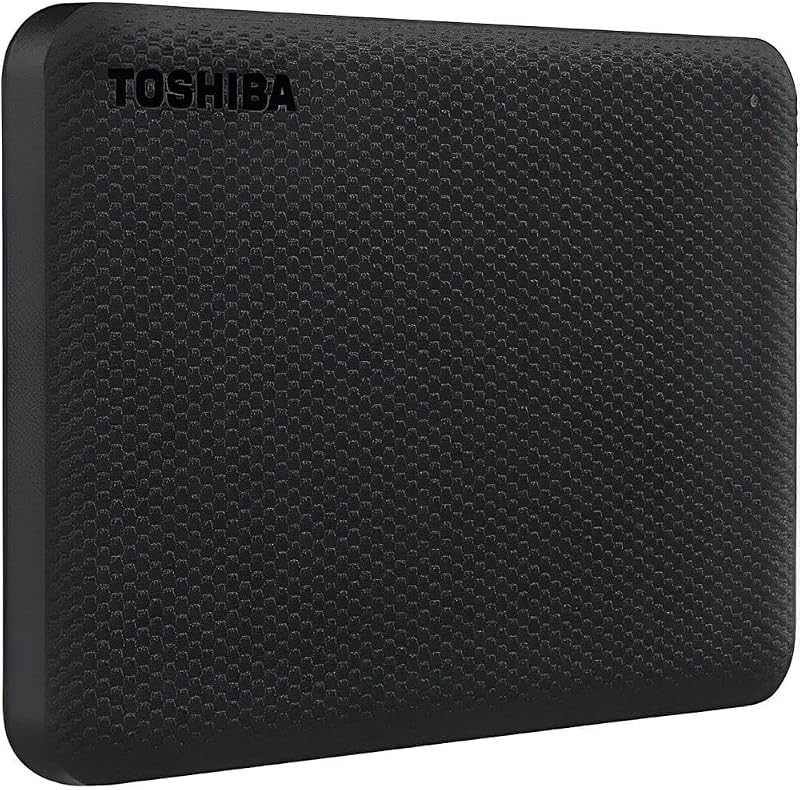
Measuring 4.3 inches long, 3.1 inches wide, and 0.55 inches thick, this external drive features a slim 2.5-inch form factor that sits unobtrusively beside a laptop or desktop monitor. Weighing only 5.28 ounces, it easily slides into a backpack pocket, computer sleeve, or desk drawer, making it convenient for transporting family records or school projects between different locations. The outer casing features a stylish, textured finish designed to provide a secure physical grip while resisting surface smudges during regular handling.
When evaluating toshiba canvio advance durability, the compact plastic shell resists ordinary tabletop friction and desktop wear. However, because this device utilizes a traditional mechanical hard disk with spinning platters, it requires sensible handling during active read and write operations. The drive should always be placed on a level, stable surface while powered and kept away from edge hazards. Those who require extreme drop protection or all-weather water resistance for outdoor travel may want to investigate armored alternatives like the lacie rugged mini 2tb external hard drive, which incorporates heavy rubber bumpers specifically for high-impact travel.
USB 3.0 Connectivity and Transfer Speed
Waiting extended periods for high-definition home videos or vast photo archives to transfer can quickly disrupt family productivity. This drive incorporates a USB 3.0 interface offering a media data transfer rate up to 5.0 Gbps. In day-to-day use, the toshiba canvio advance 2tb transfer speed handles high-resolution image batches, video clips, and system images with responsive throughput characteristic of quality 2.5-inch external mechanical drives.
The drive hardware connectivity also maintains complete backward compatibility with USB 2.0 ports, ensuring smooth operation when connected to older desktop PCs or legacy home media hubs. While operating on a USB 2.0 connection limits transfer speeds to that standard’s ceiling, it guarantees that older family hardware remains compatible with your archival plan. This dual-generation hardware flexibility makes the drive a versatile asset across mixed-age home computer setups.
Specs
Reviewing the official toshiba canvio advance specs provides clarity on hardware interfaces, physical dimensions, and operating compatibility before setting up the drive.
| Specification | Detail |
|---|---|
| Digital Storage Capacity | 2 TB |
| Hard Disk Form Factor | 2.5 inches |
| Hardware Connectivity | USB 3.0, USB 2.0 compatible |
| Data Transfer Rate | 5.0 Gbps interface media speed |
| Item Dimensions | 4.3 inches L x 3.1 inches W x 0.55 inches Thickness |
| Item Weight | 5.28 ounces |
| Default File System | NTFS (formatted for Windows PC) |
| Hardware Platform | PC, Mac (reformatting required for Mac) |
| Compatible Devices | Desktop, Laptop, Camera |
| Included Software Tools | Auto backup and password protection (free download for Windows PC only) |
Toshiba Canvio Advance 2TB Pros and Cons
What we like
- Generous 2 TB digital storage capacity
- Automated backup software for Windows PCs
- Password protection software for added privacy
- Compact 5.28-ounce textured portable enclosure
- USB 3.0 and USB 2.0 backward compatibility
What we’d change
- Requires manual reformatting for Mac computers
- Backup and security software limited to Windows
- Listing does not specify included accessories
Check Toshiba Canvio Advance 2TB on Amazon
Best Use Cases
- Consolidating household digital photos, home video clips, and creative projects into a single secure physical repository.
- Establishing scheduled, automated system backups for Windows PCs to safeguard educational coursework and personal tax records.
- Archiving business documents, professional spreadsheets, and client deliverables away from primary laptop internal drives.
- Directly offloading image and video files from compatible digital cameras to free up camera memory cards during family events.
- Transporting personal and household records between home desktop setups, office workstations, and secondary laptops.
Before You Buy
Before adding this drive to your household setup, it is crucial to review operating system requirements and out-of-the-box drive formatting. The unit arrives formatted in the NTFS file system, enabling immediate plug-and-play functionality on Windows PC systems. While toshiba canvio advance mac compatibility is fully supported, Apple users must reformat the drive via macOS Disk Utility before files can be written to disk. Furthermore, the included downloadable automated backup and password utilities are strictly limited to Windows PC environments. Households operating primarily within the Apple ecosystem will need to rely on native utilities such as macOS Time Machine. If your family relies on a diverse ecosystem of external drives, reading our passport external hard drive review offers helpful perspective on alternative software suites and drive behavior.
It is equally important to examine what the product listing does not include or specify for prospective owners. The listing details the core external hard drive unit with USB 3.0 and USB 2.0 compatibility, but the listing does not specify the precise length of the included USB cable, nor does it detail supplemental accessories such as a padded travel pouch, cable clip, or type-C adapter. Additionally, the manufacturer description does not specify an ingress protection rating against dust or water, nor does it claim any certified drop-impact rating. As a result, households should plan to operate the drive in stable desktop environments and handle it with reasonable care during transit.
How It Compares With Similar Picks
| Product | Best For | Key Difference |
|---|---|---|
| Toshiba Canvio Advance 2TB | Automated Windows backups and household privacy | Downloadable auto backup and password protection utilities for Windows with a compact textured casing |
| Everyday HDD storage. Plug-and-play backup. | Multi-platform plug-and-play convenience | Includes out-of-the-box Windows and macOS support, an Adobe CC trial, and a 1-year warranty |
| Seagate Portable 4TB External Hard | Massive media collections and gaming consoles | Doubles capacity to 4TB, supports gaming consoles, and includes 1-year Rescue Service |
| 1TB Dual Drive External SSD | Fast file transfers across modern mobile devices | Solid-state drive reaching up to 500MB/s read speeds with dual USB Type-C and USB-A connectors |
Choosing between these storage solutions depends on your household storage capacity requirements, computer platforms, and transfer needs. If you require seamless plug-and-play functionality across both Windows and Apple computers without formatting steps, a dual-platform option simplifies setup. Families managing vast multimedia archives or backing up gaming consoles will benefit from stepping up to a 4TB external mechanical drive for double the capacity. Conversely, if your priority is rapid file access across smartphones, tablets, and modern laptops, a solid-state thumb drive with dual USB-C and USB-A plugs provides superior speed despite lower raw capacity. For households seeking simple, lightweight storage for basic documents, exploring our maxone 500gb ultra slim portable external hard drive review illustrates how smaller capacities compare for entry-level tasks.
Bottom Line
When asking is toshiba canvio advance 2tb worth it for household file preservation, the drive makes a compelling case through practical utility and accessible data safety tools. For Windows PC households seeking a dependable method to archive digital photo albums, tax paperwork, and student assignments, this drive delivers outstanding value. Its combination of a generous 2 TB capacity, scheduled backup software, and password protection creates an accessible defense against computer crashes and storage clutter without recurring subscription costs.
While cross-platform households must factor in reformatting for Mac use and utilize alternative backup software, the physical drive remains a solid, lightweight, and quiet performer. Investing in dedicated external storage provides genuine peace of mind, ensuring that decades of family memories and indispensable household files remain secure and accessible for years to come. To explore how this unit compares against base models from the same brand, read our comprehensive toshiba canvio 2tb review to decide which edition best fits your family storage goals.
FAQ
Does the Toshiba Canvio Advance 2TB work on Mac computers?
Yes, the drive hardware supports Mac computers, but the unit comes pre-formatted in NTFS for Windows PC systems. Mac users must reformat the hard drive using macOS Disk Utility before copying or modifying files. Additionally, the downloadable automatic backup and password protection programs are provided for Windows PC only, meaning Mac owners must use Apple Time Machine or third-party software for automated tasks.
What software comes with the Toshiba Canvio Advance 2TB?
The drive includes access to Toshiba Storage Backup Software and Toshiba Storage Security Software as free downloads for Windows PC. The backup tool allows users to configure automated, scheduled backups for specific files and folders. The security software enables password protection to prevent unauthorized individuals from browsing your private files. Both programs are available as free downloads and are compatible with Windows PC only.
How fast is the Toshiba Canvio Advance 2TB transfer speed?
The drive features a USB 3.0 interface supporting a maximum data media rate of 5.0 Gbps. As a portable 2.5-inch mechanical hard drive with spinning platters, actual real-world read and write transfer speeds will align with standard mechanical external drives. It easily handles regular file transfers, multi-gigabyte family video clips, and routine system image backups.
Is the Toshiba Canvio Advance 2TB durable enough for travel?
The drive features a compact, textured plastic enclosure that weighs 5.28 ounces and measures 0.55 inches thick, making it easy to slip into a backpack, laptop sleeve, or briefcase. While its shell resists light handling friction, it is a mechanical drive containing spinning platters. It lacks rugged rubber bumpers or certified shockproofing, so users should place it on stable surfaces during operation and handle it gently during transport.
Can I use this drive with older USB 2.0 ports?
Yes, the drive offers backward hardware compatibility with USB 2.0 ports. You can plug the drive into an older desktop or laptop without purchasing additional hardware converters. When connected to a USB 2.0 port, data transfer rates will be capped at USB 2.0 speeds, but all file storage, reading, and writing functions operate normally.
Does the drive require an external power supply?
No, the drive does not require an external AC wall adapter. It operates as a bus-powered USB device, drawing electrical power directly from the host computer’s USB port through the connection cable. This single-cable operation enhances portability, reducing desk clutter and making file transfers between different home computers seamless and convenient.


