
What we looked at
-
 Reviewed here
Microsoft Surface Pro 7 – 12.3" Touch-Screen - 10th Gen Intel…
8.8/10
See price
Reviewed here
Microsoft Surface Pro 7 – 12.3" Touch-Screen - 10th Gen Intel…
8.8/10
See price
-
 Highest rated
15.6" 2-in-1 Touchscreen Laptop with Windows 11, i3-10100Y, 16GB, 256GB SSD
10.0/10
See price
Highest rated
15.6" 2-in-1 Touchscreen Laptop with Windows 11, i3-10100Y, 16GB, 256GB SSD
10.0/10
See price
-
 HP OmniBook X Flip 2-in-1 Copilot+ AI Laptop, 14" 2K OLED…
8.2/10
See price
HP OmniBook X Flip 2-in-1 Copilot+ AI Laptop, 14" 2K OLED…
8.2/10
See price
-
 Customized HP OmniBook 5 Flip 2-in-1 14" 2K Touch Laptop Intel…
8.2/10
See price
Customized HP OmniBook 5 Flip 2-in-1 14" 2K Touch Laptop Intel…
8.2/10
See price
As Amazon Associates, we earn from qualifying purchases. This means we may receive a small commission at no extra cost to you if you click through and make a purchase.
Balancing modern household computing needs often means navigating frustrating compromises between heavy traditional clamshell laptops and underpowered mobile slates. Shared living spaces require a computer that moves effortlessly from homework duty at the dining table to parental spreadsheet management in the home office, all while remaining accessible for streaming media and casual web browsing. When evaluating the Surface Pro 7 for family use, parents and students require responsive computing power, portable construction, and hardware capable of surviving routine daily transit. The Microsoft Surface Pro 7 addresses this demanding environment by combining standard desktop operating capability with a slender 1.7-pound chassis, offering a 10th Gen Intel Core i5 processor, 8GB of system memory, and 256GB of solid-state storage.
Our verdict on this configuration is decidedly positive for busy households: while detachable accessories like the physical keyboard cover and digital pen are sold separately, the core hardware delivers a reliable mix of speed, connectivity, and physical flexibility. It serves as an intuitive, highly portable computing companion that handles everyday school assignments, remote work, and multimedia streaming with dependable consistency.
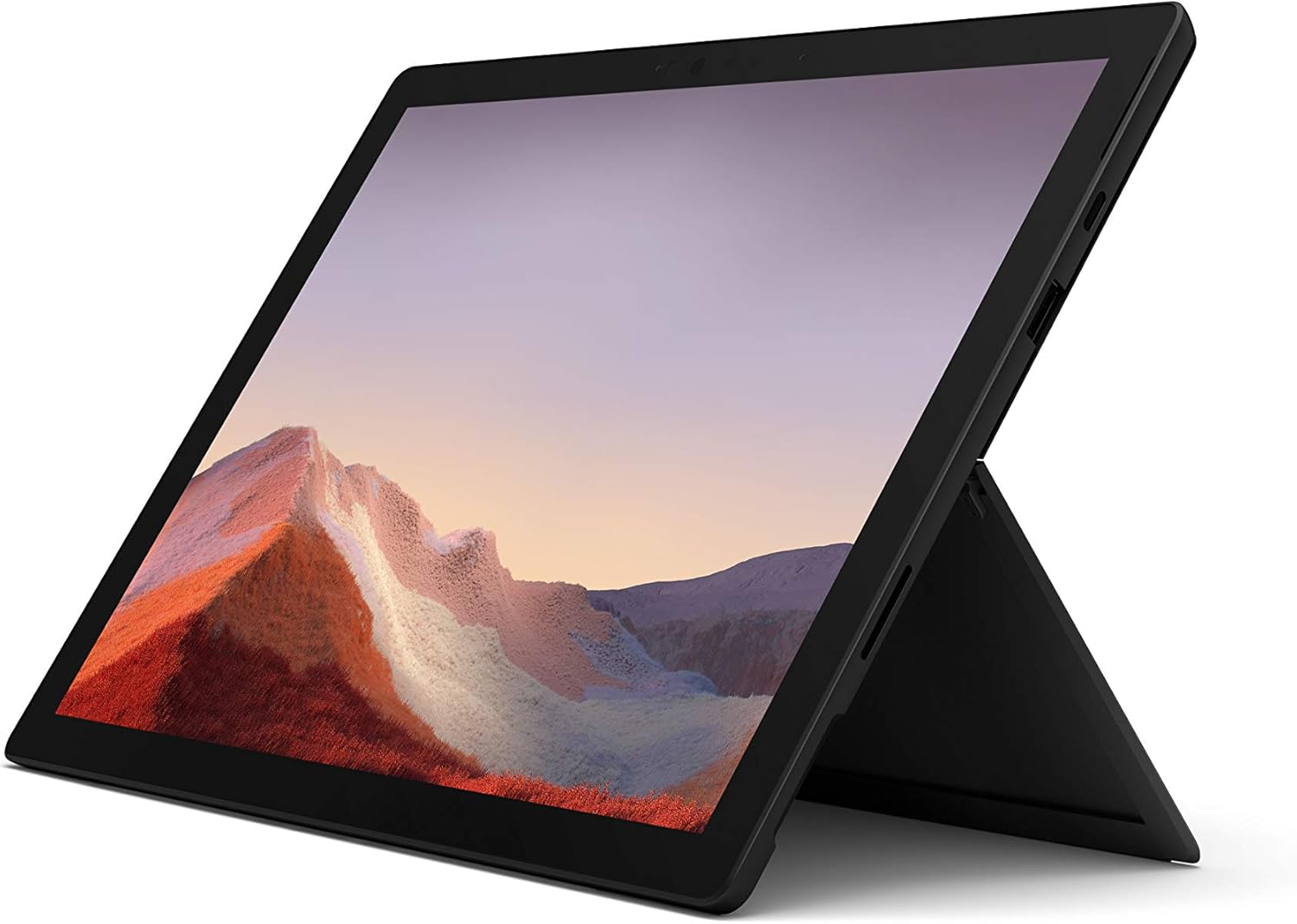


Quick Verdict

The Microsoft Surface Pro 7 stands out as an exceptionally adaptable portable computer for family multitasking, delivering snappy desktop-level responsiveness and versatile kickstand ergonomics within an ultra-slim slate profile.
- Weighs only 1.70 pounds, allowing easy transport between classrooms, kitchen counters, and family rooms.
- The 10th Gen Intel Core i5 processor and 8GB RAM configuration provide fluid responsiveness for daily household workflows.
- Features both USB-C and USB-A ports to support modern accessories alongside existing household cables.
- Fast charging replenishes the battery up to 80 percent in just over an hour.
Microsoft Surface Pro 7 Features Explained
10th Gen Intel Core i5 Processing Power
At the center of this configuration is a 10th Gen Intel Core i5 processor, which delivers a substantial step up in multitasking responsiveness compared to the older Surface Pro 6. Everyday family computing frequently involves dozens of active browser tabs, background audio streaming, and document editing applications running concurrently. Backed by 8GB of DDR4 memory, this processor ensures smooth transitions between different user tasks without the system hesitation common to budget-tier tablets.
Reviewing the official surface pro 7 i5 8gb 256gb specs highlights how well-balanced this processor is for domestic computing. Integrated Intel graphics provide smooth visual playback for educational video platforms, streaming services, and routine productivity suites. While power users with intensive 3D rendering needs might consider stepping up to a higher tier like the Microsoft Surface Pro i7, this Core i5 setup runs cool and quiet during everyday tasks, making it well suited for quiet study spaces and shared living rooms.
Flexible Tablet to Studio Form Factor
The signature strength of this device is its dynamic physical transformation between an upright workstation, an angled drafting table, and a handheld slate. As an adaptable Surface Pro 7 2 in 1 tablet laptop, the hardware moves effortlessly between various domestic roles. At just 1.7 pounds, younger learners can comfortably support the tablet in their lap while reading e-books or completing touchscreen quizzes, while older family members can deploy the integrated rear kickstand on any flat surface.
The 12.3-inch touch display responds fluidly to multi-touch inputs, allowing users to tap, pinch, and scroll through websites naturally. When tilted into Studio mode, the kickstand lowers to a comfortable incline that mimics a traditional drafting desk, facilitating handwriting notes or digital sketching. This convertible architecture eliminates the rigid posture of standard laptops, supporting comfortable use whether propped on a kitchen counter or carried through the home.
Versatile Dual USB-C and USB-A Port Selection
A major design upgrade on this model is the inclusion of both modern and classic physical ports. The addition of the dedicated Surface Pro 7 USB C port alongside a traditional full-sized USB-A connector fundamentally improves peripheral connectivity for busy homes. Earlier hardware generations relied heavily on specialized adapters, which were easily misplaced during daily household use.
This dual-port layout lets parents connect an existing external hard drive or flash drive using the USB-A connection while simultaneously leveraging the USB-C port for modern docking hubs, external displays, or accessory charging. Users can even charge smaller electronic devices like smartphones directly from the computer ports. This setup bridges the gap between legacy home peripherals and modern connectivity standards without requiring a tangle of separate dongles.
Everyday Battery Longevity and Fast Charging
Unplugged performance is critical for machines that move regularly between kitchen counters, bedrooms, and school desks. Real-world expectations for Microsoft Surface Pro 7 battery life center around an official manufacturer rating of up to 10.5 hours of typical use. The hardware also features Instant On technology, waking the machine instantly from sleep mode whenever you open the screen, mirroring the rapid accessibility of a mobile phone.
Equally valuable for active households is the built-in fast-charging technology. When the device runs low after a full afternoon of remote schoolwork, the system can recharge from empty to approximately 80 percent in just over an hour. This rapid turnaround ensures the machine is ready for evening study or streaming without remaining tethered to a wall outlet for extended stretches.
Front and Rear 1080p Cameras with Facial Recognition
Remote learning, family video calls, and virtual conferences require dependable audio-visual hardware. The forward-facing 5-megapixel camera delivers crisp 1080p full HD video recording, ensuring students and remote workers appear sharp and clear during virtual classes and meetings. On the back, an 8-megapixel camera with 1080p video capability makes it simple to capture homework worksheets, whiteboard notes, and physical documents directly to internal storage.
Biometric security is managed through integrated Windows Hello facial recognition. Instead of requiring family members to remember complex passwords or risk sharing access codes, the sensor recognizes authorized faces and unlocks the system immediately. This simplifies profile switching between parents and children while keeping private documents safely separated.
Specs
| Attribute | Detail |
|---|---|
| Processor | 10th Gen Intel Core i5 |
| Memory | 8 GB DDR4 SDRAM |
| Storage | 256 GB SSD (Serial ATA) |
| Display | 12.3″ Touch-Screen |
| Weight | 1.70 pounds |
| Operating System | Windows 10 Home (Windows 11 upgrade eligible) |
| Ports | USB-C, USB-A |
| Front Camera | 5 MP with 1080p video recording |
| Rear Camera | 8 MP with 1080p video recording |
| Biometric Security | Face Recognition (Windows Hello) |
| Color & Voltage | Matte Black, 28 Volts |
Microsoft Surface Pro 7 Pros and Cons
What we like
- Lightweight 1.70-pound portable magnesium design
- Versatile dual USB-C and USB-A connectivity
- Fast charging restores 80 percent in one hour
- Clear 1080p front and rear camera system
- Responsive 10th Gen Intel Core i5 processor
What we’d change
- Keyboard and pen accessories sold separately
- Integrated graphics unsuitable for demanding modern gaming
- 256GB storage requires management for large media libraries
Check Microsoft Surface Pro 7 on Amazon
Best Use Cases
- Managing school projects and interactive learning assignments using the responsive 12.3-inch touchscreen.
- Conducting remote work meetings and family video calls with clear 1080p camera quality.
- Handling household budgeting, web browsing, and document editing across multiple user profiles.
- Viewing recipes and instructional cooking videos hands-free on the kitchen counter using the kickstand.
- Reading digital textbooks and taking handwritten notes comfortably in lightweight tablet mode.
Before You Buy
Considering the Surface Pro 7 durability and build helps families decide whether this modular design matches their everyday routine. The listing provides the standalone tablet finished in Matte Black alongside its standard 28-volt power supply. However, the listing does not include physical input accessories such as the Microsoft Type Cover keyboard or the Surface Pen stylus. Buyers who intend to use this computer for extensive typing or digital sketching will need to budget for those separate peripheral purchases to achieve full laptop productivity.
Deploying the Surface Pro 7 for school and home environments requires noting the pre-installed software and storage parameters. The machine ships running Windows 10 Home with integrated Windows 10 automatic backup software, and it is eligible for a free upgrade to Windows 11 when available. The Surface Pro 7 256GB SSD performance provides rapid boot times and snappy application launches, but households storing extensive raw media libraries or multiple large game installations will likely want to take advantage of external cloud storage or USB storage drives.
How It Compares With Similar Picks
| Product | Best For | Key Difference |
|---|---|---|
| Microsoft Surface Pro 7 | Portable family multitasking | Lightweight 1.7-pound detachable slate with 12.3-inch screen, 10th Gen Intel Core i5, and dual USB-C/USB-A ports. |
| 360° Convertible | Larger screen workspace | 15.6-inch 1080p display with 360-degree hinge, Intel i3-10100Y, 16GB RAM, and storage expansion up to 2TB. |
| HP OmniBook X Flip 2-in-1 | Modern AI processing & creative work | 14-inch 2K OLED screen, AMD Ryzen AI 5 430 platform, 512GB SSD, Wi-Fi 7, and an included stylus. |
| WIN 11 Pro | Power-oriented student workflows | 14-inch 2K touch display, Intel Core 7 150U processor, 1TB SSD expandable to 2TB, and Windows 11 Pro. |
Choosing an alternative depends heavily on how your family balances screen size against portability. If your household prioritizes a lightweight modular slate that young learners can easily carry from room to room, the Microsoft Surface Pro 7 remains an agile choice. In contrast, families that require a stationary workstation with an integrated keyboard and a large viewing area may prefer the 15.6-inch 360° Convertible. Those seeking dedicated AI capabilities or higher onboard storage capacity can consider modern alternatives like the HP OmniBook X Flip 2-in-1, the WIN 11 Pro customized laptop, or explore traditional premium clamshell alternatives like a used MacBook Pro when a rigid keyboard deck is required.

Bottom Line
The Microsoft Surface Pro 7 strikes a practical balance between the compact portability of a handheld tablet and the productive capability of a standard Windows desktop computer. Its 10th Gen Intel Core i5 processor, 8GB of memory, and fast 256GB solid-state drive supply plenty of processing speed for typical household computing, school portals, and media consumption. The inclusion of both USB-C and USB-A ports ensures smooth integration with current household electronics without requiring extra hub adapters.
For shoppers asking is surface pro 7 worth it for everyday household needs, the answer rests on how much you value physical versatility. If you need a single, well-constructed device that transforms easily between a video-calling studio, an interactive digital slate, and a dedicated homework station, this configuration delivers dependable day-to-day value for active families.
FAQ
Can the Microsoft Surface Pro 7 run standard Windows software?
Yes, the computer comes with full Windows 10 Home and is eligible for a free upgrade to Windows 11 when available. Because it operates on an Intel x86 architecture rather than a restricted mobile operating system, it runs standard desktop software, web applications, and school management portals.
Does this package include a keyboard or digital stylus?
No, the listing includes the tablet unit, internal hardware, and the standard power adapter. Detachable keyboards such as the Surface Type Cover and active styluses like the Surface Pen are sold separately.
How long does it take to recharge the battery?
The system features rapid charging capabilities that allow the internal battery to charge from empty to roughly 80 percent in just over an hour. Overall battery life is rated for up to 10.5 hours of typical use.
Can I connect an external monitor to this computer?
Yes, the device features a USB-C port that supports video output to compatible displays, external monitors, and docking hubs. The USB-A port remains free for standard peripherals like flash drives and wired mice.
Is 8GB of memory sufficient for school and household multitasking?
For general family use, online homework research, office applications, and HD streaming, 8GB of DDR4 RAM provides responsive performance. It allows multiple browser tabs and office software to run smoothly alongside background tasks.


