What we looked at
-
 Reviewed here
Satechi Aluminum Stand & Hub for Mac mini, USB 3.0 &…
4.4
See price
Reviewed here
Satechi Aluminum Stand & Hub for Mac mini, USB 3.0 &…
4.4
See price
-
 Highest rated
UGREEN USB 3.0 Hub, 4 Ports USB A Splitter Ultra-Slim USB…
4.7
See price
Highest rated
UGREEN USB 3.0 Hub, 4 Ports USB A Splitter Ultra-Slim USB…
4.7
See price
-
 USB Hub 7 Port, USB Splitter with Individual On/Off Switches and…
4.4
See price
USB Hub 7 Port, USB Splitter with Individual On/Off Switches and…
4.4
See price
-
 Anker USB C Hub, 7in1 Multi-Port USB Adapter, 4K@60Hz USBC to…
4.5
See price
Anker USB C Hub, 7in1 Multi-Port USB Adapter, 4K@60Hz USBC to…
4.5
See price
As Amazon Associates, we earn from qualifying purchases. This means we may receive a small commission at no extra cost to you if you click through and make a purchase.
Setting up a shared family workstation around a compact Apple desktop often introduces an ergonomic headache: nearly all the vital connections sit on the back panel, forcing parents, teenagers, and younger children to awkwardly pivot the machine whenever they want to connect a flash drive, plug in classroom headphones, or transfer photos from an SD card. The Satechi Mac Mini Stand & Hub was developed specifically to solve this physical challenge by resting underneath the desktop chassis and routing essential connectivity forward. For busy households seeking a clean, clutter-free desk surface where anyone can quickly plug in daily accessories without scratching the aluminum enclosure, this peripheral stand serves as a dedicated desktop docking base.
However, Apple’s recent hardware transition raises important compatibility questions for families planning an upgrade to newer systems like the mac mini m4 512gb 16gb desktop. While the dock provides reliable aluminum construction and practical 5Gbps connectivity for older generations, the manufacturer’s listing explicitly clarifies that this dock is designed for M1 and M2 models and is not compatible with M4. Our short verdict: if your household runs a compatible previous-generation desktop, this hub delivers exceptional convenience, clean cable management, and durable desk organization, but shoppers looking for a fitted dock for newly redesigned M4 setups must look elsewhere.


Quick Verdict
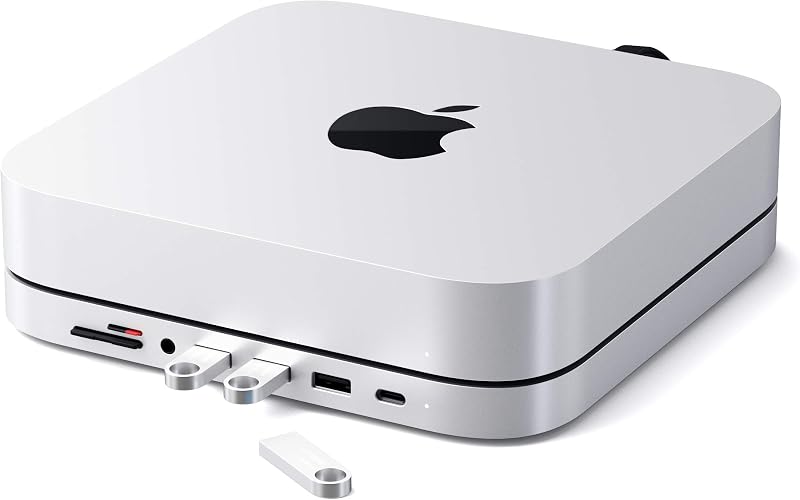
The Satechi Mac Mini Stand & Hub is a dedicated aluminum desktop accessory that elevates previous-generation Apple mini desktops while delivering seven front-facing ports for daily family use. It provides straightforward convenience for common home office tasks, though its fixed chassis design prevents compatibility with newer M4 releases.
- Front-facing connectivity hub featuring three USB 3.0 ports, one USB-C data port, dual card readers, and a 3.5mm headphone jack.
- Brushed silver aluminum alloy construction designed to complement Apple desktop hardware while anchoring securely on desks.
- Integrated bottom passive air ventilation slots engineered to promote unobstructed ambient temperature regulation.
- Explicitly listed by the manufacturer as not compatible with M4 desktops due to Apple’s revised physical dimensions.
Satechi Mac Mini Stand & Hub Features Explained
Front Port Expansion and Family Connectivity
The core benefit of this accessory is the convenient satechi mac mini stand port expansion that completely alters how family members interact with their desktop. Rather than twisting the computer around or fishing behind a heavy monitor, users have immediate access to three USB 3.0 ports operating at up to 5Gbps, a front USB-C data port also rated up to 5Gbps, dual micro and standard SD card slots, and an easily accessible 3.5mm headphone jack. This configuration makes it effortless for children to plug in wired headsets for school calls, insert thumb drives for homework assignments, or connect external controllers.
All of these ports operate through a single integrated Type-C host cable that connects directly into the rear of the computer. Because the hub operates with a total rated wattage of 5 watts, it is built to support routine data transfer, flash media, mouse receivers, and audio peripherals rather than supplying high-power charging to phones or running multiple bus-powered spinning hard drives at once. For shared family desks, having a mac mini stand with front ports reduces wear on the computer’s native rear jacks and keeps desktop cables neatly organized.
Aluminum Build Quality and Family Desktop Durability
Durability is a primary requirement for any accessory placed in a shared household space where active use can lead to accidental bumps. The satechi aluminum stand and hub build quality reflects this with a rigid aluminum alloy housing weighing 403 grams. This substantial base ensures the stand stays firmly planted on your desk mat or desktop surface without sliding around when children plug or unplug USB cords. Satechi specifies a brushed finish designed to align with Apple’s aesthetic, though the listing notes that slight color variations may occur across different computer models and manufacturing batches.
The structural rigidity of the aluminum enclosure also protects internal port circuitry against accidental impacts, spilled stationery, or rough handling during busy homework sessions. Backed by a 2-year limited warranty against defects in materials and workmanship under normal use, this stand represents a durable long-term investment for households looking to keep their shared workspace neat and protected across years of daily computer usage.
Integrated Passive Airflow Design
When stacking computer hardware in a compact family office, airflow management is critical to long-term reliability. Functioning as a specialized satechi mac mini cooling stand, the base includes a built-in air vent system engineered for optimal temperature regulation. These venting cutouts align with the lower perimeter of supported desktops, allowing cool air to circulate naturally while exhaust air escapes freely without encountering a flat, obstructive desk surface.
Because the unit relies entirely on passive airflow channels, it operates in complete silence without noisy miniature fans that could distract working parents or studying students. The listing confirms this thermal design is tailored to keep the computer cooled during multi-device data transfers and sustained peripheral connectivity, ensuring that adding front-facing ports does not compromise the host system’s native cooling architecture.
Dual Micro and SD Card Readers for Household Media
Managing family photos, video projects, and school assignments often requires moving files from digital cameras, action cams, or handheld camcorders. This hub features dedicated micro and SD card readers capable of data transfer rates up to 104 Mbps. Having both slot form factors directly on the front panel eliminates the frustration of searching through office drawers for misplaced plastic dongles or separate card adapters.
Both slots feature smooth insertion, allowing parents to offload high-resolution holiday photo albums or students to import video clips for multimedia presentations with zero setup. By providing reliable UHS-I level speeds, the reader offers sufficient bandwidth for everyday family media management without tying up the high-speed 5Gbps USB-C or USB 3.0 ports on the front fascia.
Specs
| Attribute | Detail |
|---|---|
| Brand | Satechi |
| Model Number | ST-ABHFS |
| Manufacturer Part Number | ST-ABHF |
| Hardware Interface | USB Type C |
| Total USB Ports | 4 (1x USB-C Data, 3x USB 3.0) |
| Total Number of Ports | 7 |
| Data Transfer Rates | Up to 5Gbps (USB-C & USB 3.0), up to 104 Mbps (Micro/SD) |
| Audio Interface | 3.5mm headphone jack |
| Wattage Rating | 5 watts |
| Dimensions | 10.04″L x 9.06″W x 1.06″H |
| Weight | 403 g |
| Color | Silver |
| Stated Compatibility | Mac Mini M2/M1 (not compatible with M4) |
| Warranty | 2-year limited warranty |
Satechi Mac Mini Stand & Hub Pros and Cons
What we like
- Six front-facing expansion ports for easy daily access
- Sturdy aluminum alloy casing complements desktop styling
- Integrated passive air vent system aids thermal airflow
- Dual SD and microSD card slots for family media
- Backed by a two-year limited manufacturer warranty
What we’d change
- Not physically compatible with redesigned M4 desktops
- Limited to five-watt total bus power draw
- Does not support video output or laptop charging
Check Satechi Mac Mini Stand & Hub on Amazon
Best Use Cases
- Setting up a satechi mac mini stand & hub for family desktop workstations where multiple users need quick access to USB thumb drives and wired headsets.
- Simplifying digital photography workflows by offloading memory cards through the integrated front SD and microSD slots without external dongles.
- Streamlining home office cable clutter by docking older Apple desktops atop a matching aluminum base with rear-routed host connectivity.
- Protecting wooden desks and computer enclosures from scuffs caused by blindly reaching around the back of the computer to plug in accessories.
Before You Buy
Before purchasing, buyers must carefully evaluate satechi mac mini m4 compatibility. The listing highlights in clear terms that this product is designed for Mac Mini M2/M1 systems and is explicitly not compatible with M4. Because Apple completely redesigned the exterior chassis for its newest generation—seen on machines evaluated in our mac m4 pro and mac mini m4 pro 32gb 1tb guides—the newer computers have a much smaller physical footprint, shifted ventilation openings, and existing front ports. While you could technically connect the hub’s Type-C cable to an M4 port, the new computer will not fit into the molded recess of this stand, causing an awkward physical mismatch on your desk.
Additionally, consumers should consider the functional boundaries outlined in the official satechi mac mini stand & hub specs. The hub is rated for 5 watts of operating power, meaning it does not supply passthrough power delivery to charge laptops or high-wattage external accessories. The package includes the stand, a user manual, and customer support, but the listing does not include extra USB extension cords or secondary power supplies. Furthermore, the manufacturer does not specify internal hard drive storage bays, HDMI video pass-through, or the exact length of the integrated host cable, making it unsuitable for users who need display expansion or internal SSD capacity.
How It Compares With Similar Picks
| Product | Best For | Key Difference |
|---|---|---|
| Satechi Mac Mini Stand & Hub | Fitted M1 and M2 desktop organization | Under-chassis aluminum stand with 7 front ports; not compatible with M4 models |
| 5Gbps Data Transfer for Mouse | Compact USB-A port expansion | 4-port USB-A splitter with short 0.5-foot cable; lacks card slots, audio, and stand form factor |
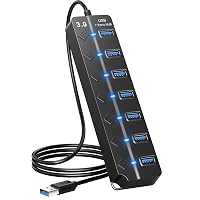
| USB 3.0 Hub with 3.3ft | Desktop setups needing long reach and individual switches | 7 USB ports with individual power switches and 3.3ft cable; plastic build without SD card slots |
| 85W Max PD | Multi-display setups and power delivery | 85W passthrough power delivery and 4K@60Hz HDMI video output; dongle design rather than fitted stand |
Choosing the best peripheral hub comes down to the computer you own and the connectivity problems you need to solve. If your household relies on a compatible older Apple desktop or an affordable machine sourced through a used mac mini guide, the Satechi stand provides an unmatched physical integration that turns the computer and ports into a single, cohesive desktop centerpiece. Conversely, if you want individual power control over connected peripherals to keep webcams or printers turned off when not in use, the USB 3.0 Hub with 3.3ft offers dedicated switches and longer cable reach. For users who need to drive an external 4K monitor and route heavy laptop charging power through a single cord, the 85W Max PD adapter provides video and power features completely absent from Satechi’s data-only stand, while the 5Gbps Data Transfer for Mouse serves minimalists who only require quick USB-A expansion.

Bottom Line
The Satechi Mac Mini Stand & Hub is a well-engineered desktop companion that brings ergonomic sanity to older Apple workstations. By bringing three USB 3.0 ports, a USB-C data connection, dual media card readers, and an audio jack directly to the front panel, it solves the daily frustration of reaching behind a stationary desktop. Its durable 403-gram aluminum chassis, passive cooling vents, and 2-year limited warranty make it an easy recommendation for family desks that handle homework, media management, and everyday office administration.
However, when asking is satechi mac mini stand & hub worth it for modern workstations, the answer depends entirely on your specific model. The manufacturer’s explicit warning confirms this stand is not compatible with M4 desktops due to Apple’s smaller chassis redesign. If you are equipping an M1 or M2 workstation, this stand delivers top-tier desk organization and long-term durability. If your household has already upgraded to the M4 generation, you should pass on this fitted stand and opt for a dedicated multi-port USB-C adapter designed for modern hardware profiles.
FAQ
Does the Satechi Mac Mini Stand & Hub fit the M4 Mac mini?
No, the product listing explicitly notes that this model is for Mac Mini M2/M1 and is not compatible with M4. Apple significantly altered the physical dimensions and port layouts on the M4 desktop, meaning the new computer will not fit properly into the molded top recess of this stand.
Can I use the front USB-C port to connect an external monitor?
No, the USB-C port on the front panel is strictly rated for data transfer at speeds up to 5Gbps. The listing does not specify video output, DisplayPort Alt Mode, or HDMI support through the stand, so any external displays must be connected directly to your computer’s built-in display ports.
Does this stand supply charging power to phones or tablets?
The stand operates with a total hardware wattage rating of 5 watts powered entirely through the host USB-C connection. It is engineered to power standard data peripherals like flash drives, wired mice, and card readers, but it does not supply high-speed charging power for external tablets or smartphones.
What comes inside the package with the hub?
According to the product data, your purchase includes the aluminum stand and hub, a user manual for straightforward setup, and access to customer support. Satechi also protects the product with a 2-year limited warranty against defects in materials and workmanship under normal use conditions.
Does the cooling vent system require separate power or software?
No, the cooling system consists of built-in passive air vents engineered to facilitate natural airflow and heat dissipation around the computer base. It operates entirely without internal fans, software drivers, or supplemental electrical power, ensuring silent operation at all times.