What we looked at
-
 Reviewed here
Microsoft Optical Desktop Elite for Bluetooth
4.3
See price
Reviewed here
Microsoft Optical Desktop Elite for Bluetooth
4.3
See price
-
 Logitech MK270 Full Size Wireless Keyboard and Mouse Combo - Black
4.5
See price
Logitech MK270 Full Size Wireless Keyboard and Mouse Combo - Black
4.5
See price
-
 Lowest price
Wireless Keyboard and Mouse Combo Silent for Office and Home(Avocado Green)
4.6
See price
Lowest price
Wireless Keyboard and Mouse Combo Silent for Office and Home(Avocado Green)
4.6
See price
-
 Highest rated
Logitech MK250 Compact Wireless Bluetooth Keyboard and Mouse Combo - Rose
4.9
See price
Highest rated
Logitech MK250 Compact Wireless Bluetooth Keyboard and Mouse Combo - Rose
4.9
See price
As Amazon Associates, we earn from qualifying purchases. This means we may receive a small commission at no extra cost to you if you click through and make a purchase.
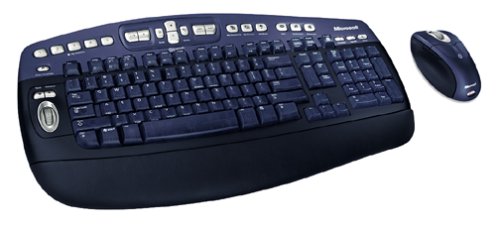
A shared family computer desk often turns into a messy environment where multiple users struggle with tangled cables, sluggish navigation, and unresponsive hardware. Investing in the Microsoft Optical Desktop Elite provides a coordinated workstation solution built to maintain order, comfort, and steady productivity. This package combines a full-sized 105-key keyboard and an optical mouse, engineered specifically for personal computers running Windows operating systems. By moving away from restricted wired connections to an integrated wireless workspace, it addresses the everyday chaos of family scheduling, school assignments, and administrative work with predictable, sturdy hardware.
Our verdict is that this wireless package provides a reliable, secure foundation for households committed to traditional desktop setups. Featuring dependable Bluetooth technology, dedicated horizontal and vertical scrolling controls, and the proven ergonomic legacy of optical tracking, this combo delivers lasting utility for users who value stability over unnecessary complexity.


Quick Verdict

The Microsoft Optical Desktop Elite serves as a dependable desktop companion for family workstations, providing reliable wireless input hardware that simplifies daily typing, web browsing, and multi-device synchronization.
- Integrated Bluetooth architecture pairs smoothly with personal computers via the included USB transceiver for stable, cable-free control.
- Optical tracking delivers consistent pointer precision without mechanical roller balls that collect dust and grime.
- Innovative side-to-side scrolling on both the keyboard and mouse accelerates document reviews and spreadsheet navigation.
- Dedicated Windows architecture ensures instant compatibility with standard PC commands, shortcuts, and peripheral routines.
Microsoft Optical Desktop Elite Features Explained
Secure Bluetooth Wireless and Device Synchronization
A key capability of this desktop configuration is its integrated Bluetooth wireless communication, which operates alongside an included USB transceiver. Beyond merely eliminating clutter across your desk surface, the system establishes a secure, wide-range connection compared to older wireless frequencies. This robust link prevents the intermittent signal drops that often interrupt family members while drafting school essays or managing household finances.
During a standard microsoft surface studio or traditional desktop routine, the hardware supports wireless synchronization of digital calendars, contact lists, and critical files between the computer and compatible handheld units such as cell phones or Pocket PC devices. This capability establishes a centralized command station where family schedules and administrative data remain unified without requiring specialized external docking cables.
Ergonomic Optical Tracking and IntelliMouse Explorer
Precision pointer control is anchored by the included intellimouse explorer for bluetooth, an optical unit designed to replace traditional ball-driven mice. The optical movement detection engine reads surfaces cleanly, delivering smooth tracking across ordinary desktop pads or wood surfaces while resisting the lint and household debris that routinely derail mechanical mice over years of shared family usage.
The ambidextrous mouse housing is engineered to support natural hand orientation, providing comfortable palm rest during extended study sessions or evening accounting tasks. Because it relies on energy-efficient optical detection, users gain prolonged operational periods between battery changes, ensuring the desktop remains ready whenever a household member sits down to work.
Comprehensive 105-Key Keyboard Architecture
The core input platform is built around a standard 105-key QWERTY layout that gives typists immediate familiarity without demanding an uncomfortable adjustment period. Full-sized spacing allows comfortable key travel, reducing accidental typos during fast typing sessions. Furthermore, the inclusion of single-color backlighting support aids legibility in dimly lit study spaces or late-night home office settings, keeping primary functional keys readable without harsh glare.
With an overall package weight of four pounds, the keyboard chassis anchors firmly to the desk. This solid heft prevents the board from sliding around during aggressive typing, providing an exceptionally stable platform for households where users of varying ages and typing styles share the same machine.
Dual-Control Side-to-Side Scrolling
Navigating wide spreadsheets, image galleries, and expansive digital records often requires tedious manual dragging of scroll bars. This combo solves that interface friction by incorporating side-to-side scrolling mechanisms on both the mouse and the keyboard body. By gently tilting the wheel or engaging the keyboard navigation control, users can pan horizontally across wide web pages or data tables with minimal finger travel.
Coupled with traditional vertical scrolling, this dual-axis navigation system streamlines administrative work. Family members reviewing household budgets, reading wide digital textbooks, or editing graphic projects can glide across documents smoothly, significantly speeding up daily computer interactions.
Specs
| Attribute | Detail |
|---|---|
| Brand | Microsoft |
| Connectivity Technology | Bluetooth, USB, Wireless |
| Movement Detection | Optical |
| Keyboard Layout | QWERTY (105 Keys) |
| Hand Orientation | Ambidextrous |
| Compatible Operating System | Windows |
| Keyboard Backlighting | Single Color |
| Power Source | Battery Powered |
| Color Scheme | Black and Blue |
| Total Item Weight | 4 pounds |
Microsoft Optical Desktop Elite Pros and Cons
What we like
- Stable Bluetooth wireless connectivity with included USB transceiver
- Proven optical tracking resists dust and lint buildup
- Smooth side-to-side scrolling on both keyboard and mouse
- Full 105-key layout with single-color backlighting
- Ambidextrous mouse shape suits left- and right-handed users
What we’d change
- Restricted exclusively to Windows personal computers
- Substantial four-pound weight reduces portability
- Requires regular battery replacements for uninterrupted power
Check Microsoft Optical Desktop Elite on Amazon
Best Use Cases
- Equipping a communal household computer hub where children and parents require a stable, familiar typing interface for homework and email.
- Streamlining remote home office setups that demand secure wireless connectivity without frequent signal cutouts.
- Handling administrative bookkeeping, banking, and wide data spreadsheets using built-in side-to-side scrolling controls.
- Maintaining an uncluttered study station where optical tracking performs cleanly without relying on mechanical mouse components.
Before You Buy
Prior to selecting this setup, buyers must consider operating system constraints. The Microsoft Optical Desktop Elite is engineered strictly for personal computers running Windows operating systems. If your household relies primarily on macOS, ChromeOS, or Linux machines, the dedicated driver layers and synchronization functions will not operate as intended. Those operating modern platforms like microsoft windows 11 pro should ensure their desktop environment supports legacy Bluetooth protocols or accommodates the included USB transceiver for dependable communication.
It is equally important to examine what the product listing does not include or specify. The listing explicitly confirms the bundle includes the keyboard, optical mouse, and USB transceiver, but it does not specify the exact battery chemistry or whether starter batteries come packaged in the box. Furthermore, the listing does not detail precise battery life projections in days or months, nor does it list custom programmable software layers for advanced macro creation. Buyers should plan on keeping standard replacement batteries on hand to maintain continuous operation.
How It Compares With Similar Picks
| Product | Best For | Key Difference |
|---|---|---|
| Microsoft Optical Desktop Elite | Windows-centric family setups needing Bluetooth and synchronization | Full 105-key layout, ambidextrous optical mouse, and dual-axis scrolling |
| Full size keyboard with spill-resistant | Busy family spaces prone to accidental beverage spills | Spill-resistant chassis paired with a dedicated USB-A nano receiver |
| 2.4G Full Size Silent Cordless | Shared quiet rooms and multi-OS environments | Silent keystrokes, tilt legs, 3-level adjustable DPI, and multi-OS support |
| Bluetooth connection only | Tight workspaces or compact writing desks | Space-saving compact frame with a smaller 3-button non-customizable mouse |
When weighing your options, the choice between these peripherals depends heavily on your workspace environment and operating system requirements. If your desktop station is located in a high-traffic kitchen counter or playroom where drink spills are an inevitable threat, selecting the Full size keyboard with spill-resistant model gives parents extra protection. Conversely, if your home office shares space with a nursery or quiet bedroom, the 2.4G Full Size Silent Cordless combo provides dampened switch mechanisms and multi-OS versatility. For minimalists working on cramped desks, the Bluetooth connection only alternative frees up surface space, whereas the Microsoft Optical Desktop Elite remains the best choice for users who want a substantial, full-featured Windows desktop suite.
Bottom Line
The Microsoft Optical Desktop Elite delivers a complete, cohesive peripheral solution tailored specifically for Windows desktop environments. While modern users might encounter lighter alternatives, the sheer four-pound structural stability, full 105-key typing layout, and comfortable ambidextrous optical tracking make this combo an exceptional workhorse for family shared workstations. Its integrated transceiver architecture eliminates the need for trailing cords while maintaining a secure link that easily supports daily computing tasks.
Whether you are outfitting a family learning station or optimizing an everyday home office workstation alongside components like t-force vulcan ddr5 memory, this desktop set focuses on fundamentals that matter: comfortable wrist posture, responsive navigation, and robust hardware resilience. It represents a practical, lasting investment for households seeking a stable, uncluttered PC interface.
FAQ
What operating systems work with the Microsoft Optical Desktop Elite?
The listing states that this desktop set is designed strictly for personal computers running Windows operating systems. It is not intended for macOS or other alternative platforms.
What components are included inside the box?
The package includes the full-sized wireless keyboard, the optical IntelliMouse Explorer mouse, and the dedicated USB transceiver for wireless communication.
Does the mouse accommodate both left-handed and right-handed users?
Yes, the specifications confirm that the mouse features an ambidextrous hand orientation, making it equally comfortable for left-handed and right-handed family members.
How does the side-to-side scrolling function operate?
Side-to-side scrolling is built directly into both the keyboard and the mouse, allowing users to navigate horizontally across wide documents, web pages, and spreadsheets without manually dragging screen scrollbars.
Does the keyboard feature any form of backlighting?
Yes, according to the product specifications, the keyboard includes single-color backlighting support to assist with key visibility in low-light home working environments.


