
What we looked at
-
 Reviewed here
Apple 2024 iMac All-in-One Desktop Computer with M4 chip with 10-core…
9.4/10
See price
Reviewed here
Apple 2024 iMac All-in-One Desktop Computer with M4 chip with 10-core…
9.4/10
See price
-
 Lenovo 24" FHD All-in-One Desktop Computer for Home & Office, Intel…
8.4/10
See price
Lenovo 24" FHD All-in-One Desktop Computer for Home & Office, Intel…
8.4/10
See price
-
 Highest rated
HP 21.5" FHD All-in-One Desktop Computer, Quad-Cores Intel N100, Windows 11…
9.0/10
See price
Highest rated
HP 21.5" FHD All-in-One Desktop Computer, Quad-Cores Intel N100, Windows 11…
9.0/10
See price
-
 HP 24“ OmniStudio All-in-One Desktop Computer, 16GB DDR5 RAM, 640GB Storage
8.8/10
See price
HP 24“ OmniStudio All-in-One Desktop Computer, 16GB DDR5 RAM, 640GB Storage
8.8/10
See price
As Amazon Associates, we earn from qualifying purchases. This means we may receive a small commission at no extra cost to you if you click through and make a purchase.
Setting up a shared workstation in a bustling family home often turns into a frustrating compromise between tangled tower cables, flimsy plastic monitors, and machines that slow down after a couple of school terms. A family desktop needs to handle multi-user switching, school homework assignments, remote office tasks, photo archiving, and weekend streaming without demanding constant maintenance. The Apple iMac M4 addresses this domestic challenge by combining high-efficiency processing power, a high-resolution display, studio-grade microphones, and room-filling audio into a single, razor-thin aluminum and glass design that occupies minimal desk space.
For households planning tech investments with an eye on the new imac 2026 horizon, our assessment confirms that this platform delivers outstanding everyday dependability and straightforward usability across generations. With ten processing cores, unified hardware components, and seamless family sharing tools, it eliminates common technical obstacles while providing lasting longevity that easily outlives budget consumer computers.


Quick Verdict
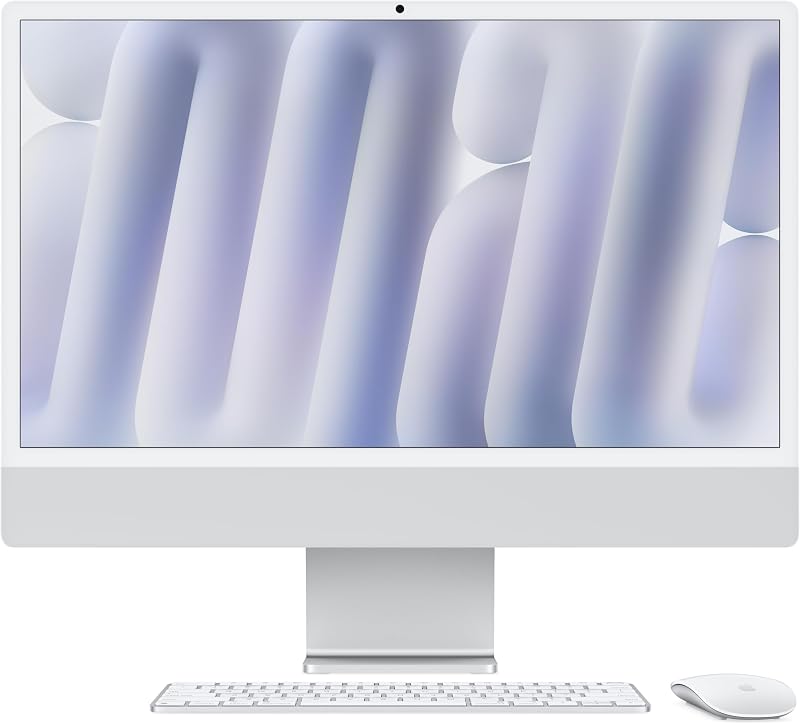
The Apple iMac M4 is an exceptional all-in-one desktop for households seeking a durable, clutter-free workstation capable of handling school research, family creative tasks, and remote work without technical friction.
- The 10-core CPU and 10-core GPU deliver rapid responsiveness across separate family user profiles, photo editing software, and browser research.
- A vibrant 24-inch 4.5K Retina display provides 500 nits of brightness and crisp text readability that reduces eye fatigue during evening homework sessions.
- The built-in 12MP Center Stage camera with Desk View and six spatial audio speakers create a clear, natural setup for family calls and virtual learning.
- Four versatile Thunderbolt 4 ports alongside Wi-Fi 6E connectivity ensure swift external backup speeds and future-ready wireless networking.
Apple iMac M4 Features Explained
Processing Power and Unified Memory Architecture
At the center of this desktop is the Apple M4 chip, configured with a 10-core CPU and a 10-core GPU. In an active household, a shared workstation rarely runs only one task at a time. A parent might be balancing family finances and browsing multiple research tabs while a student leaves demanding educational software running in the background. The M4 architecture balances these simultaneous tasks effortlessly, ensuring that daily applications like Microsoft 365 and Adobe Creative Cloud launch immediately without generating distracting fan noise or excessive heat.
Memory management is equally critical for the long-term viability of a household computer. The listing highlights 24GB of unified memory alongside a 16GB tier within the product family. Unlike conventional computers that separate graphics memory from system RAM, unified memory allows the processor and graphics cores to access one shared pool of high-speed data. Evaluating the available imac unified memory options helps families choose a setup that prevents slowdowns during intensive tasks like photo organizing or multi-profile switching, keeping the desktop fast through years of system updates.
Immersive 24-Inch 4.5K Retina Display
Screen clarity is an essential ergonomic and visual consideration for a shared family machine. The imac 24 inch retina display delivers a sharp 4.5K resolution across its slim panel, outputting 500 nits of brightness and supporting up to one billion colors. Whether children are reading digital textbooks or parents are editing family images imported from a dedicated camera like the canon g7x mark iii, fine lines remain crisp and colors stay natural from wide viewing angles across the room.
The 24-inch screen strikes a practical balance between spacious screen real estate and everyday desk footprint. It provides sufficient display space for side-by-side window multitasking, allowing kids to view source materials right next to an active text document. At the same time, the ultra-thin form factor prevents the computer from dominating the kitchen counter, living room nook, or shared study space.
Integrated Communication Suite With Center Stage
Modern family computing relies heavily on remote communication, whether keeping in touch with distant relatives or attending online music lessons and virtual school meetings. The integrated 12MP Center Stage camera dynamically keeps family members centered in the video frame as they shift in their chairs or gather around the desk. It also supports Desk View, allowing users to share a top-down view of their physical workspace alongside their face, which is ideal for presenting homework projects, drawings, or crafts during remote presentations.
The audio hardware matches this visual fidelity without cluttering the desktop with extra cables and external speakers. A three-microphone studio-quality array captures crisp dialogue while filtering out ambient background noise from nearby rooms. Meanwhile, the integrated six-speaker sound system with Spatial Audio delivers clear speech and balanced stereo depth, making video conversations natural and streaming media enjoyable for the entire family.
Apple Intelligence Desktop and Ecosystem Continuity
The integration of an apple intelligence desktop environment brings privacy-minded automated assistance to daily family routines. The system offers integrated writing tools, message summaries, and creative assistance designed to streamline everyday household management without transmitting personal family data to external servers. This focus on device-level and protected cloud processing reassures parents managing family schedules, school forms, and sensitive household documents.
Continuity features further enhance daily convenience for homes already utilizing other Apple hardware. With iPhone Mirroring, users can view and control their mobile apps directly on the 24-inch monitor without having to search for their phone across the house. Convenient features like Universal Clipboard allow quick copying of links, recipes, or school notes between mobile devices like the ipad air 13 inch new and the desktop, ensuring family projects move smoothly across devices.
Physical Footprint and High-Speed Connectivity
Measuring 21.54 inches wide, 18.15 inches tall, and resting on a compact 5.79-inch base, this all-in-one fits comfortably on small student desks and narrow credenzas. Weighing 9.77 pounds, the lightweight computer is easy for adults to reposition between rooms when household routines evolve. Its understated silver finish presents a clean, modern aesthetic that integrates naturally into home decor without looking like bulky commercial equipment.
Wired connectivity includes up to four Thunderbolt 4 ports that deliver fast data transfer speeds and allow connections to up to two external 6K displays for advanced home office setups. Wireless networking is powered by Wi-Fi 6E for dependable, high-bandwidth domestic networking, paired with Bluetooth 5.3.6 for stable connections to wireless keyboards, mice, and audio accessories.
Specs
| Attribute | Detail |
|---|---|
| Model Number | MCR24LL/A |
| Processor | Apple M4 (10-core CPU, 10-core GPU) |
| Display | 24-inch 4.5K Retina, 500 nits, 1 billion colors |
| Unified Memory | 24GB (listing notes 16GB or 24GB options) |
| Storage Capacity | 512GB SSD (listing notes 256GB or 512GB options) |
| Camera | 12MP Center Stage camera with Desk View, 1080p HD video |
| Audio Hardware | Six-speaker sound system with Spatial Audio, three studio-quality mics |
| Expansion Ports | Up to four Thunderbolt 4 ports (supports up to two 6K displays) |
| Wireless Standards | Wi-Fi 6E, Bluetooth 5.3.6 |
| Physical Dimensions and Weight | 21.54 x 5.79 x 18.15 inches; 9.77 pounds |
Apple iMac M4 Pros and Cons
What we like
- Vibrant 24-inch 4.5K Retina display
- Fast Apple M4 chip with 10-core CPU
- 12MP Center Stage camera with Desk View
- Six-speaker sound system with Spatial Audio
- Four high-speed Thunderbolt 4 ports
What we’d change
- Internal storage and memory cannot be upgraded
- Integrated stand does not adjust for height
- Compact 24-inch screen may feel small for some
Best Use Cases
- Central family command post for managing household calendars, online banking, and personal administration.
- Dedicated student study desk supporting multi-source academic research, virtual classes, and clear video presentations.
- Home creative workspace for organizing high-resolution photo libraries, editing family home movies, and hobby design.
- Hybrid remote-work workstation offering reliable multi-application performance, distinct profiles, and dual external display support.
Before You Buy
Before purchasing this desktop, families should evaluate their long-term storage requirements and memory needs carefully. The official apple imac m4 specs outline distinct configuration options, including 256GB or 512GB solid-state drives alongside 16GB or 24GB of unified memory. Because the internal hardware cannot be upgraded after purchase, choosing adequate onboard capacity upfront is essential for households that plan to store extensive photo libraries or run demanding creative programs over several years.
Prospective buyers should also review the practical setup details of the hardware. The listing indicates that three Lithium Ion batteries are required and included to power the wireless input peripherals. However, the listing does not specify any height adjustability for the integrated aluminum stand, meaning families with users of varying heights may want an adjustable chair or monitor riser. While some households may debate between a desktop and a portable laptop like a used macbook pro, a stationary desktop keeps family screen time centrally situated where parents can naturally supervise digital activities.
How It Compares With Similar Picks
| Product | Best For | Key Difference |
|---|---|---|
| Apple iMac M4 | Long-term household multitasking, creative media, and seamless Apple integration | 10-core M4 chip, 24-inch 4.5K Retina display, 24GB unified memory, and Thunderbolt 4 |
| HP 24“ OmniStudio All-in-One Desktop Computer | Budget-focused families needing flexible storage in a Windows environment | Intel Quad-Core CPU, Windows 11, 16GB DDR5 RAM, 128GB SSD plus 512GB external storage |
| HP 21.5″ FHD All-in-One Desktop | Secondary study areas requiring a compact footprint and docking hub | Smaller 21.5-inch 1080p display, Intel N100 processor, 8GB RAM, and included 8-in-1 hub |
| Lenovo 24″ FHD All-in-One Desktop | Standard home offices prioritizing Windows 11 Pro administration | Intel processor, 1080p FHD panel, 16GB RAM, 256GB PCIe SSD, and HDMI connectivity |
Choosing an alternative makes sense if your family workflow strictly requires the Windows 11 operating system or if your household wants an economical secondary machine for routine web searches. The HP OmniStudio provides an approachable hybrid storage approach for general home administration, while the compact HP 21.5-inch model and Lenovo 24-inch desktop offer standard 1080p high-definition screens suited for basic document typing rather than demanding photo editing or high-resolution graphic tasks.
Bottom Line
Investing in a shared desktop requires balancing hardware longevity against daily operational simplicity. Evaluating this m4 all in one computer demonstrates that it succeeds where active households need it most: providing dependable multi-user performance, outstanding audiovisual clarity, and a durable form factor that eliminates cable clutter. Its solid aluminum construction and stable macOS environment spare families from the recurring software slowdowns, driver conflicts, and hardware wear common to entry-level towers.
When asking is the new imac worth it for multi-generational use, the combination of a 10-core processing engine, 24GB of unified memory, and an industry-leading 4.5K Retina display offers compelling value over years of school semesters, personal projects, and remote work shifts. For families seeking a single, durable desktop anchor that every generation in the home can use with ease, this all-in-one proves to be an outstanding household investment.
FAQ
How does imac m4 durability hold up in a busy family environment?
The imac m4 durability is reinforced by a solid aluminum frame and a robust front glass panel that withstand daily family handling far better than conventional plastic casings. Furthermore, because the Apple M4 chip operates with high thermal efficiency, internal cooling fans run infrequently during routine tasks, substantially reducing dust intake over years of ownership.
Can multiple family members share this computer without interfering with each other?
Yes, macOS allows parents to establish distinct user profiles for each family member with individual passwords, personalized file spaces, and tailored parental controls. Switching between active profiles is instantaneous thanks to the fast SSD and unified memory, allowing a student to complete homework without closing a parent’s ongoing work documents.
What makes the imac m4 for family use preferable to an ordinary desktop tower?
An all-in-one design eliminates the tangled nest of power cables, display wires, external webcams, and separate speakers typical of desktop towers. Placing an all-in-one in an open living room or kitchen island keeps screen time visible to parents, while the integrated high-fidelity microphones, speakers, and Center Stage camera keep family communication effortless and tidy.
Can this all-in-one computer connect to additional external screens?
The technical specifications confirm that the four Thunderbolt 4 ports can power up to two external 6K monitors simultaneously. This capability allows parents who work from home to easily attach extra professional displays during the business day while using the built-in 24-inch Retina display as their central visual workstation.
Can the internal storage or unified memory be upgraded at home?
The internal SSD storage and unified memory chips are integrated directly into the system board and cannot be physically replaced or upgraded after purchase. However, the high-speed Thunderbolt 4 ports allow families to attach rapid external hard drives or solid-state storage modules whenever extra space is needed for home video archives or large photo libraries.


