
What we looked at
-
 Lowest price
TECKNET Wired Gaming Keyboard, RGB Backlit Keyboard with Metal Panel Design
8.8/10
See price
Lowest price
TECKNET Wired Gaming Keyboard, RGB Backlit Keyboard with Metal Panel Design
8.8/10
See price
-
 Highest rated
AULA F75 Pro Wireless Mechanical Keyboard,75% Hot Swappable Custom Keyboard with…
9.2/10
See price
Highest rated
AULA F75 Pro Wireless Mechanical Keyboard,75% Hot Swappable Custom Keyboard with…
9.2/10
See price
-
 Wireless Mechanical Backlit Gaming Keyboard with Knob,Hot Swappable,White
8.6/10
See price
Wireless Mechanical Backlit Gaming Keyboard with Knob,Hot Swappable,White
8.6/10
See price
-
 Reviewed here
Logitech G915 Lightspeed RGB Mechanical Gaming Keyboard, Low Profile GL Clicky…
8.2/10
See price
Reviewed here
Logitech G915 Lightspeed RGB Mechanical Gaming Keyboard, Low Profile GL Clicky…
8.2/10
See price
As Amazon Associates, we earn from qualifying purchases. This means we may receive a small commission at no extra cost to you if you click through and make a purchase.
Living rooms, shared family offices, and hybrid workstations often turn into chaotic environments when multiple family members share a single desk. Between students completing homework, parents handling remote work tasks, and kids jumping into evening gaming sessions, cords quickly become tangled and lower-grade peripherals suffer from physical wear. Finding a peripheral that delivers responsive input without dominating desk space or breaking under heavy handling is a continuous challenge for multi-user homes. The Logitech G915 Lightspeed addresses these concerns directly by combining high-end low-profile mechanical hardware with durable metal framing and versatile cord-free performance designed to keep desktops clean and clutter-free.
Evaluating the technical specifications and build qualities reveals that this keyboard balances rugged structural engineering with top-tier wireless connectivity. By integrating an aircraft-grade aluminum alloy top plate, dual-mode wireless pairing, and customizable low-profile clicky switches, it serves as an adaptable workstation anchor capable of handling demanding gameplay and intense typing marathons alike. For households that prioritize long-term utility, uncluttered aesthetics, and seamless device switching, it represents a well-engineered solution that withstands the rigors of multi-user daily life.
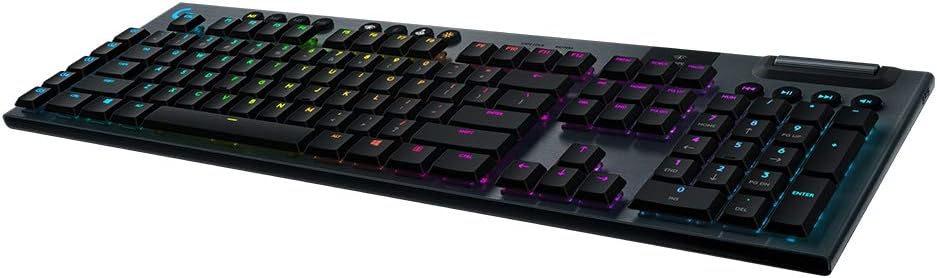


Quick Verdict

The Logitech G915 Lightspeed is a premium low-profile wireless mechanical keyboard that excels in shared household environments due to its resilient aluminum construction, zero-lag wireless performance, and effortless multi-device pairing.
- Aircraft-grade aluminum alloy top plate ensures exceptional rigidity and long-term durability
- Dual connectivity featuring 1 ms Lightspeed wireless and Bluetooth enables smooth multi-device toggling
- Low-profile GL Clicky mechanical switches provide satisfying tactile feedback at half standard switch height
- Dedicated media keys alongside an edgeless volume roller deliver instant, convenient audio adjustments
Logitech G915 Lightspeed Features Explained
Aircraft-Grade Aluminum Construction
One of the primary concerns for family environments is physical longevity, and this keyboard is constructed using an aircraft-grade aluminum alloy top plate that establishes a rigid, robust chassis. Despite measuring with an impossibly thin profile, the metal faceplate prevents deck flexing and protects internal components against forceful keystrokes. For households where children, teenagers, and adults rotate through the desk across the day, the logitech g915 durability ensures that the keyboard retains its structural integrity without creaking, bending, or degrading over years of constant use.
Beyond structural endurance, the slim low-profile format brings substantial ergonomic advantages to everyday typing. Traditional mechanical keyboards elevate the keys significantly, often forcing users to purchase separate wrist rests or tilt their wrists backward at unnatural angles. The low-slung nature of this chassis keeps the typing surface closer to the desktop, facilitating a more neutral wrist posture. This thoughtful engineering reduces fatigue during extended work sessions or marathon gaming runs while giving the workstation a clean, modern aesthetic.
Lightspeed Wireless and Bluetooth Multi-Device Support
Eliminating cable clutter without introducing latency is essential for high-performance computing, and the logitech g915 lightspeed wireless system accomplishes this through a 1 ms report rate. This pro-grade connection guarantees that input signals transfer instantaneously, matching the reliability of tethered gaming boards without stringing wires across the room. When setting up a coordinated, wire-free desk, pairing the keyboard with an efficient wireless pointer like the g305 wireless mouse creates an immaculate, cord-free desktop layout that makes cleaning and organizing simple for the entire family.
In addition to its proprietary wireless receiver, the board features integrated Bluetooth connectivity that expands its everyday utility across home devices. Managing a logitech g915 multi device setup requires only the press of a dedicated button located along the top edge of the keyboard. Family members can quickly transition between a primary gaming PC connected via the Lightspeed USB dongle and a secondary work laptop, tablet, or smartphone paired over Bluetooth. The logitech g915 bluetooth setup pairs effortlessly with Android, iOS, ChromeOS, and macOS hardware, allowing users to answer mobile text messages or draft documents on portable devices without unplugging cords or swapping hardware.
Low-Profile GL Clicky Mechanical Switches
Keystroke feel is central to any mechanical keyboard, and this model features the logitech g915 gl clicky switch design. These low-profile switches are engineered to provide the full tactile feedback and speed of a traditional mechanical switch at half the physical height. Actuation occurs briskly, with each press delivering an unmistakable tactile bump accompanied by a sharp, audible acoustic click. This distinctive sensory response informs typists precisely when an input registers, drastically lowering the rate of missed keystrokes and unintentional repeat presses when composing lengthy emails or school reports.
When deploying the logitech g915 for gaming, the shortened key travel enables swift reactions and rapid double-tapping in fast-moving titles. Competitive players benefit from the crisp feedback during crucial tactical movements where hesitation is costly. However, potential buyers should note that clicky switches produce an audible sound profile with every press. While many users love the crisp acoustic feedback, family members studying or working in the exact same quiet room might notice the consistent clicking during intense writing or gaming marathons.
Dedicated Media Controls and Programmable G-Keys
Navigating audio and video playback on a shared family computer is seamless thanks to the integrated logitech g915 media controls. Positioned above the number pad are dedicated rubberized keys designed to play, pause, advance, reverse, and mute media streams immediately. Resting beside these buttons is an edgeless, precision-engineered volume wheel that rotates smoothly under the fingertip. This roller allows anyone to quickly dial down loud game audio or pause video streaming instantly when someone enters the room, completely avoiding the need to minimize full-screen applications or hunt through system settings menus.
Customization extends further with five dedicated G-keys aligned vertically along the left flank of the chassis. Utilizing the downloadable Logitech G HUB software, users can program these buttons with custom macros, complex key sequences, and application-specific commands. Parents can set up single-press shortcuts to launch frequently used productivity software, while gamers can bind multi-action combos for their favorite real-time strategy or role-playing games. The software stores these configurations within custom profiles, ensuring tailored convenience for every family member.
Battery Longevity and Power Management
A wireless peripheral is only as dependable as its power source, and the logitech g915 battery life delivers up to 30 hours of non-stop gaming on a single full charge. This extensive reserve ensures that a busy household can enjoy several days of regular daily operation before needing to connect a charging cable. Power conservation is handled intelligently, allowing users to maximize operational uptime across busy workweeks without experiencing unexpected power loss during critical activities.
When the internal battery requires attention, the keyboard provides clear proactive warnings. An onboard battery LED indicator shifts to alert status when capacity drops to 15 percent, while an onscreen notification appears simultaneously via the Logitech G HUB software. The keyboard recharges completely in roughly 3 hours, and because it remains fully operational while connected via its charging cable, users can continue typing, working, and gaming without suffering any desk downtime.
Specs
| Attribute | Detail |
|---|---|
| Switch Type | GL Clicky Low-Profile Mechanical |
| Connectivity | Lightspeed Wireless (1 ms) and Bluetooth |
| Battery Runtime | Up to 30 hours on a full charge |
| Recharge Time | Approximately 3 hours |
| Chassis Material | Aircraft-grade aluminum alloy top plate |
| Key Count | 104 standard keys plus 5 programmable G-keys |
| Backlighting | LIGHTSYNC per-key RGB (~16.8 million colors) |
| Physical Layout | Full-size QWERTY, 4 sections |
| Operating System Compatibility | Windows, macOS, ChromeOS, Android, iOS |
| Low Battery Warning | Indicator LED and software alert at 15 percent |
Logitech G915 Lightspeed Pros and Cons
What we like
- Aircraft-grade aluminum alloy top plate
- Fast 1 ms Lightspeed wireless connection
- Dual wireless connectivity with Bluetooth toggling
- Dedicated volume wheel and media controls
- Five programmable macro G-keys
What we’d change
- Clicky switches produce audible keystrokes
- Full charging time takes three hours
- Advanced macro configuration requires software
Check Logitech G915 Lightspeed on Amazon
Best Use Cases
- Busy multi-user family desks where a durable aluminum frame stands up to repeated daily typing and gaming sessions.
- Versatile home offices where seamless toggling between a desktop PC and a Bluetooth-connected laptop streamlines workflow.
- Fast-paced competitive gaming stations requiring the ultra-low latency of a 1 ms wireless report rate.
- Living room media setups that benefit from cord-free convenience and dedicated audio controls with an edgeless volume roller.
Before You Buy
Carefully examining the logitech g915 specs reveals that while the hardware supports a wide array of operating systems, software functionality differs depending on the host platform. Basic typing and standard Bluetooth functions operate across Windows, macOS, ChromeOS, Android, and iOS devices. However, programming the five dedicated G-keys and customizing the per-key LIGHTSYNC RGB backlighting necessitates the Logitech G HUB software, which is designed primarily for desktop environments. Additionally, shoppers should evaluate whether the audible GL Clicky switch fits their household noise tolerance, as Logitech also manufactures this keyboard model in quieter GL Linear and GL Tactile switch variants.
It is equally important to consider what the retail listing specifies and what it omits. The product package contains the keyboard with its internal rechargeable battery and wireless connection hardware, but the listing does not specify whether extra items such as a dedicated wrist rest, keycap extraction tool, or travel sleeve are included. Furthermore, while the listing references compatibility with tablet computers like the AAUB P30 alongside major mobile operating systems, it does not specify an exact wireless operating range in feet or meters, meaning users operating at extended distances from their host computers should position their wireless receiver within clear line of sight.
How It Compares With Similar Picks
| Product | Best For | Key Difference |
|---|---|---|
| Logitech G915 Lightspeed | Multi-device household gaming and heavy typing | Aircraft-grade aluminum frame, low-profile GL Clicky switches, and dual Lightspeed/Bluetooth wireless |
| 15-Zone RGB Illumination | Budget-conscious quiet desks needing spill protection | Tethered wired connection, whisper-quiet operation, IP32 water resistance, and 25 anti-ghosting keys |
| AULA F75 Pro Wireless Mechanical | Compact setups favoring hot-swappable custom components | 75% compact layout, pre-lubed Reaper mechanical switches, side-printed PBT keycaps, and integrated knob |
| 75% Compact,RGB Led Light,Bluetooth,2.4GHz&USB-C,Rechargeable,Tactile Switches,Clicky | Small desktop areas wanting a white modular keyboard | White 75% compact case, hot-swappable tactile switches with clicky sound, control knob, and tri-mode connectivity |
Deciding when to choose an alternative depends on your family’s space constraints, sound preferences, and maintenance needs. If household members frequently snack or keep beverages near the keyboard, the 15-Zone RGB Illumination offers an IP32 water-resistant barrier alongside whisper-quiet membrane typing to prevent disruptive noise and liquid damage. On the other hand, if desktop real estate is limited and users prefer modular customization, 75 percent compact boards like the AULA F75 Pro Wireless Mechanical or the 75% Compact,RGB Led Light,Bluetooth,2.4GHz&USB-C,Rechargeable,Tactile Switches,Clicky provide smaller footprints, custom hot-swappable switches, and rotary control knobs. However, for users seeking an uncompromising full-size keyboard with an aircraft-grade aluminum frame, dedicated macro execution, and verified 1 ms wireless latency, the Logitech G915 Lightspeed remains the superior all-around centerpiece. High-performance gaming enthusiasts looking to pair this board with an equally responsive mouse can explore the g pro superlight 2 for an ultra-fast competitive setup.

Bottom Line
When asking whether is logitech g915 worth it for a shared household, the answer lies in its exceptional balance of structural resilience and multi-system flexibility. The aircraft-grade aluminum alloy plate provides an unyielding backbone that withstands years of enthusiastic gaming and rigorous typing, while the low-profile GL Clicky switches deliver instant mechanical precision without forcing wrists into uncomfortable angles. Its dual-mode wireless capabilities allow family members to jump effortlessly between gaming rigs, work laptops, and mobile tablets, making it a truly versatile centerpiece for any modern home.
While the audible clicky switches might prove too loud for sound-sensitive late-night study spaces and full recharging requires three hours, the keyboard excels where everyday convenience counts. The dedicated media wheel, programmable macro keys, and reliable 30-hour battery life provide practical everyday value that generic peripherals cannot match. Dedicated racing simulator enthusiasts in the home might complement their desktop with a specialized logitech g29 shifter, but for core typing and gaming, this keyboard delivers lasting performance that justifies its place in the household.
FAQ
How long does the Logitech G915 battery last on a full charge?
The logitech g915 battery life provides up to 30 hours of continuous game time on a single charge. The keyboard alerts you when power reaches 15 percent via an onboard LED indicator and software pop-ups, and it takes approximately 3 hours to completely recharge.
Can the keyboard connect to multiple devices simultaneously?
Yes, the logitech g915 multi device design allows you to pair with one system using the high-performance Lightspeed USB wireless receiver and another system over Bluetooth. You can instantly toggle between the two connected devices by pressing the dedicated wireless buttons on top of the keyboard.
What is the typing feel of the GL Clicky switch?
The logitech g915 gl clicky switch provides a distinct acoustic click paired with a crisp tactile bump at the point of actuation. Because it is a low-profile switch, it delivers this satisfying mechanical feedback at half the standard travel height of traditional mechanical keyboards.
How do you customize the macro keys and RGB lighting?
Customizing the keyboard requires the Logitech G HUB software. The application allows you to assign custom macros and commands to the five dedicated G-keys and personalize the per-key LIGHTSYNC RGB lighting across roughly 16.8 million colors with custom reactive effects.
Which operating systems are compatible with the keyboard?
According to the logitech g915 specs, the keyboard is compatible with Windows, macOS, ChromeOS, Android, and iOS. Standard typing and Bluetooth pairing work across all these platforms, while advanced configuration features like macro assignment require desktop software support.


