
What we looked at
-
 Highest rated
Samsung SSD 990 PRO 2TB, PCIe 4.0 M.2 2280, Up to…
9.4/10
See price
Highest rated
Samsung SSD 990 PRO 2TB, PCIe 4.0 M.2 2280, Up to…
9.4/10
See price
-
 Sandisk 2TB Extreme Portable SSD, Up to 1050MB/s, USB-C, USB 3.2…
9.0/10
See price
Sandisk 2TB Extreme Portable SSD, Up to 1050MB/s, USB-C, USB 3.2…
9.0/10
See price
-
 Lowest price
256GB External SSD USB Drive, 520MB/s USB-C & USB-A Portable SSD…
9.2/10
See price
Lowest price
256GB External SSD USB Drive, 520MB/s USB-C & USB-A Portable SSD…
9.2/10
See price
-
 Reviewed here
INLAND Pro 240GB SSD 3D NAND SATA III 2.5" 7mm Internal…
9.2/10
See price
Reviewed here
INLAND Pro 240GB SSD 3D NAND SATA III 2.5" 7mm Internal…
9.2/10
See price
As Amazon Associates, we earn from qualifying purchases. This means we may receive a small commission at no extra cost to you if you click through and make a purchase.
Older home computers frequently suffer from severe sluggishness caused by aging mechanical hard drives. When a family desktop or shared school laptop takes several minutes just to start up, open a web browser, or launch an office document, the entire machine feels obsolete even when the processor and memory are still capable. Installing an internal solid-state drive like the Inland Professional 240GB SSD provides a straightforward solution by substituting sluggish magnetic platters with responsive flash memory, giving older systems the quick responsiveness needed for daily household productivity.
Our verdict is that this drive serves as an economical, dependable upgrade path for revitalizing sluggish family machines that do not require massive gaming libraries. It delivers consistent SATA III speeds, robust physical shock resistance, and sufficient storage for an operating system and essential home software without demanding a costly computer replacement.




Quick Verdict
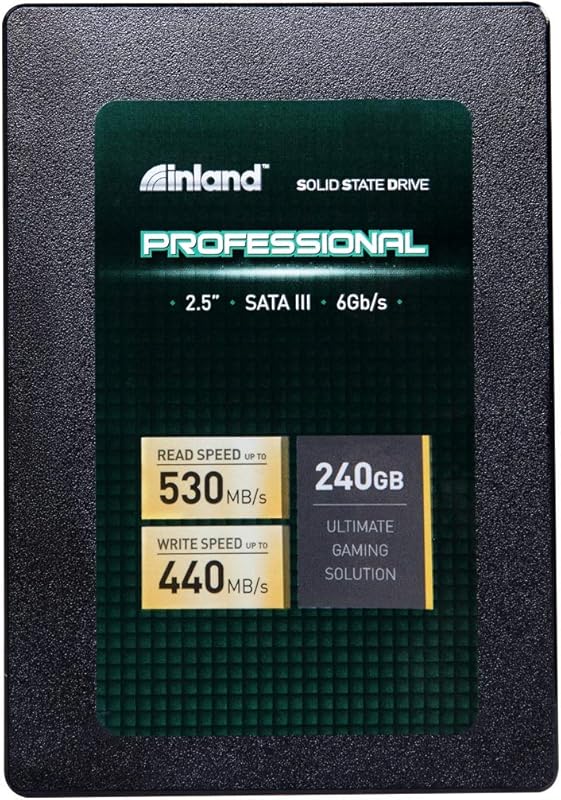
The Inland Professional 240GB SSD is a dependable internal solid-state drive that restores quick responsiveness to sluggish desktop towers and laptops. By using standard SATA connectivity and reliable flash memory, it eliminates the lag associated with legacy mechanical hard drives at minimal cost.
- Sequential read and write speeds reach up to 530MB/s and 440MB/s for snappy everyday responsiveness.
- Solid-state 3D TLC NAND construction resists movement, vibration, and accidental drops in portable computers.
- Universal 2.5-inch 7mm form factor guarantees wide compatibility across mainstream desktops, laptops, and ultrabooks.
- Backed by a three-year limited parts and labor warranty for peace of mind in family setups.
Inland Professional 240GB SSD Features Explained
SATA III Interface and Transfer Speeds
The drive utilizes a Serial ATA-600 interface operating at 6.0 Gb/s to maximize the bandwidth of standard SATA connections. When evaluating inland pro 240gb ssd speed, the drive achieves sequential read speeds up to 530MB/s and sequential write speeds up to 440MB/s. These figures represent a massive performance jump over standard 5400 RPM or 7200 RPM mechanical drives, which typically struggle to exceed 100MB/s to 140MB/s during standard file operations.
Beyond raw sequential numbers, the drive handles random read operations up to 42,000 IOPS and random write operations up to 80,000 IOPS at 4K file sizes. This random input and output throughput is what directly influences everyday system snappiness. When opening browser windows with multiple active tabs, loading desktop utilities, or installing security updates, the inland 240gb ssd sata iii connection ensures the operating system does not stall or lock up during simultaneous data requests.
3D TLC NAND Flash Durability
At the physical core of the drive is 3D TLC NAND flash memory. Unlike traditional hard disk drives that rely on spinning magnetic platters and fragile mechanical read-write heads suspended fractions of a millimeter above the surface, solid-state architecture has no moving parts. This makes the inland 240gb 3d nand ssd inherently resistant to shock, vibration, and physical movement during everyday operation.
For families with active children or shared portable computers, inland pro 240gb ssd reliability is a critical consideration. If a child bumps an active laptop on a living room table or shifts it across a desk, the solid-state architecture prevents head crashes and file corruption. Furthermore, the absence of mechanical movement means the drive generates no operational noise and does not overheat under regular family computing workloads.
Form Factor and Laptop Compatibility
This unit is built in a 2.5-inch enclosure with a slim 7mm profile, which represents the standard internal dimension for modern mobile and compact desktop computers. Choosing the inland professional 240gb ssd for laptop upgrades allows users to breathe new life into older notebook computers that originally shipped with slow mechanical disks. The 7mm profile also ensures it can slip easily into thin ultrabook drive bays without binding.
Desktop tower owners also benefit from this design, as the inland 240gb 2.5 sata ssd easily mounts into standard drive cages or attaches to dedicated 2.5-inch mounting points behind motherboard trays. Once installed, the drive works seamlessly alongside desktop productivity suites, ensuring that software like office 2013 professional plus opens in seconds rather than stalling the system during critical homework sessions.
Operating System Boot Drive Performance
Configuring this hardware as an inland professional ssd boot drive is one of the most effective ways to modernize an older machine. A clean installation of your operating system on a 240GB solid-state volume drastically cuts startup times, dropping cold boot sequences from two minutes down to a matter of seconds. System shutdowns, sleeping, and waking transitions occur almost instantaneously.
In household environments where multiple family members log into separate user accounts throughout the day, the rapid access times prevent the frustrating lag that occurs during account switching. While cutting-edge modern workstations like a mac mini m4 512gb 16gb feature integrated modern storage from the factory, upgrading an existing home PC with this SATA drive offers a sensible way to attain similar daily responsiveness without replacing the entire computer.
Specs
Reviewing the official inland professional 240gb ssd specs helps confirm that the drive matches the hardware connections and power requirements of your intended desktop or laptop computer.
| Attribute | Detail |
|---|---|
| Brand | INLAND |
| Digital Storage Capacity | 240 GB |
| Hardware Connectivity | SATA 6.0 Gb/s (Serial ATA-600) |
| Form Factor | 2.5-inch (7mm) |
| Memory Technology | 3D TLC NAND Flash |
| Sequential Read Speed | Up to 530 MB/s |
| Sequential Write Speed | Up to 440 MB/s |
| Random 4K Performance | Up to 42,000 IOPS Read / 80,000 IOPS Write |
| Hardware Compatibility | Desktop, Laptop, Ultrabook (PC / Mac) |
| Manufacturer Warranty | 3 Year Limited Parts and Labor Warranty |
Inland Professional 240GB SSD Pros and Cons
What we like
- Sequential read speeds up to 530MB/s
- Durable shock-resistant 3D TLC NAND
- Standard 2.5-inch 7mm laptop and desktop fit
- Silent operation with no overheating
- Three-year limited parts and labor warranty
What we’d change
- 240GB capacity limited for modern gaming
- SATA III speeds lower than modern NVMe
- Listing does not specify included SATA cables
Check Inland Professional 240GB SSD on Amazon
Best Use Cases
- Replacing a failing or slow mechanical hard drive inside an aging family desktop tower to speed up everyday boot and shutdown times.
- Upgrading an older student notebook computer to provide shock resistance and silent operation during daily schoolwork.
- Operating as a dedicated primary boot partition while preserving a larger secondary mechanical drive for archive files.
- Reviving a spare home office machine used primarily for web browsing, spreadsheet work, and family budgeting tasks.
Before You Buy
Before purchasing this drive, check your computer to confirm it has an available 2.5-inch drive bay and standard SATA data and power connections. While desktop towers typically provide ample interior space, older 3.5-inch drive bays require a separate adapter bracket to hold a 2.5-inch drive securely. The listing does not specify whether SATA data cables, mounting screws, or 3.5-inch bay mounting brackets are included in the retail packaging, so you may need to source those mounting accessories separately if your case does not already have them.
Shoppers frequently ask: is inland professional 240gb ssd worth it given the moderate capacity? A capacity of 240GB is ideal for the operating system, primary software tools, and standard school documents, but it can fill up quickly if family members attempt to install multiple large contemporary video games. The listing does not specify included data migration or drive cloning software, so you will need to download a third-party cloning program or perform a clean operating system installation. For users managing extensive media collections, pairing this boot drive with external devices like a lexar 2tb professional go usb 3.2 gen 2 portable ssd keeps primary system storage uncluttered.
How It Compares With Similar Picks
| Product | Best For | Key Difference |
|---|---|---|
| Inland Professional 240GB SSD | Revitalizing older desktops and laptops | Internal 2.5-inch 7mm SATA III drive with 240GB capacity and up to 530MB/s read speeds |
| NVMe Internal Solid State Hard | High-end workstations and modern gaming systems | Internal PCIe 4.0 M.2 2280 form factor with 2TB capacity and speeds reaching up to 7,450MB/s |
| Sandisk 2TB Extreme Portable SSD | Rugged mobile storage for active travel | External USB-C drive with IP65 water and dust resistance and 1050MB/s transfer rates |
| Zinc Alloy | Quick cross-device smartphone and tablet transfers | External portable thumb-drive style enclosure with dual USB-C and USB-A connections |
Selecting an alternative depends primarily on your system hardware interface and your portability needs. If your computer features a modern motherboard with an M.2 slot and you require top-tier bandwidth for video production or heavy gaming, an internal PCIe 4.0 drive is the correct route. Conversely, if you need to carry files between different computers or backup mobile devices directly without opening a computer case, external portable SSD models provide rugged enclosures and multi-port flexibility that an internal SATA drive cannot offer.
Bottom Line
The Inland Professional 240GB SSD offers practical, dependable performance for families seeking to extend the working lifespan of their existing hardware. By replacing a mechanical drive with solid-state flash memory, you eliminate the single largest performance bottleneck in older personal computers, transforming slow startup sequences and sluggish application launches into responsive, everyday computing.
While high-demand gamers and media creators will need significantly more raw storage capacity and modern NVMe speeds, this drive fits the sweet spot for everyday homework, household budgeting, and light general computing. Backed by solid shock resistance and a three-year limited warranty, it is an intelligent, cost-effective investment in your home computer equipment.
FAQ
Is the Inland Professional 240GB SSD compatible with my laptop?
The drive is compatible with any laptop or ultrabook that features a standard 2.5-inch internal SATA drive bay accommodating a 7mm drive height. If your laptop only uses soldered flash storage or proprietary M.2 slots, an internal 2.5-inch SATA drive will not fit.
Can this drive be used as the primary operating system boot drive?
Yes, the drive is engineered to serve as an internal boot drive for Windows, Mac, or Linux systems. Its 240GB capacity provides ample room for the operating system files, system updates, and core software applications while delivering fast boot-up times.
What is the difference between this drive and an NVMe M.2 SSD?
This drive connects using the standard SATA III interface with a 2.5-inch form factor, reaching maximum speeds around 530MB/s. NVMe M.2 drives resemble small circuit boards, plug directly into motherboard PCIe slots, and achieve much higher transfer speeds, but older computers rarely support them.
Does the drive come with cables and mounting screws?
The listing does not specify the inclusion of SATA data cables, power adapters, or mounting screws. When installing this unit into a desktop computer, you should ensure you have an open SATA data cable and an available SATA power lead from your power supply.
How durable is 3D TLC NAND flash for everyday family computing?
The 3D TLC NAND flash used in this drive provides dependable everyday endurance with zero moving parts. It resists shocks, vibrations, and physical movements that could permanently damage a mechanical hard drive, and it is backed by a three-year limited parts and labor warranty.


