
What we looked at
-
 Lowest price
GIGABYTE B850 AORUS Elite WIFI7 AMD AM5 ATX Motherboard, Support AMD…
8.8/10
See price
Lowest price
GIGABYTE B850 AORUS Elite WIFI7 AMD AM5 ATX Motherboard, Support AMD…
8.8/10
See price
-
 Micro Center Combo Intel Core Ultra 5 250K Plus CPU ATX…
8.4/10
See price
Micro Center Combo Intel Core Ultra 5 250K Plus CPU ATX…
8.4/10
See price
-
 Reviewed here
ASUS Prime X870-P WiFi AMD AM5 X870 ATX Motherboard 14+2+1 80A…
9.0/10
See price
Reviewed here
ASUS Prime X870-P WiFi AMD AM5 X870 ATX Motherboard 14+2+1 80A…
9.0/10
See price
-
 Highest rated
MSI MAG B850 Tomahawk MAX WiFi Motherboard, ATX - Supports AMD…
9.0/10
See price
Highest rated
MSI MAG B850 Tomahawk MAX WiFi Motherboard, ATX - Supports AMD…
9.0/10
See price
As Amazon Associates, we earn from qualifying purchases. This means we may receive a small commission at no extra cost to you if you click through and make a purchase.
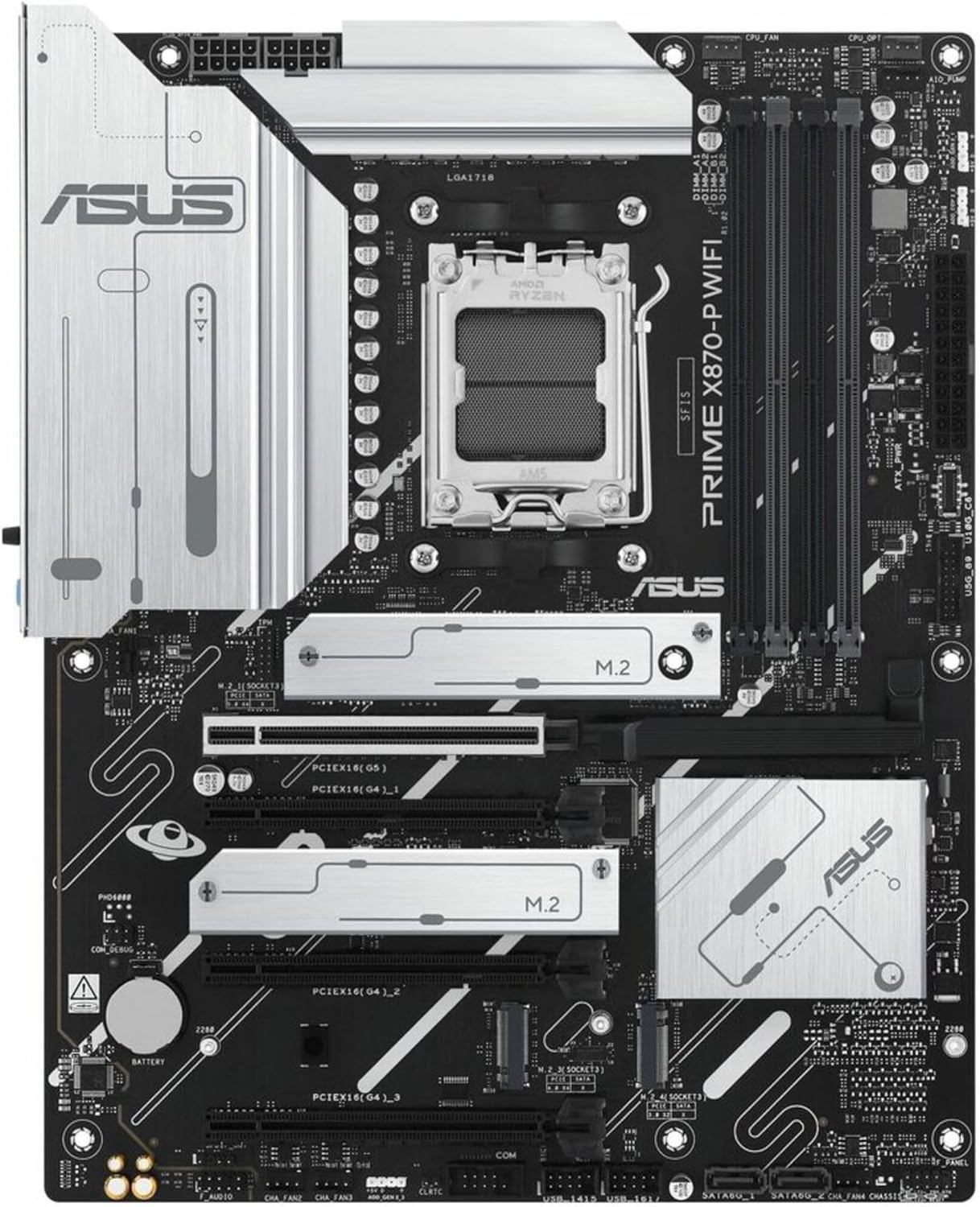
Building a desktop computer for a household requires balancing current performance demands against multi-year longevity, especially when multiple family members depend on the system for school projects, remote office work, and weekend gaming. Component stability and straightforward physical setup often matter far more than flashy aesthetic extras when assembling a shared workstation meant to remain active for years. The ASUS Prime X870-P WiFi is engineered to address these exact concerns by pairing the updated AMD AM5 platform with reinforced power architecture, modern connectivity, and thoughtful hardware accessibility features.
Our evaluation reveals that this motherboard provides a dependable, future-ready foundation for builders who want to avoid premature upgrade cycles. By integrating substantial heatsinks, high-bandwidth USB4 interfaces, and tool-free installation latches, it delivers the physical resilience and everyday convenience essential for a versatile family computer. Whether you are assembling a fresh PC from scratch or refreshing an aging home workstation, this board delivers the reliability required for uninterrupted day-to-day household computing.


Quick Verdict

The ASUS Prime X870-P WiFi strikes a practical balance between architectural resilience and everyday DIY utility for builders assembling an AMD-powered household desktop. Its durable power distribution, rapid wireless networking capabilities, and simplified mounting mechanisms eliminate the common headaches associated with custom system assembly while offering robust long-term expandability for future component upgrades. For families needing a stable workstation that can comfortably transition from remote school assignments to intensive productivity and multimedia entertainment, this board proves to be a well-grounded centerpiece.
- Robust 14+2+1 80A DrMOS power stage configuration mounted on an 8-layer PCB for reliable voltage stability.
- Integrated next-generation Wi-Fi 7 and Realtek 2.5Gb Ethernet for responsive home network connections.
- Twin 40Gbps USB4 ports with display output capability alongside four M.2 storage slots.
- Hardware-level DIY enhancements including PCIe Slot Q-Release and M.2 Q-Latch to streamline maintenance.
ASUS Prime X870-P WiFi Features Explained
Robust Power Delivery and Multi-Layer PCB Durability
Exploring the asus prime x870-p am5 durability reveals an intentional focus on continuous stability under demanding operating conditions. At the core of the motherboard is an enhanced power solution featuring 14+2+1 power stages rated at 80A DrMOS. Supported by solid ProCool connectors, alloy chokes, and durable capacitors, this configuration ensures that electrical current is delivered cleanly and consistently to the processor. For families running resource-intensive applications, long rendering jobs, or continuous gaming sessions, stable power delivery prevents sudden voltage drops and system crashes, preserving both work progress and system hardware health over years of daily operation.
Sustaining this power setup is an 8-layer printed circuit board (PCB) that provides structural rigidity and improves heat dissipation across critical electrical pathways. Proper asus prime x870-p vrm cooling is vital for platform longevity, and ASUS implements large VRM heatsinks alongside a dedicated PCH heatsink to draw heat away from primary power stages efficiently. System thermal management is further reinforced through Fan Xpert 4 software integration with AI Cooling II, which dynamically modulates cooling profiles across hybrid fan headers. This ensures whisper-quiet operation during light web browsing and homework tasks while ramping up airflow automatically during heavy processing workloads.
Next-Generation AM5 Support for Ryzen Processors
A major concern when planning an all-around home build is ensuring compatibility with both current processors and future processor upgrades. The board features the AMD Socket AM5 interface, fully prepared to host AMD Ryzen 9000, 8000, and 7000 Series desktop processors. Families who choose to start with an entry-level processor today can comfortably upgrade down the line without replacing their motherboard. Setting up an asus prime x870-p ryzen 9000 system ensures that household users benefit from modern architecture designed to handle advanced AI-accelerated tasks, productivity suites, and demanding creative software.
The platform leverages the AMD X870 chipset, bringing architectural refinements designed around advanced AI computing applications alongside modern DDR5 memory support. With four DDR5 memory slots supporting configurations up to a massive 192 GB capacity, the system can handle memory-heavy tasks such as video rendering, virtual machines, or large family photo archives without choking on capacity constraints.
PCIe 5.0 Expansion and Flexible Storage Configurations
High-speed storage and expansion slots define how well a desktop adapts to future technologies, and the asus prime x870-p pcie 5 layout provides modern throughput where it counts most. The primary expansion slot is a PCIe 5.0 x16 SafeSlot designed to support modern graphics cards with reinforced retention brackets to prevent physical sagging. If you are also researching matching graphics hardware, our look at the 5060 graphics card 16gb provides helpful context on pairing balanced components.
Storage capabilities are equally forward-looking, featuring four M.2 slots that include one dedicated PCIe 5.0 M.2 slot for ultra-fast solid-state drives. Dual M.2 heatsinks and a flexible M.2 heatsink keep drive temperatures low, preventing thermal throttling during extensive data backups or large game installations. For family storage consolidation, the board retains two standard SATA 3 ports, making it possible to migrate older hard drives or secondary storage units into the new build without needing external adapters.
Streamlined DIY Assembly and Maintenance Features
Assembling or servicing a desktop can be an intimidating process for home builders, but the thoughtful asus prime x870-p diy features significantly reduce friction during the build. The motherboard includes a pre-mounted I/O shield that protects ports and eliminates the common annoyance of forgetting to install the metal backplate into the computer chassis. For graphics card installation and removal, ASUS incorporates the PCIe Slot Q-Release button, allowing users to safely disengage large video cards at the press of a latch without struggling to reach recessed slot pins.
Internal drive swaps are just as simple thanks to the toolless M.2 Q-Latch mechanism, which secures solid-state drives with a rotating lever instead of microscopic screws that are easy to lose inside a case. When unexpected boot anomalies arise, the onboard Q-LED Core indicator lights provide quick visual status diagnostics to help identify memory, processor, or graphics issues immediately. Additionally, the external BIOS FlashBack button lets builders update or recover system firmware using only a power connection and a USB thumb drive, while the Q-Dashboard provides a clear visual interface of connected components.
Cutting-Edge Networking and USB4 Connectivity
Connectivity is a highlight in any thorough asus prime x870-p wifi review, particularly for active households where multiple users stream content, participate in video conferences, and download software simultaneously. The motherboard comes equipped with built-in Wi-Fi 7 technology paired with the ASUS Q-Antenna, which snaps into place instantly without tedious twisting or thread alignment. For wired home setups, the integrated Realtek 2.5Gb Ethernet port delivers fast, stable network bandwidth that minimizes latency during competitive multiplayer gaming or large cloud file synchronizations.
External connectivity is extensive, centered around dual rear USB4 40Gbps Type-C ports that support high-resolution Type-C display outputs alongside high-speed external storage enclosures. The board provides 17 total USB ports, incorporating a front-panel USB 10Gbps Type-C connector, rear USB 10Gbps Type-A ports, and legacy USB 2.0 headers. This generous port configuration accommodates all the peripherals a busy household relies on, from webcams and printers to game controllers, external backup drives, and digital drawing pads without requiring external hubs.
Specs
| Attribute | Detail |
|---|---|
| Processor Socket | AMD Socket AM5 |
| Compatible Processors | AMD Ryzen 9000, 8000, and 7000 Series |
| Chipset | AMD X870 |
| Power Architecture | 14+2+1 80A DrMOS power stages, 8-layer PCB |
| Memory Configuration | 4 DDR5 slots, up to 192 GB capacity (160 MHz listing detail) |
| Expansion Slots | PCIe 5.0 x16 SafeSlot (Listing also notes PCI Express 4.0 interface) |
| Storage Interfaces | 4x M.2 slots (including 1x PCIe 5.0 M.2), 2x SATA 3 ports |
| Networking | Wi-Fi 7 with Q-Antenna, Realtek 2.5Gb Ethernet |
| High-Speed Ports | 2x USB4 (40Gbps) Type-C with display output, USB 10Gbps Type-C and Type-A |
| Total Port Counts | 17 USB ports, 38 total ports |
ASUS Prime X870-P WiFi Pros and Cons
What we like
- Robust 14+2+1 80A DrMOS power stages and 8-layer PCB
- Fast Wi-Fi 7 and 2.5Gb Realtek Ethernet networking
- Twin 40Gbps USB4 Type-C ports with display support
- Four M.2 slots with PCIe 5.0 SSD compatibility
- Toolless PCIe Q-Release and M.2 Q-Latch installation
What we’d change
- Only two onboard SATA ports for traditional drives
- Listing specifies an unusual 160 MHz memory clock
- No secondary PCIe 5.0 expansion slots provided
Check ASUS Prime X870-P WiFi on Amazon
Best Use Cases
- Building a durable multi-purpose household computer capable of handling remote work, school projects, and everyday productivity tasks reliably.
- Assembling a modern gaming rig equipped to handle high-performance graphics cards and rapid PCIe 5.0 solid-state storage upgrades.
- Creating a home content creation workstation that takes advantage of dual 40Gbps USB4 ports for ultra-fast external video editing drives.
- Setting up a quiet, low-maintenance family media center where automated fan cooling and heavy-duty heatsinks prevent thermal strain during long operating hours.
Before You Buy
Before assembling a desktop around this motherboard, it is essential to verify hardware compatibility and system dimensions. The ASUS Prime X870-P WiFi is built on a standard ATX form factor, which means it requires a compatible mid-tower or full-tower computer case with appropriate standoffs and clearance for its pre-mounted I/O shield. Power delivery requires a standard 24-Pin main power connector along with dedicated CPU power connections. Additionally, this platform exclusively supports DDR5 memory modules, meaning existing DDR4 sticks from older systems cannot be transferred over. If you are comparing broader platform ecosystems or higher-tier creative boards, reviewing our analysis of the asus proart x670e-creator wifi can highlight the differences in connectivity tiers.
Storage configuration is another area that requires advance planning because the board provides only two SATA 3 ports alongside its four M.2 slots. Families planning to migrate multiple older 3.5-inch hard drives or optical drives will need to consolidate their data onto modern M.2 solid-state storage or rely on networked storage devices. Furthermore, the listing does not specify bundled accessories such as SATA data cables, chassis mounting screws, or extra thermal pads, so you will want to verify that your PC chassis and storage drives include the necessary installation hardware before starting your build.
How It Compares With Similar Picks
| Product | Best For | Key Difference |
|---|---|---|
| ASUS Prime X870-P WiFi | Balanced Family PC Longevity | AMD X870 chipset with dual USB4 40Gbps ports, 4 M.2 slots, and Wi-Fi 7 |
| GIGABYTE B850 AORUS Elite WIFI7 | Extended Warranty Coverage | AMD B850 chipset with 14+2+2 power phases, 3 M.2 slots, and a 5-year warranty |
| paired with Asrock Z890 PRO | Intel All-In-One Hardware Bundles | Intel Z890 platform bundled with an 18-core Intel Core Ultra 5 250K CPU and Wi-Fi 6E |
| MSI MAG B850 Tomahawk MAX | High-Speed Wired Home Networks | AMD B850 chipset featuring 5G LAN, 80A SPS VRM, and DDR5 memory boost to 8400+ MT/s |
Choosing the right motherboard depends on your preferred processor platform, home networking setup, and storage requirements. For builders who prefer an Intel setup complete with a pre-selected processor, the paired with Asrock Z890 PRO bundle delivers an 18-core Intel Core Ultra 5 250K chip, though it features Wi-Fi 6E rather than next-generation Wi-Fi 7. If you are committed to the AMD AM5 ecosystem but prioritize extended manufacturer coverage, the GIGABYTE B850 AORUS Elite WIFI7 provides a 5-year warranty and a 14+2+2 power phase setup, though it includes three M.2 slots compared to the four available on the Prime model. Households with ultra-fast multi-gigabit wired networks might instead look at the MSI MAG B850 Tomahawk MAX for its 5G LAN interface. If you are also weighing high-performance AMD graphics pairings, checking our review of the asus prime radeon rx 9070 xt will help identify balanced hardware pairings.

Bottom Line
When considering whether the asus prime x870-p is worth it for a dependable home workstation, the board presents a compelling case centered on long-term hardware resilience and stress-free maintenance. Its combination of a 14+2+1 80A DrMOS power stage design, 8-layer PCB, and generous heatsinks ensures that the motherboard remains thermally stable under sustained household workloads, whether handling daily homework or processing high-definition family video projects.
While the presence of only two SATA ports requires users to embrace modern NVMe storage formats, the four M.2 slots, dual 40Gbps USB4 connections, and cutting-edge Wi-Fi 7 networking provide ample future-proofing for years ahead. The inclusion of intuitive DIY mechanisms like Q-Latch and Q-Release ensures that upgrading or maintaining the system remains accessible even for novice builders. For households seeking an enduring foundation that can grow alongside their evolving computing needs, selecting the asus prime x870-p for family pc builds offers outstanding dependability and lasting value.
FAQ
What processors can be installed on this motherboard?
The board features the AMD Socket AM5 interface and is fully compatible with AMD Ryzen 9000, 8000, and 7000 Series desktop processors. This wide compatibility range allows builders to choose an affordable current processor or install high-performance modern silicon, with a dependable upgrade path for future processor generations on the AM5 platform.
How does the thermal cooling setup protect components?
Thermal protection is managed through large VRM heatsinks, a dedicated PCH heatsink, dual M.2 heatsinks, and an 8-layer PCB that naturally dissipates thermal energy across the board. These physical heatsinks work alongside ASUS Fan Xpert 4 software and AI Cooling II to automatically adjust fan speeds based on real-time hardware temperatures, maintaining low noise levels while preventing thermal throttling.
What DIY features make physical assembly easier?
The motherboard includes several user-friendly hardware features, including a pre-mounted I/O shield that eliminates sharp metal backplates, a PCIe Slot Q-Release button that lets you remove graphics cards easily, and toolless M.2 Q-Latch levers that secure SSDs without tiny screws. It also features Q-LED Core diagnostic lights for visual troubleshooting and a BIOS FlashBack button for firmware updates without a CPU installed.
Does the board support dual external displays via USB?
Yes, the motherboard includes two rear USB4 40Gbps Type-C ports that support USB Type-C display outputs alongside a standard HDMI port. This allows users to connect high-resolution external monitors directly to the rear I/O when paired with an AMD processor featuring integrated graphics, making it ideal for clean multi-monitor family workstations.
Where can I review the complete asus prime x870-p specs?
The complete asus prime x870-p specs are outlined in the specification table above, detailing its AMD X870 chipset, 192 GB DDR5 memory capacity, Wi-Fi 7 networking, four M.2 storage slots, and 17 total USB ports. Note that while the listing highlights a PCIe 5.0 x16 interface for graphics, it also lists a PCI Express 4.0 graphics interface in the spec summary, and notes a memory clock speed detail of 160 MHz.
Investing in a board with robust power delivery and straightforward physical latches minimizes long-term maintenance headaches for any shared household computer. Comparing this model against other top Motherboard Picks helps clarify which connectivity options align best with your family’s daily computing workflow. Taking time to match these hardware features with your specific peripheral needs ensures your custom build remains capable and trouble-free for years to come.


