What we looked at
-
 Reviewed here
NUC 14 Pro AI Mini Pc, Ultra 7 155H (16C/22T, Up…
4.2
See price
Reviewed here
NUC 14 Pro AI Mini Pc, Ultra 7 155H (16C/22T, Up…
4.2
See price
-
 Highest rated
KAMRUI Pinova P2 Mini PC, AMD Ryzen 7330U(4 Cores, 8 Threads,…
4.4
See price
Highest rated
KAMRUI Pinova P2 Mini PC, AMD Ryzen 7330U(4 Cores, 8 Threads,…
4.4
See price
-
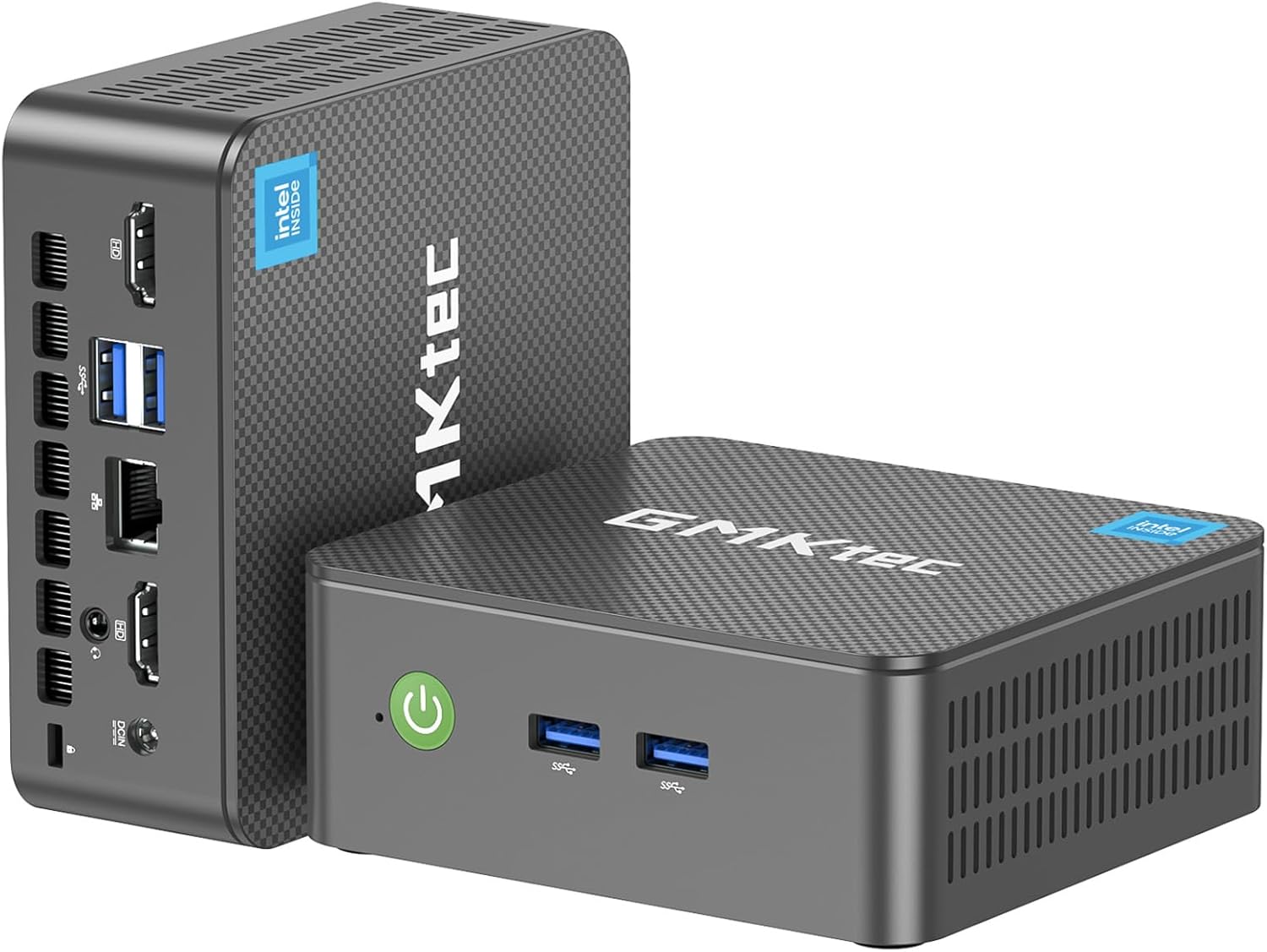
 GMKtec Mini PC, G3 PRO Intel Core i3-10110U (Beats 4300U/N150), 16GB…
4.4
See price
GMKtec Mini PC, G3 PRO Intel Core i3-10110U (Beats 4300U/N150), 16GB…
4.4
See price
-
 Lowest price
BOSGAME E5 Mini PC with Ryzen 5300U Computer
4.3
See price
Lowest price
BOSGAME E5 Mini PC with Ryzen 5300U Computer
4.3
See price
As Amazon Associates, we earn from qualifying purchases. This means we may receive a small commission at no extra cost to you if you click through and make a purchase.
A shared household computer must withstand a chaotic mix of tasks, ranging from remote office work and spreadsheet tracking to homework research, media streaming, and casual creative projects. Bulky desktop towers take up precious desk space, trap dust on the floor, and turn cable management into a nightmare, while entry-level micro-computers frequently struggle as soon as multiple browser tabs and background applications stack up. The ASUS NUC 14 Pro addresses this household friction by packing workstation-class components into a compact chassis small enough to sit unobtrusively beside a monitor or mount directly behind a family display.
Built around Intel’s Meteor Lake architecture with high-efficiency hybrid cores, this compact desktop delivers snappy responsiveness while keeping power consumption and operating noise exceptionally low. While it represents a larger hardware investment than basic web-browsing boxes, its tool-free interior access, cutting-edge connectivity options, and multi-threaded processing headroom make it a reliable, future-ready computing anchor for any busy family home.



Quick Verdict

The ASUS NUC 14 Pro sets a high standard for family-focused desktop computing by pairing an efficient 16-core processor with a tool-free, easily maintainable chassis designed to last for years.
- Powered by the 16-core Intel Core Ultra 7 155H processor for smooth family multitasking and productivity.
- Tool-free disassembly design makes maintenance and internal upgrades accessible without specialized tools.
- Generous port selection includes dual Thunderbolt 4 ports, dual HDMI 2.1 outputs, and high-speed 2.5GbE Ethernet.
- Out-of-the-box configuration features 32GB of DDR5 RAM and a swift 1TB PCIe Gen4 solid-state drive.
ASUS NUC 14 Pro Features Explained
Meteor Lake Architecture and the Intel Core Ultra 7 155H
At the center of this mini desktop is the asus nuc 14 pro ultra 7 155h configuration, representing Intel’s transition to the Meteor Lake architecture built on the Intel 4 process node. This 3D hybrid architecture unites 16 cores and 22 threads, dividing computing duties between performance cores, efficient cores, and low-power island cores. The result is a performance improvement of more than 20 percent over legacy generations while substantially reducing overall energy consumption. Whether handling heavy spreadsheets, running photo editing suites, or supporting school assignments, the processor balances power demands without drawing unnecessary wattage.
The processor also incorporates integrated Intel Arc graphics, giving graphical tasks, video rendering, and multimedia playback a noticeable lift over older integrated chipsets. Hardware acceleration and modern media encoders allow the system to handle demanding video streams and 8K HDR content cleanly. Households exploring specialized high-end graphics hardware can read our overview of the ROG NUC mini PC, but for standard productivity and media consumption, this integrated Arc setup delivers dependable everyday fidelity.
Tool-Free Chassis and Hardware Upgradeability
One of the most persistent frustrations with compact computers is their limited serviceability, as many manufacturers solder parts permanently to the circuit board. ASUS solves this issue by integrating a tool-free chassis disassembly design that requires no screwdrivers or prying tools to reach internal components. For busy households, this portable disassembly method ensures that clearing accumulated household dust or upgrading internal drives takes only a matter of seconds.
Regarding asus nuc 14 pro upgradeability, the motherboard features two dual-channel SO-DIMM slots equipped with 32GB of fast DDR5-5600 memory, with the capacity to expand all the way up to 96GB as software demands grow. Storage flexibility is similarly robust: while the primary slot houses a pre-installed 1TB M.2 2280 PCIe Gen4 x4 SSD, the interior includes dedicated expansion slots for an additional M.2 2240 PCIe Gen4 SSD and a 2.5-inch drive bay supporting SATA HDDs or PCIe Gen4 SSDs. This expansion headroom prevents the mini PC from becoming obsolete as your family’s storage needs expand.
Advanced Thermal Management and Cooling Architecture
Housing 16 processing cores inside an enclosure measuring just 4 by 3.5 by 2 inches requires thoughtful engineering to avoid thermal throttling under heavy use. To preserve performance stability, asus nuc 14 pro cooling utilizes an aluminum fin heat dissipation architecture combined with dual copper tube direct-contact technology. These direct-contact heat pipes rapidly channel thermal energy away from the processor die and into the heat sink array.
To support this thermal module, the cooling fan area has been enlarged, and large-area air inlet mesh ventilation holes have been integrated across both sides of the chassis. This configuration maximizes cool air intake and expels warm air efficiently without forcing the fan to spin at high, whiny speeds. As a result, parents working from home or children studying in quiet bedrooms enjoy steady thermal management without distracting acoustic whine.
Comprehensive External Connectivity and Modern Ports
A family desktop must accommodate an evolving assortment of peripherals, accessories, and displays. The asus nuc 14 pro ports array provides substantial external versatility, offering a front-facing USB 3.2 Gen 2×2 Type-C port for rapid file transfers, three USB 3.2 Gen 2 Type-A ports, a legacy USB 2.0 port for keyboard or mouse receivers, and a dedicated 2.5GbE (2500 Mbps) Ethernet jack for stable wired internet connections.
Display support is equally extensive, featuring two HDMI 2.1 ports alongside two Thunderbolt 4 ports. This configuration allows households to drive up to four 4K displays simultaneously, creating a multi-window workstation for home office productivity or streaming media across large screens. Wireless connectivity is covered by integrated WiFi 6E and Bluetooth 5.3, making it simple to pair wireless printers, external storage, or family controllers like the ASUS ROG Raikiri II Pro without filling physical USB ports.
Integrated AI Acceleration and Everyday Software Features
The Core Ultra processor includes an integrated Neural Processing Unit (NPU), introducing hardware-level machine learning acceleration directly to the desktop. The listing highlights asus nuc 14 pro ai features including AI Ready, AI Boost, and AI GC applications that integrate with Windows 11 Pro. These features work behind the scenes to streamline system operations, adapt to user habits, and optimize resource distribution during demanding household routines.
By offloading algorithmic processes such as webcam background blurring, audio noise reduction during remote video calls, and intelligent photo organization to the dedicated NPU, the main processor cores remain free for primary applications. While commercial data centers rely on specialized enterprise units like the Nvidia DGX Spark mini PC, the NUC 14 Pro brings practical, everyday AI assistance directly to the family desk while keeping overall energy consumption modest.
Specs
| Feature | Specification Details |
|---|---|
| Processor | Intel Core Ultra 7 155H (16 Cores, 22 Threads, up to 4.8 GHz) |
| Graphics | Intel Arc GPU (PCI Express Interface) |
| Memory | 32GB DDR5-5600 Dual-Channel RAM (Expandable up to 96GB) |
| Primary Storage | 1TB M.2 2280 PCIe Gen4 x4 NVMe SSD |
| Secondary Storage Support | Supports M.2 2240 PCIe Gen4 SSD and 2.5-inch PCIe/SATA SSD/HDD (Not Included) |
| Dimensions | 4 x 3.5 x 2 inches |
| Operating System | Windows 11 Pro |
| Networking | 2.5GbE Ethernet, WiFi 6E, Bluetooth 5.3 |
| Video Output | 2 x HDMI 2.1, 2 x Thunderbolt 4 (Type-C) |
| Security Features | Windows Hello, Windows Defender, Windows Security |
ASUS NUC 14 Pro Pros and Cons
What we like
- Tool-free chassis for effortless hardware maintenance
- 16-core Intel Core Ultra 7 155H processor
- Expandable dual-channel DDR5 memory up to 96GB
- Dual Thunderbolt 4 and dual HDMI 2.1 outputs
- Integrated NPU for local AI workflow acceleration
What we’d change
- Secondary storage drives not included in packaging
- No bundled keyboard, mouse, or monitor included
- Compact chassis limits internal expansion to smaller drive formats
Check ASUS NUC 14 Pro on Amazon
Best Use Cases
- Serving as a central family productivity station for homework, administrative tasks, and multimedia browsing.
- Anchoring a multi-monitor home office setup requiring reliable 16-core performance and fast data transfer speeds.
- Functioning as a quiet, ultra-compact media center capable of outputting 8K HDR content to living room screens.
- Organizing large household photo and video libraries with secondary drive expansion support for long-term archiving.
Before You Buy
When planning to integrate the asus nuc 14 pro for home office duties, remember that this mini PC ships as a standalone desktop unit. The retail box does not include essential external peripherals such as a monitor, keyboard, or mouse. Fortunately, the system features broad plug-and-play compatibility with standard USB and Bluetooth accessories, projectors, printers, and external drives, while the HDMI 2.1 and Thunderbolt 4 connections allow straightforward pairing with virtually any modern computer display.
Shoppers should also be aware of what the internal storage configuration entails out of the box. While the system supports adding a secondary M.2 2240 SSD and a 2.5-inch drive, these extra drives are not included in the packaging and must be purchased separately if extra internal capacity is needed. Furthermore, the listing identifies a standard North American Type A 2-pin power plug, but it does not specify bundled display cables or mounting brackets, so you will want to verify your existing cable setup before installation.
How It Compares With Similar Picks
| Product | Best For | Key Difference |
|---|---|---|
| ASUS NUC 14 Pro | Demanding households needing longevity and upgradeability | 16-core Ultra 7 155H, 32GB DDR5, dual Thunderbolt 4, tool-free chassis |
| KAMRUI Pinova P2 Mini PC | Budget-conscious basic web browsing and homework tasks | AMD Ryzen 7330U 4-core processor, 16GB RAM, 256GB SSD |
| GMKtec Mini PC | Entry-level documentation and lightweight office routines | Intel Core i3-10110U processor, 16GB DDR4 RAM, 512GB storage |
| 16GB RAM 512GB SSD | General multi-display productivity with dual LAN connectivity | Ryzen 5300U processor, 16GB RAM, 512GB SSD, dual LAN ports |
Choosing between these mini PCs comes down to the computing longevity and workload complexity your home requires. Alternatives like the KAMRUI Pinova P2 Mini PC and GMKtec Mini PC provide sufficient power for straightforward web navigation and school word processing, but their entry-level 4-core and 2-core architectures, smaller storage drives, and lack of Thunderbolt 4 connectivity limit their multitasking potential. Investing in the ASUS NUC 14 Pro provides the memory capacity, 16-core modern architecture, and physical drive expandability needed to keep a shared household computer running smoothly over many years.

Bottom Line
Deciding whether is asus nuc 14 pro worth it depends on whether your household values durable long-term capability over entry-level convenience. Rather than cutting corners with non-upgradeable hardware or dated processors, this system delivers an advanced Meteor Lake foundation paired with generous dual-channel DDR5 memory and high-bandwidth interfaces that easily manage modern workloads.
For families seeking an asus nuc 14 pro family mini pc that eliminates desk clutter, runs quietly during intensive multitasking sessions, and provides straightforward, tool-free access for future upgrades, this model offers outstanding build quality and performance stability that will serve a busy household well for years to come.
FAQ
What are the primary asus nuc 14 pro ai mini pc specs?
The system features an Intel Core Ultra 7 155H processor with 16 cores and 22 threads, integrated Intel Arc graphics, 32GB of dual-channel DDR5-5600 RAM, and a 1TB M.2 PCIe Gen4 NVMe SSD. It also includes dual Thunderbolt 4 ports, two HDMI 2.1 ports, 2.5GbE LAN, WiFi 6E, Bluetooth 5.3, and Windows 11 Pro.
Can I upgrade the memory and storage on the ASUS NUC 14 Pro?
Yes. The ASUS NUC 14 Pro utilizes a tool-free disassembly design that lets you open the chassis without tools. You can expand the system memory up to 96GB of DDR5 RAM across two slots, and you can install an additional M.2 2240 PCIe Gen4 SSD alongside a 2.5-inch SATA or PCIe drive to supplement the primary 1TB SSD.
How many displays can the ASUS NUC 14 Pro support simultaneously?
The unit can drive up to four independent displays simultaneously by utilizing its two HDMI 2.1 ports and two Thunderbolt 4 Type-C connections. This setup supports high-resolution outputs up to 8K HDR, making it versatile for multi-monitor workstations and home theater setups.
Is the cooling system quiet during typical household use?
The mini PC incorporates an aluminum fin heatsink, dual direct-contact copper heat pipes, and an enlarged cooling fan complemented by mesh ventilation on both side panels. This setup efficiently dissipates heat, allowing the fan to maintain low, whisper-quiet speeds during routine tasks like web browsing, homework, and video streaming.
What artificial intelligence capabilities are integrated into this mini PC?
The Intel Core Ultra 7 155H processor includes an integrated Neural Processing Unit (NPU) paired with AI Boost and AI Ready architecture. This dedicated hardware accelerates on-device AI tasks in Windows 11 Pro, such as camera framing, audio background noise suppression, and local app automation without overburdening the primary CPU cores.