What we looked at
-
 Lowest price
Sceptre New 22-Inch Gaming Monitor, FHD 1080p, Up to 144Hz, HDMI,…
8.8/10
See price
Lowest price
Sceptre New 22-Inch Gaming Monitor, FHD 1080p, Up to 144Hz, HDMI,…
8.8/10
See price
-
 Highest rated
Acer 27in FHD 1920x1080 IPS 120Hz Gaming Monitor | Office KB272…
9.2/10
See price
Highest rated
Acer 27in FHD 1920x1080 IPS 120Hz Gaming Monitor | Office KB272…
9.2/10
See price
-
 Samsung 32-in S7 S70H 4K UHD Computer Monitor - LS32H704EANXZA (2026)…
8.8/10
See price
Samsung 32-in S7 S70H 4K UHD Computer Monitor - LS32H704EANXZA (2026)…
8.8/10
See price
-
 Reviewed here
Acer Predator 27in QHD 2560x1440 IPS 360Hz Gaming Monitor XB273U F5bmiiprx
6.2/10
See price
Reviewed here
Acer Predator 27in QHD 2560x1440 IPS 360Hz Gaming Monitor XB273U F5bmiiprx
6.2/10
See price
As Amazon Associates, we earn from qualifying purchases. This means we may receive a small commission at no extra cost to you if you click through and make a purchase.
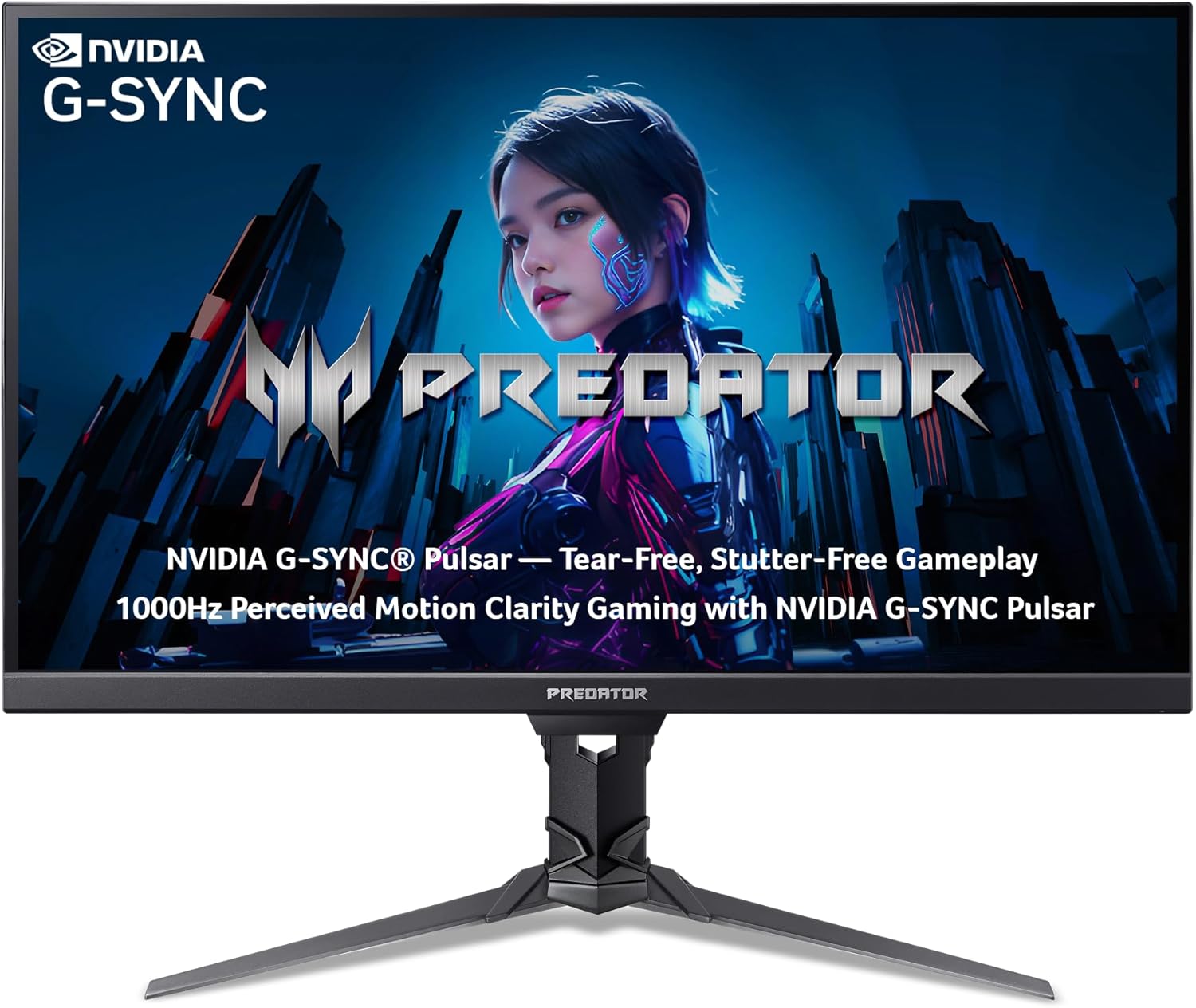
Modern households often require computer equipment to wear multiple hats throughout the day. A single desk setup may need to accommodate fast-paced multiplayer competitions, extensive school homework, remote professional workloads, and evening media streaming. When multiple family members share one workstation, finding a display that balances competitive technical performance with long-term physical durability is no easy task. The Acer Predator XB273U F is designed to answer that challenge by combining an ultra-fluid 360Hz refresh rate with a 2560 x 1440 WQHD IPS panel, bridging the gap between high-speed esports demands and the visual clarity needed for everyday productivity.
After evaluating its physical specifications, visual capabilities, and motion features, our verdict is that this screen offers substantial longevity and performance for busy, tech-focused households. The integration of advanced NVIDIA motion handling alongside a sturdy, fully adjustable ErgoStand gives this display the flexibility to handle intense gaming sessions as well as daytime office assignments. For homes running a mix of high-end rigs and versatile everyday laptops like the acer swift go 14, it serves as a robust visual hub that will not feel outdated anytime soon.



Quick Verdict

The Acer Predator XB273U F delivers tournament-grade visual fluidity without compromising the viewing angles, color balance, or physical adaptability necessary for shared everyday living.
- Ultra-responsive 360Hz refresh rate backed by NVIDIA G-SYNC Pulsar for exceptional motion clarity
- Vibrant 27-inch WQHD 2560 x 1440 IPS panel featuring 90% DCI-P3 coverage and Delta E<2 accuracy
- Highly adaptable ErgoStand with complete tilt, swivel, pivot, and height adjustments for multi-user desks
- Flexible connectivity including DisplayPort 1.4, two HDMI 2.1 ports, and built-in stereo speakers
Acer Predator XB273U F Features Explained
NVIDIA G-SYNC Pulsar and 360Hz Motion Performance
Motion clarity is the defining characteristic of this display. The acer predator xb273u f 360hz panel updates three hundred and sixty times per second, paired with an ultra-low response time that reaches down to 0.5 milliseconds (and up to 0.05 milliseconds gray-to-gray). This rapid cycle ensures that quick mouse sweeps, chaotic team fights, and rapid screen transitions remain sharp without the trailing artifacts or blur common on lower-tier screens. For families with dedicated competitive players, having this level of responsiveness provides an immediate, tangible benefit in reaction times and spatial tracking.
Motion integrity is reinforced by the acer predator xb273u f g-sync pulsar implementation. Unlike standard variable refresh rate setups that can struggle with blur during dynamic frame fluctuations, G-SYNC Pulsar utilizes variable frequency strobing to synchronize motion clarity across the entire operating window. This architecture delivers perceived motion clarity equivalent to a 1000Hz baseline, eliminating tearing and stutter without introducing disruptive visual artifacts. When evaluating the acer predator xb273u f for competitive gaming, this technology ensures that fast-moving opponents stay in precise focus during critical split-second engagements.
Crisp 1440p IPS Visuals and Factory Color Tuning
While pure speed is crucial for gaming, visual fidelity determines how pleasant a monitor is during standard daily operations. This acer predator xb273u f gaming monitor utilizes an In-Plane Switching (IPS) panel with a 2560 x 1440 WQHD native resolution across a 27-inch diagonal. The 16:9 aspect ratio provides ample screen real estate for viewing side-by-side browser windows, editing family photos, or managing complex spreadsheets. Because IPS technology maintains wide viewing angles, colors and contrast remain stable even when siblings or parents are observing the screen from the side.
Color representation on the panel is thoroughly calibrated straight from the factory. The display achieves a Delta E<2 color accuracy rating and covers 90% of the wide DCI-P3 color space. Combined with HDR10 support, standard brightness of 400 nits, HDR mode brightness of 500 nits, and peak brightness reaching 600 nits, the screen reproduces vibrant tones with high contrast. The ZeroFrame bezel design further enhances the visual experience, trimming down borders to maximize the active display area and simplify side-by-side dual-monitor configurations.
G-SYNC Ambient Adaptive Technology for Mixed Lighting
Household workstations experience drastic changes in lighting conditions throughout the day, transitioning from bright morning sun to dimmed evening lamps. The Acer Predator XB273U F addresses this issue with G-SYNC Ambient Adaptive Technology. Built-in light sensors read the surrounding room environment and automatically adjust both screen brightness and color temperature to match the space. This continuous calibration preserves consistent image clarity without forcing users to manually fiddle with monitor buttons every few hours.
For household members logging extended hours for study or remote work, ambient lighting adjustment is a major ergonomic asset. By softening display intensity in darker rooms and elevating visibility when daylight floods the room, the monitor helps mitigate eye fatigue during long sessions. This balance makes the monitor well suited for acer predator xb273u f daily use, ensuring that children finishing homework or parents working late into the night enjoy optimal visual comfort.
Sturdy ErgoStand Adjustments and Build Quality
Physical adjustability is essential in any shared home setup where users of different heights share the same chair and desk. The acer predator xb273u f ergostand provides full physical articulation, including extensive height adjustment, forward and backward tilt, left and right swivel, and 90-degree pivot orientation. Shifting the display from an adult-friendly eye level down to a comfortable height for a younger student takes just a few seconds of smooth physical repositioning, supporting better posture across the whole family.
Physical stability is anchored by solid construction materials. The monitor measures 24.17 inches wide, 19 inches high, and 9.69 inches deep on its base, weighing a solid 12.3 pounds. This robust footprint prevents accidental wobbling when people bump the desk or aggressively type on mechanical keyboards. The exterior shell features a clean matte finish that resists fingerprints and surface scuffs, underscoring the solid acer predator xb273u f build quality designed to survive years of active household utilization.
Versatile Connectivity and Integrated Audio
Modern family setups rarely connect to just a single machine. The acer predator xb273u f displayport hdmi array features one DisplayPort 1.4 connection and two HDMI 2.1 ports, alongside a 3.5mm audio output and three USB ports. This selection allows a desktop tower to remain permanently wired via DisplayPort while leaving the two HDMI 2.1 inputs available for modern video game consoles or a secondary high-performance laptop such as the predator helios neo 16s.
The display also integrates a pair of two-watt internal stereo speakers. While built-in monitor speakers cannot match dedicated desktop soundbars or gaming headsets for bass depth, they provide functional audio out of the box for quick YouTube videos, instructional tutorials, or casual system notifications. Having functional speakers built into the chassis keeps desk surfaces tidy and eliminates the immediate need to purchase standalone desktop sound systems for non-gaming tasks.
Specs
| Attribute | Detail |
|---|---|
| Screen Size | 27 Inches |
| Display Type & Panel | IPS LCD with Matte Finish |
| Native Resolution | 2560 x 1440 (WQHD) |
| Aspect Ratio | 16:9 |
| Refresh Rate | 360Hz |
| Response Time | 0.5 ms (up to 0.05 ms G to G) |
| Motion Technology | NVIDIA G-SYNC Pulsar |
| Brightness | 400 nits normal / 500 nits HDR / 600 nits peak |
| Color Gamut & Accuracy | DCI-P3 90%, Delta E<2, HDR10 |
| Video Ports | 1 x DisplayPort 1.4, 2 x HDMI 2.1 |
| Ergonomic Adjustments | Height, Tilt, Swivel, Pivot |
| VESA Compliance | 100 x 100 mm |
Acer Predator XB273U F Pros and Cons
What we like
- Blistering 360Hz refresh rate with NVIDIA G-SYNC Pulsar
- Crisp 2560 x 1440 WQHD IPS panel with wide viewing angles
- Full ErgoStand height, tilt, swivel, and pivot adjustments
- G-SYNC Ambient Adaptive light and color temperature control
- Factory-calibrated Delta E<2 color accuracy and HDR10 support
- DisplayPort and HDMI video cables included in the box
What we’d change
- Integrated two-watt speakers offer basic audio output
- Stand base depth requires adequate desktop space
- Reaching 360Hz at 1440p requires powerful PC hardware
Check Acer Predator XB273U F on Amazon
Best Use Cases
- High-level competitive multiplayer gaming where 360Hz refresh speeds and rapid pixel response deliver distinct tactical advantages.
- Shared home desks requiring frequent ergonomic height and angle adjustments to accommodate children, teens, and adults comfortably.
- All-day study and home office workstations that benefit from automatic ambient light tracking to reduce eye fatigue across changing daylight.
- Multi-system entertainment hubs linking high-end desktop rigs via DisplayPort alongside modern home consoles connected over HDMI 2.1.
- Detailed content consumption and light creative work demanding factory-calibrated Delta E<2 color accuracy and wide DCI-P3 coverage.
Before You Buy
Before bringing this monitor home, examine your current computer hardware to ensure it can take full advantage of the screen. Driving modern titles at 2560 x 1440 resolution at up to 360 frames per second requires a powerful graphics card and processor. Connecting the monitor to an ultra-capable gaming machine like the acer predator helios 18 ai rtx 5090 ensures you can output the high frame rates necessary to utilize the 360Hz ceiling. Fortunately, the retail package includes both a DisplayPort cable and an HDMI cable in the box, saving you from purchasing separate high-bandwidth video cords during initial installation.
It is also important to note the boundaries of the listing specifications. While the monitor features three USB ports and two component output connections according to the product specifications, the manufacturer listing does not specify whether a USB upstream cable is included in the packaging. Additionally, while the built-in dual two-watt speakers provide adequate audio for basic system alerts and online classroom lectures, they do not deliver the acoustic depth, volume, or immersion needed for cinematic gaming or rich music playback. Plan on utilizing dedicated gaming headsets or external desktop speakers plugged into the audio-out jack for serious entertainment sessions.
How It Compares With Similar Picks
| Product | Best For | Key Difference |
|---|---|---|
| Acer Predator XB273U F | Competitive esports and shared family desks | 27-inch 1440p IPS panel with 360Hz, G-SYNC Pulsar, and full ErgoStand adjustability |
| Sceptre New 22-Inch Gaming Monitor | Tight spaces and strict entry-level setups | Smaller 22-inch 1080p panel with 144Hz refresh rate and basic tilt-only stand |
| 1ms | General office duties and casual gaming | 27-inch 1080p panel capped at 120Hz refresh rate with standard color space |
| Samsung 32-in S7 S70H 4K | High-density visual productivity and media | Spacious 32-inch 4K UHD screen focused on resolution rather than high refresh gaming |
Choosing an alternative comes down to available workspace, budget priorities, and how you intend to use the display. If your desk has severe spatial limitations and only requires basic entry-level speeds, the 22-inch Sceptre monitor offers a compact footprint with standard 144Hz output. If you are outfitting a secondary family workstation primarily for basic schoolwork, the 27-inch 1080p Acer alternative provides simple 120Hz productivity without the advanced esports overhead. Conversely, if your household focuses entirely on spreadsheet data density, video editing, or high-definition media consumption without any competitive gaming aspirations, the 32-inch 4K Samsung display trades high frame rates for expansive screen real estate.
Bottom Line
When asking if the acer predator xb273u f is worth it for a shared household, the answer depends on how much value your family places on peak gaming performance matched with mechanical adaptability. This display is not merely a high-speed esports peripheral; it is a well-engineered 1440p workstation hub. Its IPS panel delivers accurate color reproduction for everyday projects, while the G-SYNC Ambient Adaptive system takes the guesswork out of brightness management across varied room lighting.
The robust ErgoStand engineering guarantees that multiple family members can find comfortable viewing angles throughout the day, protecting posture and reducing neck strain. Backed by solid build quality and cutting-edge motion clarity through NVIDIA G-SYNC Pulsar, the Acer Predator XB273U F stands as a durable, future-ready investment for homes that refuse to compromise between elite competitive play and dependable daily utility.
FAQ
Does the Acer Predator XB273U F support variable refresh rate technology?
Yes, the display integrates NVIDIA G-SYNC Pulsar technology. This advanced variable refresh rate system synchronizes the monitor refresh rate with your graphics card while utilizing variable frequency strobing to eliminate stutter, screen tearing, and motion blur during fast gameplay.
What display cables are included in the box with the monitor?
The retail package comes equipped with both a DisplayPort cable and an HDMI cable. This allows you to hook up your gaming desktop or modern game consoles immediately without having to purchase extra high-speed cords separately.
Can the Acer Predator XB273U F stand be adjusted for multiple family members?
Yes, the monitor includes Acer’s ErgoStand, which allows full physical adjustability. You can easily adjust the height, tilt the screen forward or backward, swivel it left and right, or pivot it 90 degrees into a vertical orientation to accommodate users of different heights.
Is the screen finish glossy or matte?
The monitor features a matte screen finish. This anti-glare surface treatment helps disperse reflections from overhead household lights and nearby windows, maintaining comfortable visibility during daytime use.
Does this gaming monitor have built-in audio speakers?
Yes, the display includes integrated stereo speakers delivering two watts per channel. While suitable for basic system sounds, classroom lectures, and casual videos, external headphones or desktop speakers connected via the 3.5mm audio jack are recommended for immersive gaming.
What is the VESA mounting specification for this monitor?
The Acer Predator XB273U F is compliant with standard 100 x 100mm VESA mounts. This makes it straightforward to remove the included desk stand and attach the display to aftermarket monitor arms or wall mounting brackets.