What we looked at
-
 msi Codex Z2 Gaming Desktop, AMD R7-8700F, RTX 5070, 32GB DDR5,…
8.6/10
See price
msi Codex Z2 Gaming Desktop, AMD R7-8700F, RTX 5070, 32GB DDR5,…
8.6/10
See price
-
 Alienware Aurora Gaming Desktop, RTX 5070, Intel Core Ultra 7 265F
8.6/10
See price
Alienware Aurora Gaming Desktop, RTX 5070, Intel Core Ultra 7 265F
8.6/10
See price
-
 Highest rated
KOTIN Gaming PC Desktop, Ryzen 7 8700F, RTX 5060 Ti 8GB,…
8.8/10
See price
Highest rated
KOTIN Gaming PC Desktop, Ryzen 7 8700F, RTX 5060 Ti 8GB,…
8.8/10
See price
-
 Reviewed here
YEYIAN Phoenix Gaming Computer PC Case - Mesh, ATX Mid Tower,…
8.4/10
See price
Reviewed here
YEYIAN Phoenix Gaming Computer PC Case - Mesh, ATX Mid Tower,…
8.4/10
See price
As Amazon Associates, we earn from qualifying purchases. This means we may receive a small commission at no extra cost to you if you click through and make a purchase.
Family gaming setups face a distinct set of hardware challenges that everyday office desktops never encounter. Between marathon weekend multiplayer matches, graphic-intensive school multimedia projects, and accidental bumps in shared living spaces, a household desktop requires serious ventilation and physical protection. Many modern gaming enclosures rely heavily on brittle tempered glass panels, which can pose safety concerns in homes with energetic children or pets. Selecting the right foundation for a reliable yeyian phoenix gaming pc means choosing an enclosure built to withstand household activity while maintaining steady thermal performance across demanding applications.
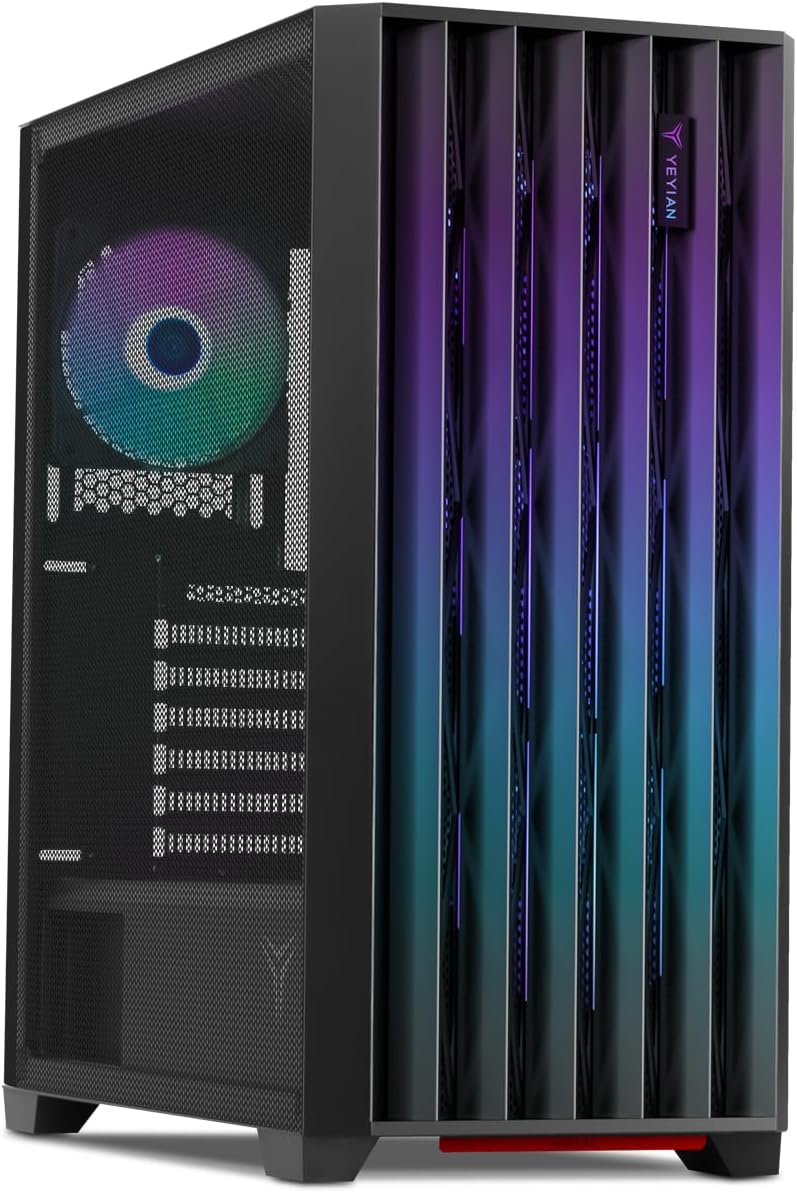
The Yeyian Phoenix addresses these common family build concerns directly by prioritizing structural integrity and high-volume airflow over fragile styling. Engineered with a sturdy 0.6 mm metal frame, dual iron mesh side and front panels, and four pre-installed ARGB cooling fans, this mid-tower enclosure offers an accessible, robust starting point for parents and teens assembling their own home gaming rig.


Quick Verdict
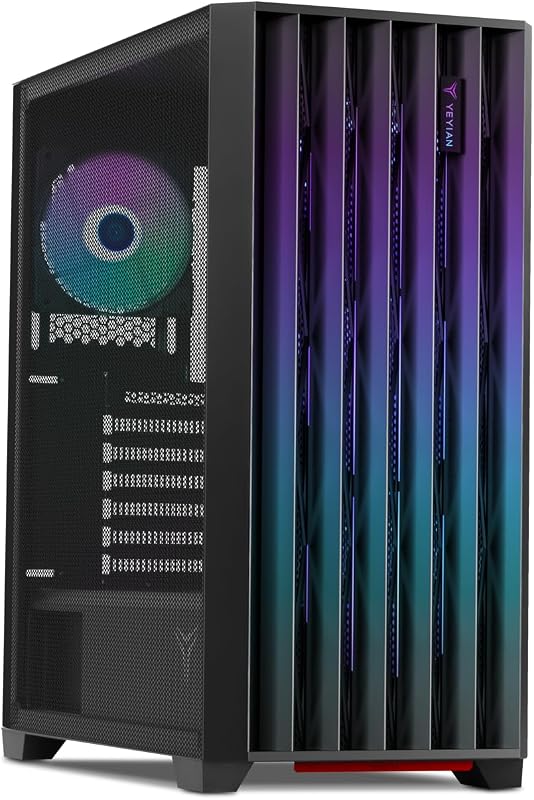
The Yeyian Phoenix is an airflow-focused mid-tower case designed for durability, featuring an all-metal iron mesh exterior that bypasses brittle glass in favor of continuous ventilation and physical resilience.
- Four factory-installed ARGB fans with rear PWM control deliver immediate cooling right out of the packaging.
- Solid 0.6 mm steel frame combined with iron mesh panels provides long-lasting structural protection for family spaces.
- Extensive cooling expandability accommodates up to nine cooling fans or liquid cooling radiators up to 360 mm.
- Modern front-panel I/O includes high-speed USB 3.2 Gen 2 Type-C, dual USB 3.0 ports, and HD audio jacks.
Yeyian Phoenix Features Explained
Durable 0.6 mm Metal Frame and Iron Mesh Chassis
Shared family workspaces and living rooms demand hardware that can endure daily wear and tear. The yeyian phoenix mesh chassis eliminates fragile glass surfaces in favor of a heavy-duty iron mesh side panel supported by a 0.6 mm steel structural frame. This approach enhances everyday durability, ensuring that accidental kicks under a study desk or rough handling during room cleaning will not result in shattered panels or safety risks. The continuous metal mesh framework also serves as a high-permeability barrier that lets cool air circulate freely into internal hardware cavities.
With an unpopulated weight of 13.42 pounds, the chassis exhibits a grounded, stable feel that stays firmly anchored in place when children plug in controllers or adjust headset cables. When assembling a shared family battle station paired with ergonomic home furniture such as the secretlab titan evo 2022, selecting an all-metal enclosure guarantees dependable yeyian phoenix build quality that holds up over multiple hardware generation upgrades.
Dynamic Cooling System with Four ARGB PWM Fans
Keeping family gaming hardware running at safe operating temperatures prevents sudden thermal throttling and preserves component lifespan. Out of the box, the Yeyian Phoenix comes equipped with a dynamic cooling configuration featuring four pre-installed ARGB fans. Three 120 mm fans populate the front intake area, drawing cool room air directly across the drive bays and motherboard bay, while a single 120 mm fan at the rear exhausts warm air outward.
The rear exhaust fan features pulse-width modulation (PWM) speed management, enabling your system motherboard to automatically adjust rotational speeds based on real-time internal temperatures. During light homework sessions, typing, or web browsing, the fan curves can throttle down for whisper-quiet family operation, ramping up automatically when family members launch resource-heavy gaming titles. For builders planning higher thermal loads, the chassis interior supports up to nine fans total, including mounting locations along the top chassis roof and atop the bottom power supply shroud.
Airflow Customization and 360 mm Liquid Cooling Mastery
Household room configurations often dictate where a PC must sit, whether tucked into the corner of a bedroom, placed against a desk wall, or set beside an entertainment console. The Yeyian Phoenix incorporates an interchangeable front panel structure designed to let builders direct airflow either toward the right or the left side of the chassis. This directional flexibility allows home builders to tailor intake patterns specifically to their desk placement, preventing warm exhaust from recirculating into intake vents when the PC rests against a side wall.
For builders seeking advanced thermal headroom, the enclosure delivers liquid cooling compatibility supporting radiators up to 360 mm. This expansive radiator clearance enables parents and builders to mount high-capacity liquid cooling all-in-one loops along the front or top fan mounts. In a rigorous yeyian phoenix airflow test environment, having the ability to pair a 360 mm radiator with porous iron mesh panels ensures high-performance processors stay well within target operating temperatures during summer gaming sessions.
Modern Front-Panel Connectivity and HD Audio
Convenient access to external connection ports is essential when multiple family members share a single computer for studying, gaming, and creative hobbies. The Yeyian Phoenix features an accessible top-front I/O hub containing two USB 3.2 Gen 1 Type-A ports alongside a fast USB 3.2 Gen 2 Type-C connector. This modern Type-C port makes it easy to hook up contemporary smartphones, fast external backup SSDs, and modern gaming peripherals without searching for adapters or climbing behind the desk.
The front panel also incorporates dedicated HD audio input and output jacks supported by an integrated audio routing system. The manufacturer emphasizes advanced clarity through this connection, ensuring crisp voice reception and balanced game audio during voice chat, classroom video calls, and multiplayer gaming sessions. The physical power and reset switches sit flush with the top panel, minimizing accidental triggers while keeping primary controls within easy reach.
Specs
| Attribute | Detail |
|---|---|
| Chassis Form Factor | ATX Mid Tower |
| Chassis Materials | 0.6 mm Metal Frame and Iron Mesh Panels |
| Pre-Installed Fans | 4 ARGB Fans (3 Front Intake, 1 Rear Exhaust with PWM) |
| Maximum Fan Capacity | Up to 9 Fans (Front, Top, Rear, PSU Shroud) |
| Liquid Cooling Support | Compatible with Radiators up to 360 mm |
| Front I/O Ports | 1x USB 3.2 Gen 2 Type-C, 2x USB 3.2 Gen 1 Type-A, HD Audio In & Out |
| Supported Motherboards | Micro ATX (ATX and ITX referenced in listing title) |
| Internal Drive Bays | 3 Internal Bays (Supports 3.5-inch Hard Drives) |
| Power Supply Position | Bottom Mount |
| Dimensions and Weight | 19.2 x 8.7 x 17.3 inches; 13.42 lbs |
Yeyian Phoenix Pros and Cons
What we like
- Four pre-installed ARGB fans with PWM control
- Durable 0.6 mm steel chassis and mesh
- Supports liquid cooling radiators up to 360 mm
- Fast front USB 3.2 Gen 2 Type-C port
- Room for up to nine total cooling fans
What we’d change
- Micro ATX spec conflicts with listing title
- Listing omits maximum GPU clearance length
- Requires manual component assembly
Check Yeyian Phoenix on Amazon
Best Use Cases
- Assembling a durable family gaming desktop where an iron mesh exterior eliminates the shattering risk associated with glass panels.
- Building a system requiring dependable yeyian phoenix mid tower cooling with four pre-installed ARGB fans included out of the box.
- Setting up a shared household workstation utilizing high-speed front-panel USB 3.2 Gen 2 Type-C connectivity for swift data transfers and external device charging.
- Constructing a high-performance gaming rig that integrates an advanced 360 mm liquid cooling radiator for long-term component preservation.
Before You Buy
Before purchasing your components, pay close attention to the dimensional requirements outlined in the official yeyian phoenix case specs. A notable discrepancy in the product listing involves motherboard compatibility: while the technical specification table designates Micro ATX as the supported standard, the listing headline references both ATX and ITX compatibility. To prevent installation delays, builders planning to install full-size ATX boards should measure internal standoff clearances carefully. Additionally, the product data specifies three internal 3.5-inch drive bays, but the listing does not specify maximum graphics card clearance lengths or exact CPU air cooler tower height limits.
It is equally important to recognize that the Yeyian Phoenix is a standalone chassis enclosure, meaning it does not include a power supply unit, motherboard, processor, memory, or operating system. For families seeking a fully assembled desktop that avoids manual assembly and DIY yeyian phoenix cable management, exploring a complete prebuilt configuration like the yeyian phoenix mesh gaming pc – intel core ultra 5 225f, geforce rtx 5060, 32gb ddr5, 1tb ssd – ai‑r desktop or looking into turn-key options such as the sky tech nebula may prove far more practical for busy households.

How It Compares With Similar Picks
| Product | Best For | Key Difference |
|---|---|---|
| Yeyian Phoenix | Custom family DIY builds focused on durable mesh cooling | Standalone mid-tower case featuring 4 ARGB fans and an iron mesh side panel |
| NVIDIA GeForce RTX 5070 | High-end prebuilt gaming and VR performance | Complete MSI Codex Z2 desktop with AMD R7-8700F, RTX 5070, 32GB DDR5, and 2TB SSD |
| 1TB SSD | Advanced family gaming with cutting-edge connectivity | Complete Alienware Aurora ACT1250 desktop with Intel Core Ultra 7 265F, RTX 5070, and Wi-Fi 7 |
| Prebuilt Gaming Tower with WiFi | Out-of-the-box 1080p and 1440p gaming and streaming | Complete KOTIN desktop with Ryzen 7 8700F, RTX 5060 Ti, 16GB DDR5, and 650W Gold PSU |
Choosing between a standalone chassis and a fully assembled system comes down to your family’s willingness to build a PC from scratch. While the Yeyian Phoenix provides the blank slate and ventilation necessary for a custom build, turnkey options like the NVIDIA GeForce RTX 5070 gaming desktop or the feature-packed 1TB SSD Alienware Aurora setup eliminate assembly time by providing fully operational hardware right out of the shipping crate. Similarly, the Prebuilt Gaming Tower with WiFi represents an assembled mid-range gaming alternative for shoppers who want ready-to-run graphics without purchasing parts separately. Families who decide that desktop PC upkeep is too demanding may even prefer a dedicated living-room system like the play 5 slim for simple console gaming.

Bottom Line
So, is yeyian phoenix worth it for a dependable family gaming setup? If your priority is finding a rugged, well-ventilated mid-tower case that foregoes fragile glass side panels in favor of structural steel and iron mesh, this chassis delivers exceptional practical value. The combination of four pre-installed ARGB fans, directional airflow adaptation, and 360 mm radiator support ensures your family’s components stay cool under heavy computational loads.
While builders need to verify their motherboard form factor and internal component clearances due to vague listing specifications, the overall platform offers solid protection and thermal headroom. For parents and teenagers ready to tackle a custom build together, the Yeyian Phoenix provides a durable, airflow-focused foundation that will reliably serve household gaming needs for years to come.
FAQ
How many fans come pre-installed in the Yeyian Phoenix case?
The Yeyian Phoenix includes four pre-installed ARGB cooling fans directly from the factory. Three 120 mm ARGB intake fans sit behind the front panel, while one 120 mm ARGB fan with PWM speed control is installed in the rear exhaust position.
Can the Yeyian Phoenix accommodate liquid cooling setups?
Yes, the chassis provides liquid cooling compatibility and can support radiators measuring up to 360 mm. This allows builders to mount multi-fan all-in-one liquid CPU coolers in the case for enhanced thermal management.
Does the Yeyian Phoenix feature a tempered glass side panel?
No, the Yeyian Phoenix uses an iron mesh side panel rather than tempered glass. This all-metal mesh design maximizes airflow across internal components while eliminating the risk of shattering in busy family environments.
What ports are available on the front I/O panel?
The front connection panel features one high-speed USB 3.2 Gen 2 Type-C port, two USB 3.2 Gen 1 Type-A ports, and dedicated HD Audio input and output jacks for headsets and microphones.
Are internal computer parts like a power supply or processor included with this case?
No, the Yeyian Phoenix is an empty computer chassis enclosure. You must purchase internal components such as the motherboard, CPU, GPU, memory, storage, and power supply separately to build a functioning computer.