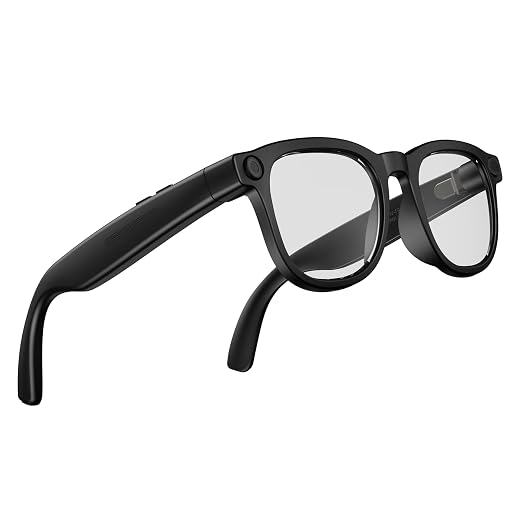
What we looked at
-
 Highest rated
VITURE Pro 2 XR/AR Glasses - UltraClarity 3.0 Myopia Adjustment -5.0D…
4.4
See price
Highest rated
VITURE Pro 2 XR/AR Glasses - UltraClarity 3.0 Myopia Adjustment -5.0D…
4.4
See price
-
 VITURE Beast XR/AR Glasses: Biggest. Boldest. Smartest. 174" 1200p, 58°FOV
4.0
See price
VITURE Beast XR/AR Glasses: Biggest. Boldest. Smartest. 174" 1200p, 58°FOV
4.0
See price
-
 Reviewed here
VITURE Luma Ultra XR/AR Glasses, 152'' Ultra Sharp Display,1500 Nits, 6DoF
4.0
See price
Reviewed here
VITURE Luma Ultra XR/AR Glasses, 152'' Ultra Sharp Display,1500 Nits, 6DoF
4.0
See price
-
 XREAL xbx a01+ AR Glasses, 147'' Big-Screen Display for Movies &…
3.9
See price
XREAL xbx a01+ AR Glasses, 147'' Big-Screen Display for Movies &…
3.9
See price
As Amazon Associates, we earn from qualifying purchases. This means we may receive a small commission at no extra cost to you if you click through and make a purchase.
Living room screens often turn into household battlegrounds when multiple family members want to unwind simultaneously. Between console gaming marathons, streaming binge sessions, and remote work tasks, finding quiet visual space without isolating yourself behind closed doors can be challenging. Standard portable monitors take up desk space, while traditional virtual reality headsets are bulky, isolating, and cumbersome to pass around between siblings or partners. The VITURE Luma Ultra addresses this domestic friction by packing an expansive 152-inch virtual display into a standard eyewear profile. Built for versatile viture luma ultra family use, these glasses provide individual immersion while leaving wearers plugged into their home environment, offering an appealing solution for multi-device households.
In this comprehensive viture luma ultra xr/ar glasses review, we evaluate how well these smart spectacles handle everyday multi-user demands, from handheld gaming compatibility to spatial tracking features. Rather than focusing purely on novel tech specifications, our analysis centers on practical household longevity, physical adaptability, and whether the inclusion of dedicated spatial cameras justifies investing in wearable displays for the long haul. For families seeking a flexible visual upgrade across smartphones, gaming handhelds, and computers, the Luma Ultra represents a refined approach to personal entertainment.


Quick Verdict

The VITURE Luma Ultra stands out as an exceptional wearable display for shared households, combining high-resolution visual output with frictionless physical adjustments that make switching between family members seamless.
- Vibrant 152-inch virtual screen powered by Sony Micro-OLED optics running at 1200p and 120Hz.
- Integrated physical myopia dials up to -4.0D eliminate the hassle of sharing custom prescription lens inserts.
- Onboard front RGB and dual depth cameras unlock future-ready 6DoF spatial awareness and head tracking.
- Open-ear HARMAN-tuned audio drivers maintain clear game sound while preserving situational awareness.
VITURE Luma Ultra Features Explained
Sony Micro-OLED Optical Engine and High Brightness
Visual performance makes or breaks any personal display system, and the Luma Ultra leverages high-end Sony Micro-OLED panels delivering a 152-inch virtual image. Operating at a native 1200p resolution, the visual presentation achieves remarkable density that eliminates peripheral distortion and screen-door effects, delivering a clarity profile that rivals 4K displays. Text rendering remains exceptionally sharp from corner to corner, making the display just as capable for reading documents and working on spreadsheets as it is for gaming or streaming movies.
Brightness plays a critical role in how versatile wearable glasses are around the house. Producing up to 1500 nits of peak brightness with a smooth 120Hz refresh rate, the panels remain vivid and easily readable even in sunlit living rooms. Furthermore, the frames feature electrochromic lenses that can be dimmed with a single tap, instantly shielding against ambient lighting distractions when family members want complete cinematic immersion without retreating into a dark room.
Integrated Myopia Adjustment for Frictionless Sharing
One of the biggest hurdles when sharing wearable tech across a household is accommodating different vision requirements. The viture luma ultra myopia adjustment dials solve this dilemma through built-in optical dials that adjust independently for each eye up to -4.0D. Nearsighted family members can quickly dial in their precise focal setting without needing magnetic prescription clips or wearing their everyday spectacles underneath.
This mechanical convenience makes passing the glasses between adults and teens genuinely practical. Rather than ordering custom prescription lenses that limit the hardware to a single owner, any near-sighted user within the correction range can pick up the glasses, twist the dials, and immediately enjoy a crisp 1200p image. For users with stronger prescriptions or significant astigmatism, standard prescription inserts remain an option, but the built-in system covers most common visual needs out of the box.
Advanced 6DoF Tracking and SpaceWalker Architecture
While many standard wearable glasses only function as static screen mirrors, the viture luma ultra 6dof tracking capabilities bring true spatial computing into the living room. Equipped with a front-facing RGB camera and dual depth cameras, the glasses physically track position and environmental depth. When running the viture luma ultra spacewalker application, the system supports three-degree-of-freedom (3DoF) pinning, multi-screen desktop layouts, ultra-wide canvas modes, and one-click 3D content playback on compatible computer platforms.
This software ecosystem turns a connected laptop into a private multi-monitor workstation. Connecting the glasses to an everyday productivity machine like the lenovo – yoga 7i 2-in-1 14 2k oled touchscreen laptop – core ultra 5 processor 322 2026- 16gb memory allows users to anchor several virtual displays side by side without cluttering a physical desk. It is important to note that full six-degree-of-freedom tracking and hand gesture controls currently require pairing with the VITURE Pro Neckband, while desktop gesture tracking for macOS and Windows is scheduled for a future software update.
Handheld Gaming and Multi-Device Connectivity
Gamers will appreciate how readily the glasses integrate with modern handheld systems. Using direct USB-C DisplayPort alternate mode, the viture luma ultra steam deck connection requires zero software configuration or external power hubs. Handhelds like the Steam Deck, ROG Ally, and Lenovo Legion Go beam their video output directly into the glasses, transforming a compact portable console into a massive personal theater. This setup solves neck fatigue during long gaming sessions, allowing players to recline on the couch or play in bed while looking straight ahead.
Beyond PC handhelds, the Luma Ultra natively supports modern smartphones, including compatible USB-C video-output iPhone 15, 16, and 17 series devices. Users can stream video services or play mobile titles on a 152-inch canvas without extra adapters. For iOS power users seeking the full SpaceWalker XR feature set, pairing the glasses with the upcoming USB-C XR Charging Adapter Ultra enables advanced spatial modes while keeping the phone powered during prolonged sessions.
HARMAN-Tuned Audio and Ergonomic Durability
Sound is just as important as visual fidelity when sharing space with others. The Luma Ultra incorporates open-ear speakers tuned by HARMAN, directing crisp audio straight to the wearer’s ears while minimizing sound leakage into the room. This acoustic design delivers deep dialog clarity and spatial game effects without requiring uncomfortable in-ear monitors, allowing parents or teens to hear doorbells, family questions, or household pets while remaining engaged in their entertainment.
When evaluating viture luma ultra durability, the physical construction balances structural resilience with a lightweight 2.93-ounce footprint. The frame hinges and nose bridge are engineered to endure frequent handling and the natural flexing that occurs when passing the glasses between family members. This sturdy build ensures that daily wear across varied face shapes does not compromise the internal wiring or delicate micro-OLED optical alignment.
Specs
The following viture luma ultra specs outline the core hardware capabilities and physical dimensions reported by the manufacturer.
| Attribute | Detail |
|---|---|
| Display Technology | Sony Micro-OLED |
| Perceived Screen Size | 152 inches virtual screen |
| Native Resolution | 1200p |
| Peak Luminance | 1500 nits |
| Refresh Rate | 120Hz |
| Spatial Tracking Hardware | Front RGB camera and dual depth cameras (6DoF capable) |
| Audio Architecture | HARMAN-tuned open-ear directional sound |
| Diopter Adjustment | Built-in optical myopia dials up to -4.0D |
| Lens Shading Control | One-tap electrochromic dimming |
| Hardware Weight | 2.93 ounces |
| Package Dimensions | 8.19 x 4.84 x 3.7 inches |
| Item Model Number | Luma Ultra |
VITURE Luma Ultra Pros and Cons
What we like
- Sharp 152-inch 1200p Sony Micro-OLED display
- Bright 1500-nit panel with smooth 120Hz refresh
- Built-in optical myopia dials up to -4.0D
- Front RGB and dual depth cameras for 6DoF
- Clear HARMAN-tuned open-ear directional audio
What we’d change
- Full 6DoF and hand gestures require optional Neckband
- Myopia adjustment dials do not correct for astigmatism
- Full iOS SpaceWalker features require upcoming adapter
Check VITURE Luma Ultra on Amazon
Best Use Cases
- Private handheld gaming sessions on the Steam Deck or ROG Ally that free up the living room television for the rest of the household.
- Multi-monitor productivity workflows using SpaceWalker on macOS or Windows to pin multiple virtual screens above a standard work desk.
- Streaming movies, sports, or cloud gaming in bed without needing to hold a heavy phone or prop up a tablet.
- Shared household media viewing where multiple near-sighted family members can quickly dial in their vision settings without prescription clips.
- Travel entertainment on planes or trains, utilizing electrochromic dimming to block out harsh cabin lighting.
Before You Buy
Before adding these glasses to your family entertainment setup, it is essential to understand hardware compatibility requirements. The Luma Ultra relies on a USB-C port with DisplayPort Alternate Mode to receive video signals. While it connects directly to modern handheld consoles like the Steam Deck, ROG Ally, Legion Go, and compatible USB-C iPhone 15, 16, and 17 models, devices relying exclusively on HDMI or older lightning connections will require extra adapters. Furthermore, full six-degree-of-freedom tracking and hand gesture controls require the companion VITURE Pro Neckband, and the full iOS SpaceWalker experience requires the USB-C XR Charging Adapter Ultra, which the manufacturer lists as launching soon.
Prospective buyers should also review what is omitted from the base retail package. The listing covers the standalone Luma Ultra eyewear and does not include optional expansion hardware such as the VITURE Pro Mobile Dock (needed for dual-player console gaming and HDMI input) or the Pro Neckband. Additionally, while the built-in myopia dials cover corrections up to -4.0D, they do not correct for astigmatism, meaning users with complex prescriptions will need to source custom magnetic inserts. The listing does not specify internal battery capacity since the glasses draw operating power directly from connected host devices, nor does it detail water resistance ratings or carry case inclusions.
How It Compares With Similar Picks
| Product | Best For | Key Difference |
|---|---|---|
| VITURE Luma Ultra | Spatial computing, 6DoF interaction, and multi-user family gaming | 152-inch 1200p Sony Micro-OLED, front RGB and dual depth cameras, -4.0D optical dials |
| 50°FOV with Sony Micro-OLED | Dedicated gaming with deeper vision correction | 146-inch display, 1600 nits, 50-degree FOV, UltraClarity 3.0 myopia adjustment to -5.0D, 63g chassis |
| 62g Ultralight | Featherweight travel and HDR movie streaming | 62g lightweight frame, 1600-nit HDR10 support, 147-inch virtual display without built-in diopters |
| with Sony Micro-OLED | Maximum virtual cinema scale and wide field of view | 174-inch 1200p display, 58-degree FOV, 9-level dimming, 1250 nits brightness |
Selecting the right smart glasses depends on your family’s specific optical requirements and visual priorities. If you or your family members have stronger myopia that exceeds -4.0D, the viture pro 2 alternative provides optical adjustment down to -5.0D alongside an ultra-responsive 1600-nit panel. Frequent travelers seeking the absolute lightest frame for watching media on long flights may lean toward the 62g XREAL model for its featherweight feel and HDR10 support. Meanwhile, home cinema enthusiasts who prioritize an expansive movie theater experience above all else will appreciate the wider 58-degree field of view on the VITURE Beast. For those seeking the advanced capabilities of the virtue pro xr glasses ecosystem paired with true spatial depth tracking and cameras, the Luma Ultra remains the most future-ready choice.
Bottom Line
Investing in wearable displays for a household requires balancing visual fidelity, multi-device versatility, and physical durability. The question of whether the viture luma ultra worth it comes down to how your household consumes digital media. With its 1200p Sony Micro-OLED engine, 1500 nits of brightness, and built-in -4.0D myopia dials, it eliminates the traditional sharing friction that plagues personal displays. Different family members can adjust the focus in seconds, plug directly into their preferred gaming handheld or smartphone, and enjoy a private 152-inch screen.
While unlocking advanced hand gestures and untethered spatial features requires purchasing separate accessories like the Pro Neckband, the base hardware delivers exceptional daily value right out of the box. Its combination of open-ear HARMAN sound, one-tap electrochromic shading, and direct compatibility with platforms like the Steam Deck makes the VITURE Luma Ultra a dependable, future-proof entertainment hub for active modern families.
FAQ
Does the VITURE Luma Ultra require custom prescription inserts?
Not necessarily. The glasses feature built-in mechanical myopia dials that adjust independently for each eye up to -4.0D, allowing most nearsighted family members to use them without inserts. However, individuals with astigmatism or prescriptions stronger than -4.0D will require separate custom prescription lenses.
How does 6DoF spatial tracking function on this model?
The Luma Ultra is equipped with an integrated front RGB camera and dual depth cameras that track environmental position in six degrees of freedom. To access full 6DoF tracking and hand gesture control, the glasses must be paired with the VITURE Pro Neckband or used through the SpaceWalker app on macOS and Windows, with desktop gesture tracking scheduled for a future update.
Can you connect the glasses directly to a Steam Deck or Nintendo Switch?
The glasses connect directly via USB-C to handhelds that support DisplayPort Alternate Mode, such as the Steam Deck, ROG Ally, and Lenovo Legion Go, providing instant plug-and-play video. For consoles like the standard Nintendo Switch that require HDMI video docking, you will need the optional VITURE Pro Mobile Dock.
Can wearers still hear what is happening around them?
Yes. The glasses feature HARMAN-tuned open-ear acoustic speakers built into the temple arms. These speakers direct sound toward your ears while leaving your ear canals open, allowing you to stay aware of conversations, doorbells, and family members while enjoying games or media.
How does the electrochromic dimming feature work?
The outer lenses incorporate an electrochromic film that darkens with a single tap of a physical control on the frame. This allows users to reduce ambient room light and boost visual contrast for movies or gaming without needing to attach physical snap-on lens shades.