
What we looked at
-
 Lowest price
Logitech G PRO Flight Yoke System Professional Simulation - Black
4.3
See price
Lowest price
Logitech G PRO Flight Yoke System Professional Simulation - Black
4.3
See price
-
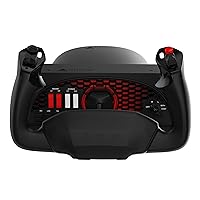 Highest rated
Honeycomb Alpha Flight Controls Yoke & Switch Panel
4.6
See price
Highest rated
Honeycomb Alpha Flight Controls Yoke & Switch Panel
4.6
See price
-
 Reviewed here
Turtle Beach VelocityOne Flight Universal Control System - Xbox Series X…
4.0
See price
Reviewed here
Turtle Beach VelocityOne Flight Universal Control System - Xbox Series X…
4.0
See price
-
 Logitech G Pro Flight Yoke System + Pro Flight Rudder Pedals…
4.6
See price
Logitech G Pro Flight Yoke System + Pro Flight Rudder Pedals…
4.6
See price
As Amazon Associates, we earn from qualifying purchases. This means we may receive a small commission at no extra cost to you if you click through and make a purchase.
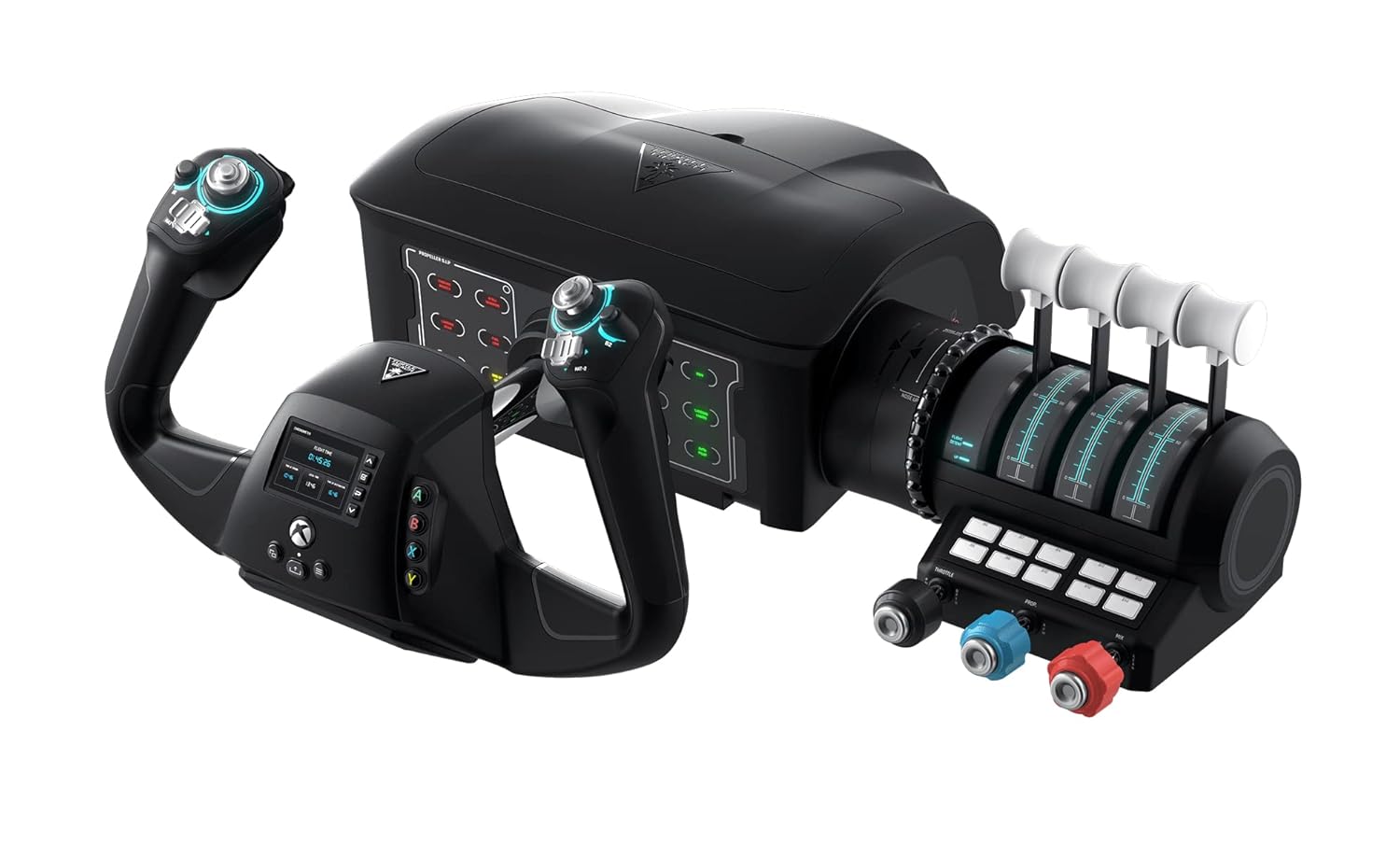
Setting up a home flight simulation station often overwhelms living rooms and shared home offices with tangled cords, separate foot pedals, and multiple cumbersome desk mounts. For families and aviation enthusiasts sharing a single multi-use workspace or living room gaming console, dedicating floor space to rudder pedals and multiple bulky throttle boxes is rarely practical. The Turtle Beach VelocityOne Flight solves this space and clutter dilemma by consolidating the control yoke, throttle levers, trim controls, and rudder steering into a unified corded electric console. Designed to bring accessible aviation hardware to shared households, this velocity one flight yoke bridges the gap between complicated commercial flight setups and basic handheld gamepads.
Our turtle beach velocityone flight review finds that this all-in-one system provides a strong balance of functional realism and everyday practicality. By combining 180 degrees of smooth handle travel with integrated fingertip rudder controls, it eliminates the immediate requirement to purchase and store detached floor pedals. While flight enthusiasts researching traditional stick-based hardware might evaluate flight sticks like the thrustmaster t flight hotas one, this unit offers a comprehensive, family-friendly control arrangement that secures firmly to a table and works across Xbox consoles and Windows computers right out of the box.


Quick Verdict

The Turtle Beach VelocityOne Flight is an all-in-one flight controller that delivers realistic controls and durable non-contact sensors in a tidy desktop footprint that shared living spaces require.
- Integrated throttle quadrant, dedicated trim wheel, and yoke handle in a single 10-pound unit.
- Fingertip rudder and brake triggers that remove the clutter and storage demands of floor pedals.
- Smooth 180-degree handle rotation powered by non-contact hall effect sensors for longevity.
- Cross-platform USB connectivity tailored for Xbox Series X|S, Xbox One, and Windows PCs.
Turtle Beach VelocityOne Flight Features Explained
True-to-Life 180-Degree Rotation and Non-Contact Sensors
A central challenge with entry-level flight controllers has traditionally been unnatural turning radiuses and internal mechanical components that wear down over repeated use. The Turtle Beach VelocityOne Flight addresses this by offering a full 180-degree yoke handle rotation that matches authentic general aviation steering dynamics. Inside the housing, Turtle Beach employs a non-contact hall effect sensor instead of traditional potentiometers. Because hall effect sensors measure magnetic fields without physical mechanical friction, the system resists wear over hundreds of flying hours, ensuring velocity one flight durability remains consistent whether children are learning basic traffic patterns or adults are navigating crosswind approaches.
The ergonomic yoke handle feels balanced and stable during prolonged cruising sessions. The smooth glide of the central shaft allows for fine pitch and roll corrections without the sticky center detents or mechanical jitter that often frustrate beginners trying to establish level flight.
Modular Throttle Quadrant and Dedicated Pitch Trim Wheel
Managing engine output and aircraft stability requires responsive tactile feedback, and the velocityone flight throttle quadrant provides versatile options for diverse aircraft profiles. The modular quadrant comes equipped with customizable lever handles and buttons that allow pilots to adapt the setup for single-engine trainers, multi-engine commercial jets, or turboprops. Having physical levers to manipulate manifold pressure, prop pitch, and fuel mixture teaches authentic throttle management directly at the desk.
Integrated directly alongside the throttle levers is a dedicated pitch trim wheel designed for continuous, fine-tuned adjustment of aircraft control surfaces. Maintaining neutral yoke pressure is vital for smooth approaches and level cruise, and the physical wheel allows users to trim out elevator resistance gradually rather than tapping digital buttons. Across the modular quadrant and yoke face, pilots have access to 12 analog axes, two POV switches, two 4-way HAT switches, and 26 buttons, giving family members ample physical inputs to bind essential flight commands without reaching for a separate keyboard.
Integrated Rudder Controls and Fingertip Brakes
One of the biggest hurdles when introducing flight simulation into a family room or compact bedroom is the physical requirement for floor rudder pedals. Separate foot pedals create tripping hazards, clutter carpets, and require adjustments whenever users of different heights sit down. Turtle Beach solves this issue by incorporating velocity one flight rudder controls directly into the yoke handles. Spring-loaded fingertip triggers let pilots actuate left and right rudder movements seamlessly during crosswind takeoffs, coordinated turns, and taxi operations.
Alongside directional yaw, the integrated triggers provide intuitive braking control when touching down on the runway. For households with young pilots or shared computer spaces, keeping yaw and braking at hand level ensures everyone can command full aircraft control without repositioning floor hardware or pushing back office chairs.
Flight Management Display and Status Indicator Panel
Navigating modern flight simulation software can be daunting for newcomers, but the onboard full-color Flight Management Display helps flatten the learning curve. This integrated display allows users to learn control profiles, monitor internal axis positions, and configure system settings directly on the device. It provides immediate visual confirmation of active profiles, helping beginners understand how yoke movements correspond to in-sim control surface reactions without digging through complex software menus.
Complementing the central display is an authentic Status Indicator Panel designed for PC use. This panel illuminates critical warning lights and avionics notifications, echoing the annunciator boards found in real cockpits. While the full active telemetry of this annunciator panel is engineered specifically for PC simulation setups, it adds a layer of cockpit realism that captivates aspiring aviators and reinforces proper pre-flight checklist habits.
Xbox and Windows Integration with Secure Mounting
Versatility is paramount for family hardware, and the velocity one flight for xbox and Windows covers the major platforms effortlessly. Designed primarily around Microsoft Flight Simulator 2020 and Microsoft Flight Simulator 2024, the unit connects via a standard USB corded electric setup to Xbox Series X, Xbox Series S, Xbox One, and Windows 10 & 11 PCs. Completing your turtle beach flight yoke setup is straightforward: plug the USB connection into your designated gaming platform, clamp the console securely to your desktop or table, and select the default controller profile.
The integrated clamping system is engineered to secure the 10-pound unit firmly to a wide variety of desktop thicknesses without slipping during sudden flight maneuvers. Because the clamp operates smoothly and stores neatly, the unit can be attached for an afternoon flight lesson and quickly unfastened when the desk is needed for homework or everyday computer tasks.
Specs
| Attribute | Detail |
|---|---|
| Brand and Model | Turtle Beach VelocityOne Flight (TBS-0715-02) |
| Hardware Platform Compatibility | Windows 10 & 11 PC, Xbox Series X, Xbox Series S, Xbox One |
| Yoke Handle Rotation | True-to-life 180-degree rotation |
| Sensor Mechanism | Non-contact hall effect sensor |
| Total Analog Axes | 12 analog axes |
| Buttons and Switches | 26 buttons, 2 POV switches, 2 4-way HAT switches |
| Integrated System Controls | Yoke handle, modular throttle quadrant, dedicated pitch trim wheel, fingertip rudder controls |
| Displays and Annunciators | Full color flight management display, Status Indicator Panel for PC |
| Power and Connectivity | Corded electric via USB connection |
| Dimensions and Weight | 9.8″D x 6.46″W x 19″H (Packaged: 19.01 x 7.2 x 19.5 inches), 10 pounds |
Turtle Beach VelocityOne Flight Pros and Cons
What we like
- Universal all-in-one yoke, throttle, and trim design
- True-to-life 180-degree rotation with hall effect sensors
- Integrated fingertip rudder and brake triggers
- Customizable modular throttle quadrant with extra handles
- Cross-platform support for Xbox and Windows PCs
What we’d change
- Status Indicator Panel features limited to PC
- Substantial desktop footprint requires deep clamp space
- Fingertip rudder triggers lack true foot pedal realism
Check Turtle Beach VelocityOne Flight on Amazon
Best Use Cases
- Shared family living rooms where console gamers need full flight simulator control on Xbox Series X|S without cluttering the carpet with floor pedals.
- Beginner flight students learning fundamental navigation, pitch trim balance, and multi-engine throttle management on Microsoft Flight Simulator 2020 or 2024.
- Compact home office setups requiring a flight yoke that securely clamps to an existing desk and removes cleanly when the workday begins.
- Aviation enthusiasts transitioning from standard handheld gamepads who desire authentic 180-degree rotation and physical trim wheels.
Before You Buy
Before purchasing the Turtle Beach VelocityOne Flight, check your desk dimensions and USB port availability. When evaluating the velocity one flight specs, the hardware balance stands out, but the physical dimensions demand adequate space. The unit measures 9.8 inches deep, 6.46 inches wide, and 19 inches high with a total item weight of 10 pounds, so it requires a sturdy table edge with adequate clearance underneath for the integrated clamping system. Although the device is fully compatible across Windows 10 and 11 PCs as well as Xbox One and Xbox Series X|S consoles, note that the authentic Status Indicator Panel is designed specifically for PC use and its full lighting telemetry features do not operate identically on Xbox consoles. Families planning to mount this on a desk facing an entertainment display like the lg g5 slim should also verify cable reach from the console to their seating position.
It is equally important to review what the package includes and what the listing does not specify. The package quantity is one complete flight control system featuring the yoke handle, modular throttle quadrant, and customizable lever handles. However, the listing does not specify whether extra desk spacer pads, extension cables, or independent cockpit mounting brackets are provided in the box. If you anticipate needing dedicated flight pedals later, you can expand your setup down the road, or you might research comparative traditional options like the logitech saitek yoke to see how separate peripheral ecosystems compare with an all-in-one housing.
How It Compares With Similar Picks
| Product | Best For | Key Difference |
|---|---|---|
| Turtle Beach VelocityOne Flight | All-in-one family flight simulation across PC and Xbox | Integrated throttle, trim wheel, fingertip rudder controls, and color display in a single unit |
| Professional simulation | Pilots seeking multi-mode programming on desktop setups | Features 3 modes, 75 programmable controls, and configurable knobs with a separate yoke chassis |
| Logitech G Pro Flight Yoke | Simmers who want dedicated floor foot pedals right away | Bundles a traditional flight yoke system together with separate Pro Flight rudder pedals |
| Compatible w PC & mac | Enthusiasts desiring a steel shaft build with ignition switches | Offers 180-degree rotation with a steel shaft and ignition switch panel for PC and Mac |
Choosing an alternative depends heavily on your household space constraints, preferred gaming platform, and hardware layout. If you already have dedicated floor room and specifically want physical foot controls included out of the box, the Logitech G Pro Flight Yoke bundle delivers an independent pedal set alongside its yoke base. Meanwhile, simmers focused on Mac operating system support or desiring heavy-duty steel shaft construction with an integrated ignition switch panel may prefer the Compatible w PC & mac Honeycomb Alpha system. For users who want a high-count multi-mode programmable switch setup, the Professional simulation Logitech G PRO unit provides 3 operational modes and 75 assignable controls. However, for households seeking a neat, unified unit that works natively on modern Xbox consoles and eliminates floor clutter, the Turtle Beach VelocityOne Flight remains the most cohesive all-in-one solution.

Bottom Line
When asking is velocity one flight worth it, the answer depends on whether you prioritize convenience, versatility, and clean desktop management. As a flight yoke for beginners and family households, the Turtle Beach VelocityOne Flight succeeds by bundling 180-degree hall effect yoke steering, modular throttle levers, a smooth trim wheel, and integrated fingertip rudder controls into a single chassis. It bypasses the tangled cabling, expensive separate pedals, and complicated driver installations that often discourage new flight sim enthusiasts.
While flight simulation hobbyists with dedicated cockpit furniture might explore multi-piece component rigs, this 10-pound controller delivers remarkable long-term durability and plug-and-play simplicity. Whether your household is exploring aviation for the first time or practicing instrument approaches on Microsoft Flight Simulator, this universal control system offers reliable performance that accommodates pilots of all ages without taking over your living space.
FAQ
Does the Turtle Beach VelocityOne Flight require separate rudder pedals to fly?
No, the system includes integrated rudder and brake controls built directly into the yoke handles. Spring-loaded fingertip triggers allow you to steer the aircraft on the ground and execute coordinated rudder turns in the air without needing floor pedals.
Which platforms and flight simulators work with this control system?
The VelocityOne Flight is compatible with Windows 10 & 11 PCs, Xbox Series X, Xbox Series S, and Xbox One consoles via a standard USB connection. It is specifically designed for popular simulation titles including Microsoft Flight Simulator 2020 and Microsoft Flight Simulator 2024.
What does the modular throttle quadrant include?
The modular throttle quadrant features customizable lever handles and buttons, allowing users to configure controls for single-engine aircraft, multi-engine commercial jets, or turboprops. It also includes a dedicated pitch trim wheel and multiple analog axes.
Does the Status Indicator Panel work on Xbox consoles?
The authentic Status Indicator Panel is designed for PC use. While the central full-color Flight Management Display functions across both PC and Xbox to configure profiles and view status, the peripheral annunciator warning lights on the Status Indicator Panel are engineered for PC simulation setups.
How does the yoke handle rotation compare to real aircraft?
The yoke handle features true-to-life 180-degree rotation powered by a non-contact hall effect sensor. This allows smooth, authentic general aviation steering without physical friction parts that degrade over time.


