What we looked at
-
 Reviewed here
KODAK Dock Plus 4x6 Photo Printer, Smartphone Docking, 4PASS, 50 Sheets
8.4/10
See price
Reviewed here
KODAK Dock Plus 4x6 Photo Printer, Smartphone Docking, 4PASS, 50 Sheets
8.4/10
See price
-
 Liene M100 4x6'' Photo Printer, Phone Printer 100 Sheets & 3…
8.8/10
See price
Liene M100 4x6'' Photo Printer, Phone Printer 100 Sheets & 3…
8.8/10
See price
-
 Highest rated
Brother MFC-L3765CDW Wireless Color All-in-One Laser Printer
10.0/10
See price
Highest rated
Brother MFC-L3765CDW Wireless Color All-in-One Laser Printer
10.0/10
See price
-
 Lowest price
Nelko PP01 Photo Printer, 2x3 Portable Photo Printer, Mini Printer, White
8.8/10
See price
Lowest price
Nelko PP01 Photo Printer, 2x3 Portable Photo Printer, Mini Printer, White
8.8/10
See price
As Amazon Associates, we earn from qualifying purchases. This means we may receive a small commission at no extra cost to you if you click through and make a purchase.
In busy family households, hundreds of special moments get trapped inside smartphone camera rolls, rarely making it into physical photo albums or picture frames where grandparents and children can enjoy them. Traditional inkjet printers frequently frustrate parents with clogged print heads, smudged wet ink, and tedious Wi-Fi network handshakes that fail right when you need a quick picture for a school project. The Kodak Dock Plus solves this chronic headache by providing a dedicated, tabletop printing station that transforms digital files into physical prints right from your smartphone. Designed specifically for home users seeking long-term keepsake preservation without technical friction, this system brings physical tangible memories back to the center of the household.
Our verdict is that this unit stands out as an exceptionally reliable home memory station, pairing genuine dye-sublimation technology with straightforward physical and wireless connectivity. By sealing each 4×6 print with a specialized protective laminate layer, it prevents the water damage, fading, and fingerprint smears that often ruin standard photo prints handled by eager little hands. While its reliance on a wall power outlet means you will not be carrying it to outdoor picnics, its stable desktop footprint and foolproof operation make it a practical, enduring asset for families building lasting scrapbooks and albums.


Quick Verdict
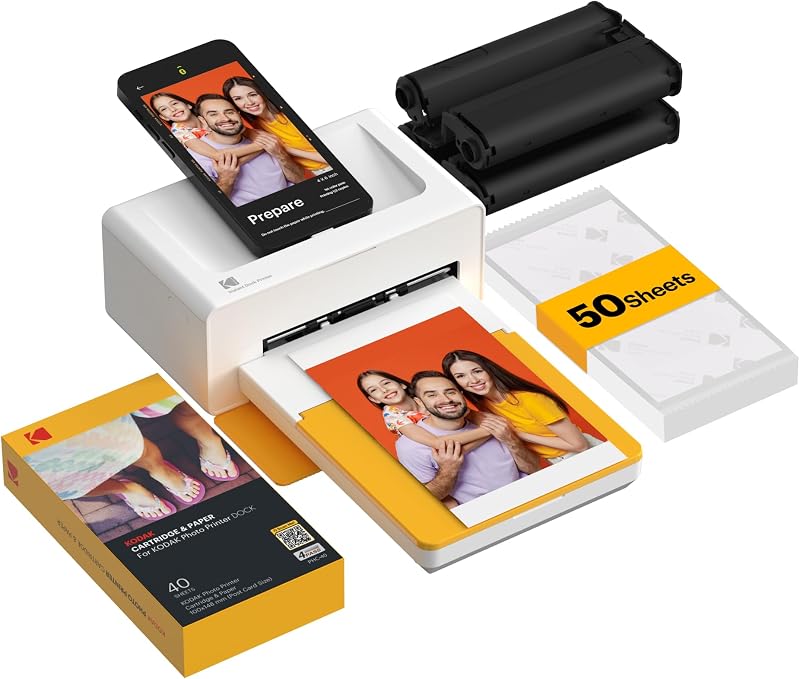
The Kodak Dock Plus delivers impressive color accuracy and archival durability via its 4PASS thermal dye transfer, making it a dependable family fixture for everyday memory archiving.
- Protective four-pass lamination layer shields prints from spills, fingerprints, and UV fading
- Integrated docking port charges your smartphone while handling direct or Bluetooth wireless printing
- Generates full-bleed 4×6-inch borderless prints in roughly 55 seconds per photo
- Tied to desktop wall power, guaranteeing consistent output without worrying about battery degradation
Kodak Dock Plus Features Explained
Genuine 4PASS Dye Sublimation Printing Process
At the mechanical heart of this unit is a dedicated kodak 4pass dye sublimation printer mechanism, which diverges significantly from conventional liquid inkjets. Instead of spraying droplets of ink onto paper, the machine utilizes thermal transfer ribbon rolls to lay down continuous tones of yellow, magenta, and cyan solid dyes consecutively. Each color pass fuses heat directly into the proprietary glossy photo paper, resulting in rich gradient transitions, accurate skin tones, and sharp contrast across a 300 resolution matrix.
The final pass is what truly elevates the kodak dock plus print quality for home scrapbooks: an automated, transparent lamination overcoat. This protective shield locks out ambient humidity, guards against liquid spills, prevents fingerprint smudges, and protects dye layers from progressive UV fading. For families with toddlers who want to touch and carry recent snapshots, this lamination ensures that fresh prints emerge completely dry, durable, and ready to be handled immediately without the dreaded smudge risk of traditional wet ink.
Physical Docking Station and Device Charging
One of the primary friction points of modern gadgetry is finding cables and establishing stable connections, which is where this kodak phone docking photo printer excels. The top surface features a physical docking connector where users can seat their compatible iOS or Android phone directly onto the printer chassis. This direct mechanical connection ensures stable data transfer while simultaneously charging your phone battery during the print job, avoiding dropped wireless transmissions midway through a cycle.
For users who keep bulky protective cases on their phones or prefer operating from across the kitchen table, the unit also integrates wireless Bluetooth connectivity. Whether docked physically on the cradle or connected wirelessly, the system eliminates complex local network configuration, network password re-entry, or printer driver installations that often complicate general home computing. If you have previously explored smaller portable models like the kodak mini 2 retro portable photo printer, you will appreciate how this dedicated desktop dock creates a permanent, anchored home station where family members always know where to print.
KODAK Photo Printer Mobile Application
Managing the kodak dock plus setup and day-to-day output is coordinated entirely through the companion KODAK Photo Printer app available for iOS and Android devices. The software serves as a creative dashboard, allowing parents and children to select photos from their camera rolls, crop framing, apply visual filters, or apply decorative digital templates before hitting the print command. The interface is deliberately streamlined to ensure non-technical relatives can operate it effortlessly.
The application also gives you the option to choose between bordered and borderless printing formats depending on your display requirements. Family members creating scrapbook collages can leave a clean white border for handwritten dates and notes, or output a complete edge-to-edge 4×6 image ready to slide straight into standardized photo frames. Similar to the straightforward editing flow found when reviewing the kodak retro printer line, the mobile app handles color processing quickly, keeping the total time between snapping a phone picture and holding a finished print under two minutes.
Stationary Desktop Home Base Design
Measuring 4.5 inches deep, 8.5 inches wide, and 2 inches high, the unit is intentionally engineered as a dedicated desktop home printing station rather than a pocket-sized travel gadget. Connecting to standard AC household current via an external power supply, it delivers consistent thermal energy for continuous dye transfer cycles without suffering from battery drain or performance throttling. The compact horizontal profile sits unobtrusively on a kitchen counter, hallway console, or family desk without occupying excessive work surface.
Because it utilizes a specialized single-sheet feed tray mechanism that passes the photo back and forth four times during printing, it requires a small clearance area behind and in front of the unit during active printing. The steady desktop build ensures the machine remains anchored while the paper traverses the internal thermal drum. For parents wondering whether a stationary dock beats pocket devices like the kodak mini shot 2, the advantage lies in the standard 4×6 photo format, which delivers double the viewing area of compact novelty instant prints.
Specs
| Attribute | Detail |
|---|---|
| Printing Technology | 4PASS Dye Sublimation |
| Print Resolution | 300 DPI |
| Print Size | 4 x 6 inches |
| Color Process | Yellow, Magenta, Cyan, plus Protective Overcoat |
| Print Speed | Approximately 55 seconds per print |
| Dimensions (D x W x H) | 4.5″D x 8.5″W x 2″H |
| Supported Operating Systems | Android, iOS |
| Connectivity | Direct Docking and Bluetooth Wireless |
| Media Type | Glossy photo paper |
| Paper Trays | 1 Input Tray |
| Warranty | Limited Warranty |
Kodak Dock Plus Pros and Cons
What we like
- Protective lamination resists fingerprints and water
- Physical dock charges phone while printing
- Generates standardized 4×6 borderless glossy prints
- Dual connectivity via docking port and Bluetooth
- Fast 55-second print time per photo
What we’d change
- Requires stationary AC wall outlet power
- Single-sheet print mechanism per pass
- Requires front and back clearance for paper travel
Check Kodak Dock Plus on Amazon
Best Use Cases
- Preserving physical snapshots for long-term baby books and family scrapbooks that resist moisture and fading over time.
- Printing instant 4×6 framed gifts for grandparents directly from smartphones during holiday visits and birthday parties.
- Producing durable photo assets for children’s school projects that will not smear under glue or wet fingers.
- Creating standardized 4×6 prints for family wall galleries and photo albums without waiting for commercial lab mail orders.
Before You Buy
Before purchasing the kodak dock plus 50 sheet bundle, families should evaluate how this system fits into their physical living spaces and regular printing routines. Because the Kodak Dock Plus relies entirely on an AC wall adapter, it is not an untethered battery-powered portable printer; it needs a permanent spot near an electrical outlet. Furthermore, examining the kodak dock plus retro specs shows that the 4PASS process requires unimpeded physical clearance of several inches both in front of and behind the chassis, as the glossy photo paper glides back and forth through the mechanism four times while laying down yellow, magenta, cyan, and the clear laminate seal. Obstructing the paper feed during an active print cycle can introduce dust particles or mechanical misfeeds, so keeping the area clear of clutter is vital.
Prospective buyers must also consider ongoing supplies and cartridge management. The system utilizes combined all-in-one cartridges containing both ribbon dye rolls and photo sheets matched to specific bundle sizes. When planning for ongoing use, researching kodak dock plus replacement cartridges ensures you understand that the dye ribbon and paper run out simultaneously in pre-measured amounts. Regarding hardware inclusions, the listing notes that the bundle includes the printer docking unit and 50 sheets of photo media, but the listing does not specify whether extra connection adapters or specific port cables beyond the standard docking pin are provided in the carton. Checking your smartphone’s case thickness is also advised, as very thick rugged cases may prevent a flush connection with the physical docking connector, requiring you to use the integrated Bluetooth wireless connection instead.
How It Compares With Similar Picks
| Product | Best For | Key Difference |
|---|---|---|
| Kodak Dock Plus | Family home stations needing durable 4×6 prints | Features a physical phone docking and charging port with 4PASS lamination |
| Liene M100 4×6” Photo Printer | High-volume mobile Wi-Fi photo printing | Uses thermal dye sublimation with Wi-Fi connectivity and includes 100 sheets with 3 cartridges |
| Fast Color Printing Up to | High-speed multi-page home office documents | Brother laser all-in-one printing up to 27 ppm with automatic duplexing |
| Instant Color Inkjet Printer | Casual scrapbooking with mini sticky stickers | Nelko PP01 ultra-portable 2×3 instant color inkjet producing sticky-back photos |
Choosing between these distinct printing systems comes down to your primary format preference and household workflow. When deciding on the Kodak Dock Plus for family photos, you get an optimal balance between everyday simplicity, child-resistant print longevity, and the standard 4×6 frame size. In contrast, families needing higher volume output out of the box might look at the Liene M100 4×6” Photo Printer for its included 100 sheets and Wi-Fi architecture. If your household demands fast document handling, school reports, and double-sided printing, the Fast Color Printing Up to Brother laser all-in-one is built for heavy text workloads rather than dedicated gloss photo archiving. Finally, teens or crafters who prefer pocket-sized sticker pictures for notebooks will find the compact 2×3 format of the Instant Color Inkjet Printer far more convenient for quick casual crafting on the go.

Bottom Line
When asking is kodak dock plus worth it for an active household, the answer lies in its ability to bridge the gap between smartphone snapshots and tangible family heritage. By combining a reliable phone charging dock, trouble-free app navigation, and genuine 4PASS dye-sublimation technology, it eliminates the messy ink cartridges and maintenance chores that make traditional printing a burden. The resulting 4×6 photos emerge dry, vibrant, and laminated against fingerprints and accidental spills, ensuring precious memories endure in scrapbooks and frames for decades.
While power cord dependence means it will remain a stationary tabletop appliance rather than a travel accessory, that stationary nature is precisely why it works so well for households. It establishes an accessible, dependable printing corner where parents, grandparents, and children can liberate memories from their digital devices with zero frustration. For anyone prioritizing archival longevity and effortless operation, this Kodak bundle delivers outstanding everyday utility.
FAQ
How long does the Kodak Dock Plus take to print a 4×6 photo?
According to the product specifications, each 4×6 print takes approximately 55 seconds to complete. The printer moves the glossy photo paper back and forth through four distinct passes to lay down yellow, magenta, cyan dyes, and the final clear protective laminate layer.
Does the Kodak Dock Plus work without docking a phone physically?
Yes, the printer includes integrated wireless Bluetooth connectivity alongside its physical docking station. Users with thicker phone cases or tablets can connect wirelessly through the KODAK Photo Printer app on compatible iOS and Android devices.
Does the photo print emerge completely dry from the printer?
Yes, because the system utilizes 4PASS thermal dye sublimation with an integrated lamination overcoat, prints are 100 percent dry the instant they finish the fourth pass. There is no wet ink to smudge, and the surface is resistant to fingerprints and water immediately.
Can the Kodak Dock Plus print from iPads or Android tablets?
Yes, tablets running iOS or Android can connect to the Kodak Dock Plus via the KODAK Photo Printer application over Bluetooth. While tablets cannot sit flush on the physical smartphone dock connector, all wireless printing and photo editing functions work identically.
What comes inside the kodak dock plus 50 sheet bundle?
The bundle listing specifies the Kodak Dock Plus photo printer station along with 50 sheets of glossy photo paper media. The listing does not specify whether extra port adapters or specialized accessories are packaged in the box beyond the standard unit and paper bundle.