
What we looked at
-
 Lowest price
HP DeskJet 2955 Wireless All-in-One Color Inkjet Printer, Scanner, Copier, Best-for-Home,…
7.4/10
See price
Lowest price
HP DeskJet 2955 Wireless All-in-One Color Inkjet Printer, Scanner, Copier, Best-for-Home,…
7.4/10
See price
-
 Canon PIXMA TS4320 – Wireless Color Inkjet Printer with Print, Copy,…
8.0/10
See price
Canon PIXMA TS4320 – Wireless Color Inkjet Printer with Print, Copy,…
8.0/10
See price
-
 Highest rated
HP Color LaserJet Enterprise 4701dw Wireless Printer
8.6/10
See price
Highest rated
HP Color LaserJet Enterprise 4701dw Wireless Printer
8.6/10
See price
-
 Reviewed here
Epson EcoTank ET-4850 Wireless Color All-in-One Supertank Printer - Black
8.2/10
See price
Reviewed here
Epson EcoTank ET-4850 Wireless Color All-in-One Supertank Printer - Black
8.2/10
See price
As Amazon Associates, we earn from qualifying purchases. This means we may receive a small commission at no extra cost to you if you click through and make a purchase.
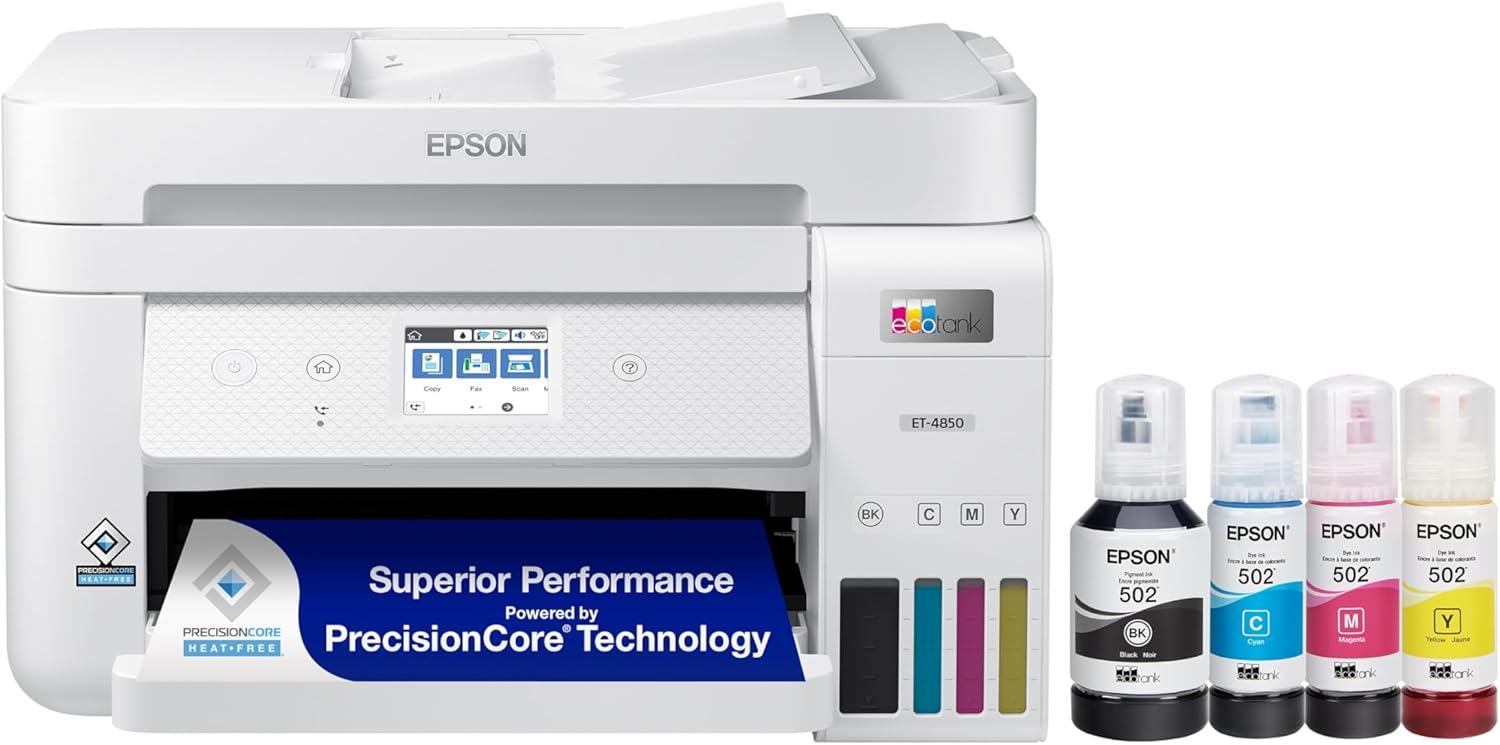
Managing daily print volume in an active household quickly exposes the shortcomings of traditional desktop printing hardware. Between school assignments, remote work documentation, permission forms, and colorful creative projects, standard disposable cartridges frequently run out of fluid at inconvenient times, leaving users stranded and frustrated. The Epson EcoTank ET-4850 solves this ongoing operational dilemma by substituting micro-cartridges with integrated, high-capacity ink reservoirs. Engineered as a multifunction centerpiece, this all-in-one supertank printer focuses on dependable, high-volume production with minimal manual intervention, catering directly to families and home professionals who require consistent day-to-day operation without recurring trips to purchase replacement consumables.
Our research into the machine’s specifications and user workflows confirms that this device delivers impressive utility, dependable paper management, and consistent output quality across various media types. While the hardware requires an initial investment in desk space and a measured initial filling routine, the extended operating endurance and versatile connectivity yield strong lasting value. For families seeking an end to cartridge exhaustion, this all-in-one unit presents a balanced and practical domestic solution.


Quick Verdict

The Epson EcoTank ET-4850 delivers reliable performance and expansive ink reserves, making it an outstanding long-term investment for households and home offices handling high volumes of daily documents.
- Refillable ink reservoir tanks provide long-lasting supply volume and reduce ongoing replenishment interruptions.
- Print speeds reaching up to 15.5 ppm in black and 8.5 ppm in color keep daily family schedules on track.
- Automated two-sided printing and an automatic document feeder simplify multi-page paperwork.
- A 2.4-inch color touchscreen interface paired with broad wireless options ensures effortless shared operation.
Epson EcoTank ET-4850 Features Explained
High-Capacity Refillable Ink Tank System
At the center of the unit is the epson et-4850 refillable ink tank architecture, which eliminates traditional plastic cartridges entirely. The built-in supertank design houses four separate CMYK fluid compartments that can be inspected visually from the front of the chassis. Instead of discarding spent cartridges every few weeks, users replenish the reservoirs using specially keyed ink bottles designed to prevent spills and accidental color cross-contamination. This setup drastically lowers total consumable waste while ensuring the machine remains ready for high-volume assignments without unexpected mid-project shutdowns.
Evaluating the et-4850 supertank durability demonstrates that continuous ink delivery promotes stable printhead performance during repetitive jobs. Epson strongly recommends using genuine ink formulations to safeguard internal mechanics, as third-party chemical mixtures can jeopardize the printhead and are not covered under the manufacturer limited warranty. For busy households balancing school curricula and household paperwork, having abundant ink reserves on hand offers peace of mind and dependable output.
Print Speeds and Automated Duplexing

In shared family spaces, efficiency matters just as much as fluid capacity. The Epson EcoTank ET-4850 delivers print speeds reaching up to 15.5 pages per minute for monochrome files and 8.5 pages per minute for color presentations. Generating documents at a detailed 4800 x 1200 dpi resolution, the engine produces sharp black text for reports and vivid color reproduction across charts, school flyers, and creative home crafts. This ensures that multi-page essays and official paperwork emerge crisp and legible without excessive waiting periods at the output tray.
Another major operational advantage is the epson ecotank 4850 auto duplex printing functionality. Automatic double-sided printing saves considerable paper stock over the lifespan of the machine, halving material consumption on large document packets and study guides. Rather than manually flipping sheets and risking misfeeds, the internal duplexer reverses pages seamlessly, keeping home tasks tidy and environmentally conscious.
Wireless Setup and Mobile Connectivity
Modern domestic printing requires seamless access from numerous handheld and desktop platforms. The epson 4850 wireless setup allows family members to connect via standard Wi-Fi or hardwired Ethernet connections, making it network-ready right out of the box. Users can send jobs directly from mobile devices utilizing Apple AirPrint, Android Printing, Fire OS Printing, and Mopria Print Service. Additionally, the Epson Smart Panel App transforms smartphones and tablets into control centers for monitoring ink levels, running diagnostics, and configuring network parameters.
Beyond local network sharing, the hardware supports Epson Email Print, Epson Remote Print, and Epson Scan to Cloud, allowing parents and students to transmit documents from work or school directly to the home tray. Integration with voice control platforms provides hands-free convenience for routine printing commands. When organizing multiple workstations in a study or home office alongside equipment like a thinkpad usb4 dock 5000, having both wired Ethernet and wireless operational choices ensures uninterrupted connectivity across all household electronics.
Scanning Hardware and Automated Document Feeder
Handling household administrative tasks requires reliable digitization tools. The epson ecotank 4850 scanner features a flatbed glass platen capable of capturing high-resolution scans of bound books, fragile family photos, identification cards, and passports. Complementing the flatbed glass is an integrated Auto Document Feeder, which allows users to duplicate, scan, or fax multi-page contracts and school worksheets without manually feeding individual sheets one by one onto the platen.
Copy functionality matches the print engine in swiftness, achieving maximum black-and-white copy speeds of up to 15.5 pages per minute. The hardware accommodates various media dimensions up to 8.5 x 14 inches (legal size), as well as standard envelopes and glossy photo paper. Whether digitizing historical records, sending faxes for administrative obligations, or assembling duplicate course packets, the combined scanner and document feeder assembly handles tasks smoothly.
Color Touchscreen and Onboard Navigation
Navigating complex multifunction hardware can prove daunting for younger children or less tech-savvy family members. The ET-4850 addresses usability through an integrated 2.4-inch color touchscreen situated on a tilted front control console. The display presents crisp, recognizable icon menus for selecting between print, copy, scan, and maintenance utilities, eliminating confusing multi-key combinations and reducing errors during routine operation.
Through this interface, users can quickly check maintenance status, view network status, perform printhead alignment routines, and trigger standalone copy routines without waking a connected PC. Households looking at smaller desktop units such as the epson ecotank 2900 will appreciate that the ET-4850 adds this direct interactive screen alongside dedicated fax controls, making daily operations significantly more intuitive.
Specs
The following epson ecotank et-4850 specs outline the key technical parameters, physical dimensions, and capabilities specified in the manufacturer documentation.
| Attribute | Detail |
|---|---|
| Printer Type | Inkjet all-in-one |
| Print Resolution | 4800 x 1200 dpi |
| Print Speed | Up to 15.5 ppm black, up to 8.5 ppm color |
| Duplex Printing | Automatic 2-sided |
| Scanner Type | Flatbed scanner with Auto Document Feeder |
| Copy Speed | Up to 15.5 cpm black |
| Supported Media | Plain paper, glossy photo paper, envelopes (up to 8.5 x 14 inches) |
| Connectivity | Wi-Fi, Ethernet, Mobile Printing (AirPrint, Mopria, Fire OS, Epson Smart Panel) |
| Display | 2.4-inch color touchscreen |
| Dimensions and Weight | 16.4″D x 19.8″W x 10″H; 14.8 pounds |
Epson EcoTank ET-4850 Pros and Cons
What we like
- High-capacity refillable ink tank system
- Fast print speeds up to 15.5 ppm black
- Automatic two-sided printing saves paper
- Integrated auto document feeder and flatbed scanner
- Clear 2.4-inch color touchscreen display
- Versatile wireless, Ethernet, and mobile connectivity
What we’d change
- Single paper tray requires manual media swapping
- Substantial desk footprint at almost twenty inches wide
- Requires genuine Epson ink to protect limited warranty
Check Epson EcoTank ET-4850 on Amazon
Best Use Cases
- Printing high-volume elementary, high school, and college assignments without running out of ink mid-semester.
- Operating a busy epson ecotank 4850 for home office setup requiring contract copying, client invoicing, and regular faxing.
- Managing double-sided study packets and family household documents using automated duplexing to minimize paper waste.
- Scanning receipts, tax documents, and personal IDs to cloud storage platforms via mobile apps and the flatbed scanner.
- Producing colorful home charts, creative craft printouts, and glossy photo prints from smartphones and tablets across the home.
Before You Buy
Before adding the printer to your workspace, take note of its physical footprint and structural layout. Measuring 16.4 inches deep, 19.8 inches wide, and 10 inches high, and weighing 14.8 pounds, the unit requires a stable, dedicated surface with sufficient vertical and front clearance for the paper trays and top-mounted document feeder. The device features a single main paper tray, meaning users who frequently alternate between standard plain paper and envelopes or specialty photo paper will need to swap media manually. Compatibility covers modern devices via Wi-Fi and Ethernet networking, alongside mobile support across iOS, Android, and Fire OS platforms.
Prospective buyers should also understand what the retail listing does not include or specify. The listing documentation does not specify the exact page count yield of the initial bottled ink supply included in the packaging, nor does it include an Ethernet cable or USB printer cable. Furthermore, the listing does not specify support for borderless legal-sized photo production, focusing instead on standard media dimensions up to 8.5 x 14 inches. Genuine Epson ink bottles are strictly recommended by the manufacturer to preserve long-term printhead integrity, so users should prepare to utilize official consumables throughout the limited warranty period.
How It Compares With Similar Picks
| Product | Best For | Key Difference |
|---|---|---|
| Epson EcoTank ET-4850 | High-volume households and home offices | Refillable supertank reservoir, 15.5 ppm speed, ADF, auto duplex printing, and touchscreen |
| HP DeskJet 2955 Wireless All-in-One | Light home printing and basic copying | Cartridge-based system with 3-month trial of Instant Ink and AI-capable tools |
| Canon PIXMA TS4320 Cost Efficient Multi-Function Photo Printer | Compact home photo printing and scanning | Compact multi-function design focused on everyday color photo output and easy setup |
| HP Color LaserJet Enterprise 4701dw Wireless Printer | Demanding office and enterprise environments | Fast laser printing engine with advanced corporate security features |
Selecting the right hardware hinges on matching your workload to the printer architecture. Households with modest or intermittent printing requirements may prefer the simplicity of the HP DeskJet 2955 Wireless All-in-One or the Canon PIXMA TS4320 Cost Efficient Multi-Function Photo Printer, both of which serve entry-level copying and photo needs without requiring large ink reservoir maintenance. On the other hand, commercial offices prioritizing rapid document throughput and data protection across corporate networks should consider the HP Color LaserJet Enterprise 4701dw Wireless Printer instead of a home-oriented inkjet system.

Bottom Line
For busy households balancing school obligations, domestic administrative paperwork, and remote professional workflows, the Epson EcoTank ET-4850 provides a practical, highly capable printing hub. By eliminating single-use ink cartridges in favor of clean-filling, high-capacity liquid reservoirs, it fundamentally solves the issue of running dry during urgent tasks. Combined with automatic duplexing, a flatbed scanner with document feeder, and broad wireless support, this machine delivers consistent performance that justifies making it a permanent household fixture.
When considering whether the epson ecotank 4850 family printer fits your living space, the primary trade-offs center on its desk footprint and single paper tray. For families and home offices with steady multi-page demands, the long-term consumable savings, dependable paper handling, and multi-device accessibility make this all-in-one supertank a remarkably sensible investment.
FAQ
Is the Epson EcoTank 4850 worth it for a family?
Yes. If you are wondering is epson ecotank 4850 worth it for everyday family routines, the high-capacity refillable ink reservoirs significantly lower the ongoing disruption and expense of replacing small ink cartridges. Families handling recurring homework packets, schedules, color crafts, and office forms will appreciate the sustained supply capacity and reliable auto duplex printing.
Can the Epson EcoTank ET-4850 handle different paper types?
The printer accommodates plain paper, envelopes, and glossy photo paper in media sizes up to 8.5 x 14 inches. However, because the unit features a single main paper tray, users must manually swap media when switching from regular standard paper to envelopes or specialty photo stock.
How does mobile printing work on the Epson ET-4850?
The printer connects over Wi-Fi or wired Ethernet and integrates with Apple AirPrint, Android Printing, Fire OS Printing, and Mopria Print Service. Family members can also install the Epson Smart Panel App on smartphones and tablets to initiate prints, monitor ink levels, run maintenance, or execute scans remotely.
Does the Epson EcoTank ET-4850 support automatic double-sided scanning?
The ET-4850 features an Auto Document Feeder for handling multi-page documents alongside its flatbed glass scanner, but the listing specifies automatic 2-sided printing rather than two-sided scanning through the document feeder. For two-sided originals, users may need to re-feed or turn pages manually on the flatbed scanner.
What type of ink does the Epson ET-4850 use?
The printer utilizes a CMYK four-color liquid ink system with keyed refill bottles. Epson strongly recommends using genuine Epson ink bottles to maintain print quality and avoid internal damage that would not be covered under the limited warranty.


