What we looked at
-
 HP 14 Laptop, 2027 Edition, 4GB RAM, 128GB SSD, Intel N150…
2.5
See price
HP 14 Laptop, 2027 Edition, 4GB RAM, 128GB SSD, Intel N150…
2.5
See price
-
 Highest rated
15.6 Inch Laptop Computer, N4020, 4GB DDR4 RAM, 128GB eMMC,with Windows…
4.3
See price
Highest rated
15.6 Inch Laptop Computer, N4020, 4GB DDR4 RAM, 128GB eMMC,with Windows…
4.3
See price
-
 HP 2026 Essential Laptop, Intel Processor, 128GB Storage, Windows 11
4.3
See price
HP 2026 Essential Laptop, Intel Processor, 128GB Storage, Windows 11
4.3
See price
-
 Reviewed here
Dell Latitude 5550 Laptop, 15.6" FHD, Ultra 5 125U, 32GB DDR5,…
4.3
See price
Reviewed here
Dell Latitude 5550 Laptop, 15.6" FHD, Ultra 5 125U, 32GB DDR5,…
4.3
See price
As Amazon Associates, we earn from qualifying purchases. This means we may receive a small commission at no extra cost to you if you click through and make a purchase.
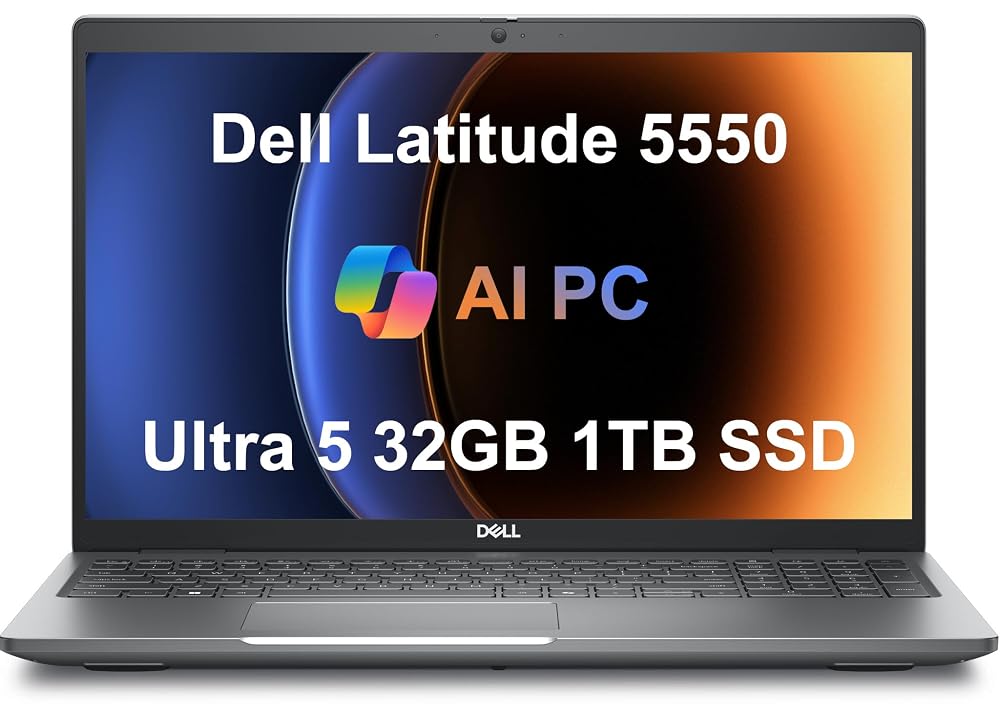
Household computers must routinely survive an unpredictable gauntlet of demands. Between parents running dense business spreadsheets during the workday, students toggling through dozens of browser tabs for school research in the evening, and family members streaming entertainment at night, standard budget laptops often falter under the weight of shared usage. Flimsy display hinges, sluggish memory bottlenecks, and thermally constrained processors can quickly transform an everyday family laptop into an exercise in daily frustration. The Dell Latitude 5550 is engineered to address these exact pain points by bringing commercial-grade hardware into the home environment. Instead of thin consumer plastics and minimal specifications, this machine provides an enterprise-tested foundation created to handle sustained productivity across multiple user profiles without slowing to a crawl.
Our verdict on this configuration is unequivocally positive for families and home office professionals who prioritize longevity and immediate multitasking capacity over flashy aesthetics. Packed with a 12-core Intel Core Ultra 5 processor, an exceptional 32GB of modern DDR5 system memory, and a dual-solid-state drive setup totaling 1TB of storage, it bypasses the common limitations that force households to replace entry-level laptops every couple of years. Although the listing discloses that the laptop has been resealed by an aftermarket technician to install these extensive storage and memory upgrades, the combination of substantial multi-core performance, comprehensive physical ports, and durable construction makes it an outstanding productivity investment for any busy home.


Quick Verdict
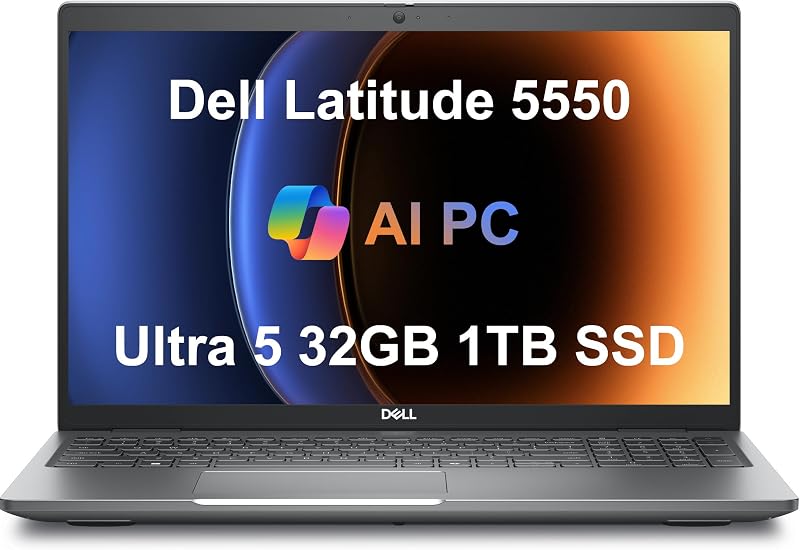
The Dell Latitude 5550 delivers a powerful blend of commercial build quality and modern processing speed, making it an ideal central workstation for multi-user households and hybrid home offices.
- Exceptional 32GB DDR5 memory allowance ensures seamless task-switching for busy remote workers and students alike.
- Clever dual 512GB PCIe NVMe SSD configuration isolates the Windows 11 Pro system files from household data libraries for improved system stability.
- Robust physical connectivity includes two 40 Gbps Thunderbolt 4 ports, wired Ethernet, HDMI 2.1, and dual external monitor support.
- Resealed by ISTComputers to provide upgraded storage and RAM, backed by a dedicated three-year warranty on upgraded parts and one-year manufacturer coverage on the base system.
Dell Latitude 5550 Features Explained
Intel Core Ultra 5 125U Processing Power
At the center of this machine is the Intel Core Ultra 5 125U processor, a 12-core silicon architecture designed to balance computational power with low-power battery efficiency. In a bustling household, computer usage rarely involves just one lightweight program running at a time. More often, the system must process background cloud backups, multiple communication tools, and data-heavy applications simultaneously. The dell latitude 5550 core ultra 5 processor utilizes a hybrid arrangement of performance and efficient cores that distributes these varied workloads intelligently, preventing sudden lag spikes when a student launches an educational application while a parent works on large document libraries.
Beyond raw core count, the processor integrates dedicated hardware acceleration for background productivity and everyday AI tasks through Windows 11 Pro. When evaluating the dell latitude 5550 performance across daily home tasks, the processor manages thermal output efficiently inside its 0.9-inch thick clamshell chassis. The cooling assembly prevents the severe thermal throttling that frequently plagues thinner, consumer-oriented devices during prolonged video calls or sustained computing sessions, ensuring reliable responsiveness hour after hour.
Generous 32GB DDR5 Memory and Dual SSD Storage
One of the primary reasons family computers feel sluggish over time is inadequate system memory. This configuration completely eliminates that bottleneck by providing 32GB of high-speed 4800MHz DDR5 RAM. While mainstream laptops often ship with 8GB or 16GB of memory that struggles under heavy browser usage and modern multitasking, this generous pool allows multiple family members to leave their accounts, browser tabs, and desktop software open without forcing the system into aggressive virtual memory caching. For households seeking long-term equipment value, avoiding an immediate latitude 5550 ram upgrade is a significant convenience.
Storage architecture on this machine is equally distinctive due to its split design. Rather than relying on a single 1TB drive, the internal storage is split across two 512GB PCIe NVMe M.2 solid-state drives. This setup allows the primary drive to host Windows 11 Pro and core applications while the secondary drive is dedicated to personal archives, family photos, school assignments, and downloads. Separating these directories preserves system responsiveness, prevents accidental OS drive clutter, and delivers rapid boot times along with instantaneous file access.
15.6-Inch Anti-Glare Display and FHD HDR Webcam
Visual comfort is critical for machines used across long workdays and evening study sessions. The Dell Latitude 5550 features a 15.6-inch Full HD (1920 x 1080) IPS display with an anti-glare matte coating. This matte treatment helps diffuse harsh reflections from overhead living room lights or sunny home office windows, reducing eye strain during long hours of reading or writing. While integrated Intel graphics manage the visual output via shared video memory, the IPS panel ensures stable viewing angles when family members huddle around the screen to review documents or watch instructional videos together.
Above the panel sits an FHD HDR RGB front camera designed specifically for crisp video fidelity during remote classes, Zoom meetings, and virtual corporate presentations. The inclusion of high dynamic range processing balances uneven backlighting, such as bright windows behind the user. For households where personal privacy is a top priority, the webcam includes an integrated physical privacy shutter that physically blocks the lens when the camera is not actively in use, giving parents complete peace of mind.
Versatile Connectivity and Dual External Monitor Support
Many modern consumer laptops eliminate traditional ports in favor of a minimal aesthetic, forcing households to purchase expensive dongles and docking stations. In contrast, this model excels in physical connectivity, making the dell latitude 5550 for home office setups remarkably practical. The chassis includes two high-bandwidth Thunderbolt 4 ports operating at 40 Gbps, two legacy USB 3.2 Gen 1 Type-A ports, an HDMI 2.1 video output, a dedicated RJ-45 Gigabit Ethernet port, a combo audio jack, and a microSD card slot. For users considering lighter commercial options like the dell latitude 3450, the 15.6-inch Latitude platform provides noticeably more surface area for integrated ports.
This wide array of interfaces allows users to drive up to two external displays simultaneously via HDMI and Thunderbolt, instantly converting this portable notebook into an expansive multi-screen desktop workstation. Wireless connectivity is similarly forward-looking, incorporating Intel Wi-Fi 6E (802.11ax) for high-speed network communication on the 6GHz spectrum alongside Bluetooth for wireless mice, headsets, and printers. The built-in full-sized backlit keyboard also includes a dedicated numeric keypad, an indispensable addition for household budgeting, accounting tasks, and math homework.
Enterprise-Grade Windows 11 Pro Operating System
Equipped with Windows 11 Professional 64-bit, this laptop provides enhanced administrative control and data protection compared to standard Home editions. Features such as BitLocker drive encryption, comprehensive network domain joining, and remote desktop access make it simple for a family administrator to safeguard private information or manage network permissions across shared users. The integrated Copilot AI tools also offer intelligent assistance for summarizing documents, drafting emails, and organizing workflow tasks directly from the taskbar.

The enterprise background of the Latitude line translates into high operating consistency. While mainstream laptops can suffer from erratic software configurations, the professional platform is built around long-term stability and standardized enterprise updates. This software framework reinforces overall dell latitude 5550 reliability, ensuring that unexpected driver conflicts or operating system errors remain minimal throughout years of continuous home and professional duty.
Specs
| Hardware Attribute | Specification Detail |
|---|---|
| Processor | Intel Core Ultra 5 125U (12-core hybrid architecture) |
| System Memory | 32GB DDR5 RAM (4800MHz) |
| Storage Drives | 1TB Total (2x 512GB PCIe NVMe M.2 SSDs) |
| Display Panel | 15.6-inch FHD (1920 x 1080) IPS, Anti-Glare Coating |
| Graphics Architecture | Integrated Intel Graphics (Shared Video Memory) |
| Operating System | Windows 11 Professional 64-bit with Copilot |
| Webcam & Privacy | FHD HDR RGB Front Camera with Physical Privacy Shutter |
| Physical Ports | 2x Thunderbolt 4 (40 Gbps), 2x USB 3.2 Gen 1 Type-A, HDMI 2.1, RJ-45 Ethernet, Audio Jack, MicroSD Slot |
| Wireless & Networking | Intel Wi-Fi 6E (802.11ax), Bluetooth |
| Chassis Dimensions & Weight | 14.09″ L x 9.19″ W x 0.9″ Thickness; 3.6 lbs; Gray Clamshell |
Dell Latitude 5550 Pros and Cons
What we like
- Generous 32GB DDR5 memory for multitasking
- Dual 512GB SSDs separating system and storage
- Efficient 12-core Intel Core Ultra 5 processor
- Dual Thunderbolt 4 ports with multi-monitor support
- Built-in physical webcam privacy shutter
What we’d change
- Third-party resealed packaging for component upgrades
- Integrated graphics unsuited for heavy 3D rendering
- No built-in optical disc drive
Check Dell Latitude 5550 on Amazon
Best Use Cases
- Hybrid telecommuting setups requiring simultaneous management of enterprise software, dual external monitors, and background video calls.
- Multi-student households needing a durable, shared study laptop capable of handling heavy browser research, virtual classes, and large file libraries.
- Home business operations managing inventory databases, numeric spreadsheet accounting, and administrative tasks using the built-in numeric keypad.
- Everyday family computing centers focused on long-term hardware life, private file management, and reliable high-speed Wi-Fi 6E connectivity.
Before You Buy
Prospective purchasers must pay close attention to the specific provenance of this configuration. The listing explicitly discloses that this brand-new computer has been opened and resealed by ISTComputers in order to install the upgraded 32GB DDR5 memory and dual 512GB solid-state drives. To support these modifications, Issaquah Highlands Tech provides a separate three-year warranty specifically covering the upgraded RAM and SSD components, while the original manufacturer provides a one-year warranty on the remaining factory parts. Buyers seeking an entirely factory-sealed, unmodified box should keep this professional third-party configuration in mind, though the extended memory warranty offers notable peace of mind. For those evaluating alternative procurement routes, comparing this upgraded unit to a dell latitude renewed option can clarify whether upgraded components or secondary savings matter most for your household.
It is also essential to recognize the physical boundaries of this chassis. The Dell Latitude 5550 does not contain an internal optical drive, meaning any family members needing to read physical CDs or DVDs will require an external USB disc drive. Furthermore, while the integrated Intel graphics processor effortlessly drives standard 4K displays and routine multimedia streaming, it uses shared memory and is not intended for intensive 3D gaming or professional film rendering. The listing also does not specify the exact color gamut rating or nit brightness level for the 15.6-inch panel, making it a dependable office and study screen rather than a specialized monitor for color-critical print photography.
How It Compares With Similar Picks
| Product | Best For | Key Difference |
|---|---|---|
| Dell Latitude 5550 | Multi-user homes and intensive telecommuting | 12-core Core Ultra 5, 32GB DDR5 RAM, dual 512GB SSDs, Thunderbolt 4 |
| 2026-2027 edition | Lightweight, cloud-focused personal travel | 14-inch form factor, Intel N150 processor, 4GB RAM, 128GB SSD |
| Supports 1TB TF Card Expansion | Entry-level student tasks and casual browsing | Intel Celeron N4020, 4GB DDR4 RAM, 128GB eMMC flash storage |
| Copilot AI | Basic everyday household web surfing | Natural silver chassis, entry-level Intel CPU, 128GB base storage |
When reviewing the broader marketplace, shoppers will discover vastly different classes of hardware at various capacity tiers. For instance, the 2026-2027 edition HP laptop offers a compact 14-inch footprint designed around an entry-tier Intel N150 chip, 4GB of RAM, and cloud storage utilities, making it an option only for individuals whose computing needs rarely leave a basic web browser. Similarly, options like the generic 15.6-inch notebook highlighting that it Supports 1TB TF Card Expansion rely on an older Celeron N4020 processor and eMMC memory, serving strictly as an absolute minimal-use study terminal. Even the HP Copilot AI model caps its local storage at 128GB, positioning it for single-task users who rely entirely on web apps. If your household requires physical versatility or a convertible touch format for younger children, exploring a 2-in-1 device like the dell latitude 3340 might make sense; however, for full-scale computing endurance and substantial memory overhead, the Latitude 5550 operates in a significantly higher functional tier.

Bottom Line
The Dell Latitude 5550 bridges the gap between commercial reliability and practical household utility. By combining an enterprise-grade clamshell frame with modern Intel Core Ultra processing and a substantial 32GB DDR5 memory configuration, it eliminates the performance compromises that frequently cause budget consumer laptops to become obsolete within two or three years. The thoughtful inclusion of dual 512GB solid-state drives, Thunderbolt 4 connectivity, and a hardware webcam shutter shows an uncompromising focus on the features that matter most for daily remote productivity.
While the third-party resealed packaging required to achieve this upgraded memory and storage profile may give pause to purists who insist on untouched factory seals, the included component warranty provides reliable coverage. For households and remote workers seeking a durable, capable, and versatile computing hub that will handle demanding workloads for years to come, this configuration represents a dependable and future-ready home investment.
FAQ
Is the Dell Latitude 5550 worth it for a family home office?
Yes. When assessing whether is latitude 5550 worth it for family duty, the combination of commercial-tier construction, 32GB of fast DDR5 memory, and a 12-core Intel Core Ultra 5 processor provides outstanding longevity. It comfortably manages multiple user profiles, heavy remote workloads, and educational software without slowing down, giving it substantial long-term value over consumer-grade alternatives.
How does the latitude 5550 vs latitude 3550 comparison hold up?
The latitude 5550 vs latitude 3550 dynamic reflects a clear generational step forward. The product listing highlights the Dell Latitude 5550 as a direct, next-generation successor featuring a higher-tier platform. With updated Intel Core Ultra architecture, Thunderbolt 4 connectivity, dual SSD drive options, and advanced Wi-Fi 6E, the 5550 platform delivers superior throughput, greater connectivity, and higher performance headroom than previous 3000-series models.
Can you perform a latitude 5550 ram upgrade in the future?
Because this specific model has already been upgraded to an expansive 32GB of 4800MHz DDR5 memory by the seller, an additional latitude 5550 ram upgrade is completely unnecessary for virtually any household, educational, or standard business workflow. The existing 32GB capacity provides ample breathing room for massive browser sessions, virtual environments, and intensive multitasking for years to come.
What makes dell latitude 5550 durability stand out for multi-user households?
Unlike fragile consumer notebooks made from thin exterior plastics, dell latitude 5550 durability stems from its business-class clamshell design. The chassis is engineered to endure repeated handling, frequent lid adjustments, and daily transport between rooms. Its sturdy physical hinges and matte anti-glare display resist common wear and tear, making it exceptionally well suited for shared family environments.
Does the Dell Latitude 5550 support multiple external monitors?
Yes. Thanks to its modern video output options, which include two 40 Gbps Thunderbolt 4 ports and an HDMI 2.1 port, the system can connect to two external displays simultaneously. This allows remote professionals to create an expansive, multi-window desktop setup while using the laptop at home.