What we looked at
-
 HP 14 Laptop, 2027 Edition, 4GB RAM, 128GB SSD, Intel N150…
5.0/10
See price
-
 Highest rated
15.6 Inch Laptop Computer, N4020, 4GB DDR4 RAM, 128GB eMMC,with Windows…
8.6/10
See price
-
 HP 2026 Essential Laptop, Intel Processor, 128GB Storage, Windows 11
8.6/10
See price
-
 Reviewed here
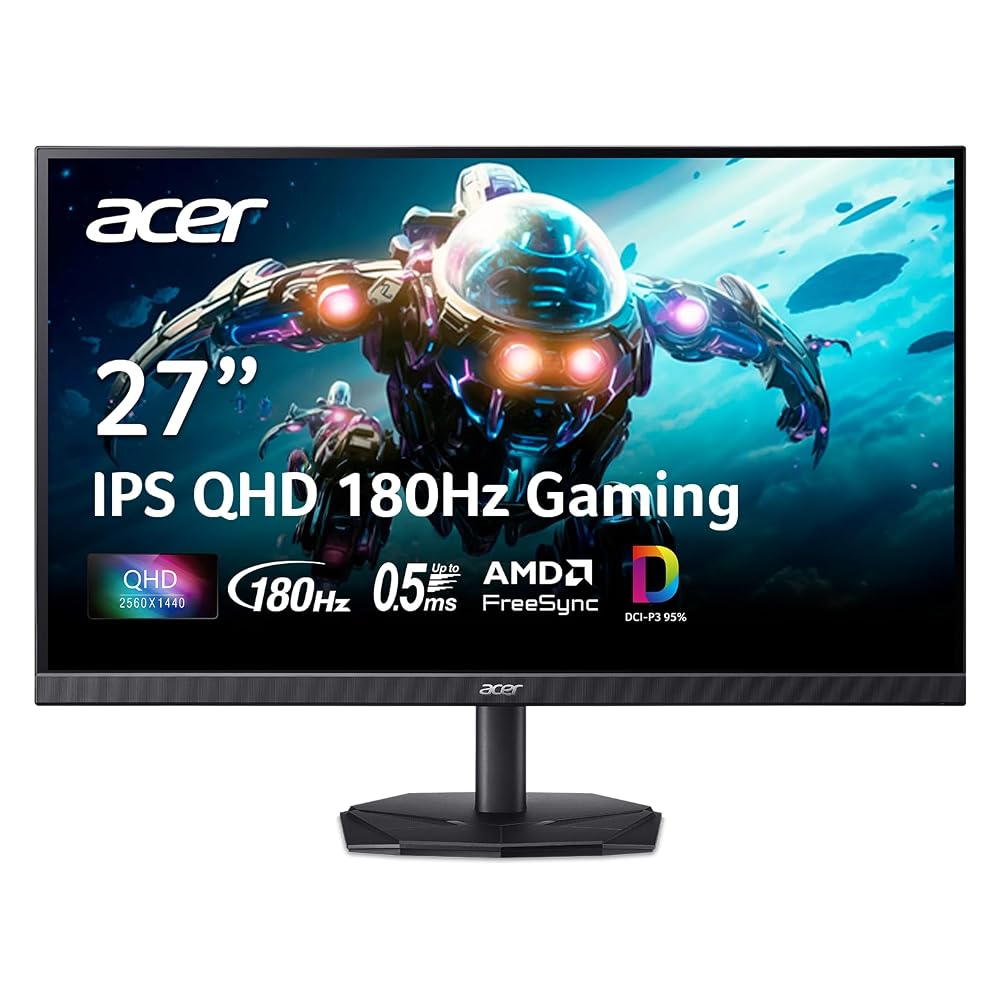
Acer Nitro 27in QHD 2560x1440 IPS 180Hz Gaming Monitor KG271U N3bmiipx
9.0/10
See price
As Amazon Associates, we earn from qualifying purchases. This means we may receive a small commission at no extra cost to you if you click through and make a purchase.
Equipping a busy shared desk with a display that satisfies everyone in the home can be a frustrating challenge. Parents and working adults require crisp text, dependable color fidelity, and eye-friendly screen coatings for remote productivity, while kids and teenagers demand fast refresh rates and low latency for after-school video games. Budget office displays often suffer from sluggish response times and muddy colors, whereas hyper-focused esports gear frequently compromises on color depth. The Acer Nitro KG271U seeks to solve this dilemma by uniting sharp Quad High Definition visuals, dedicated creative color coverage, and swift gaming mechanics in a single desktop panel.
Our practical evaluation indicates that this display delivers genuine multi-purpose value for households balancing education, office productivity, and recreational media. With wide viewing angles that keep cooperative schoolwork readable from the side, adaptive sync that smooths out gaming frame drops, and dedicated anti-glare filtering, it provides a dependable daily workspace without forcing families to purchase separate screens for work and entertainment.


Quick Verdict
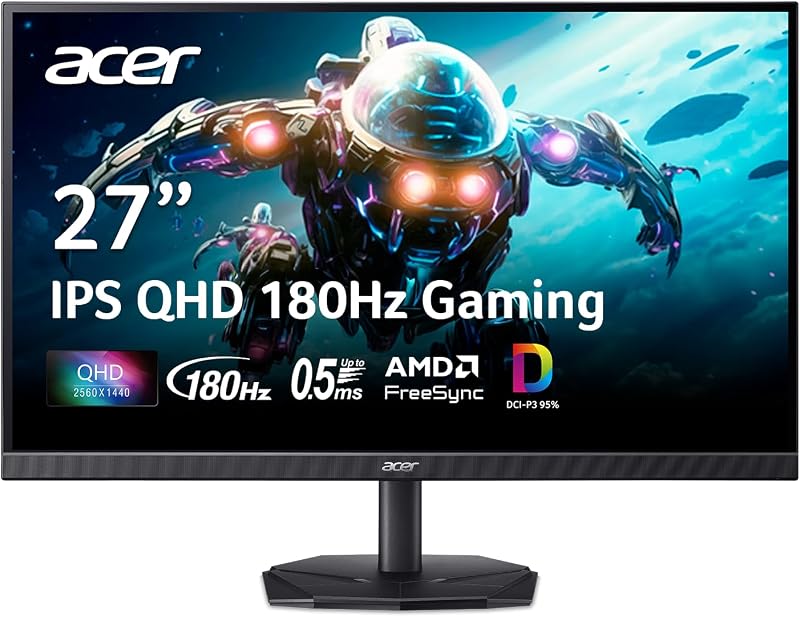
The Acer Nitro KG271U stands out as a balanced, high-utility display tailored for multi-user family workstations. It seamlessly transitions from color-sensitive homework assignments and everyday document management to high-speed gaming without missing a beat.
- Fluid 180Hz refresh rate paired with a 0.5ms GTG response time keeps gaming smooth and clear.
- Expansive 95% DCI-P3 color gamut coverage provides vibrant, true-to-life tones for graphic design and media viewing.
- The 27-inch IPS panel maintains clear 178-degree viewing angles so multiple family members can see the screen without color fading.
- ComfyView anti-glare technology, flicker-less illumination, and low-dimming features protect developing eyes during extended study hours.
Acer Nitro KG271U Features Explained
Visual Precision and Wide Viewing Angles
At the center of this display is a 27-inch In-Plane Switching panel operating at a native resolution of 2560 x 1440 in a widescreen 16:9 aspect ratio. Stepping up to 1440p from standard full high definition introduces noticeably denser pixel grouping, which keeps text sharp across spreadsheets, school research portals, and digital textbooks. Because it utilizes an IPS configuration, the screen offers generous 178-degree horizontal and vertical viewing angles, preventing the frustrating color shifts and darkening that commonly occur on entry-level twisted nematic displays when siblings or parents look over a shoulder.
Acer pairs this panel with an edge-to-edge zero-frame enclosure that minimizes plastic borders along the top and sides. This architecture frees up usable visual territory on the desktop and simplifies multi-monitor configurations for home offices. Households that connect multiple devices, such as pairing this monitor with an acer nitro v gaming machine or a family desktop tower, benefit from clean sightlines and expansive desktop space for multitasking.
Motion Clarity and FreeSync Performance
Gaming performance is anchored by an expansive 180Hz refresh rate that refreshes the on-screen image up to 180 times every second. Compared to standard 60Hz household monitors, this rapid frame cycling delivers fluid 2D motion, significantly reduces perceived input lag, and gives players quick visual feedback in competitive multiplayer titles. Backing up the refresh rate is a rapid response time that reaches down to 0.5ms Gray-to-Gray, effectively preventing visual smearing and ghosting during rapid camera pans or chaotic action scenes.
Screen tearing is eliminated through integrated AMD FreeSync technology, which synchronizes the monitor frame refresh rate with the output of your computer graphics processor. Rather than locking the monitor to a rigid pace, FreeSync dynamically matches fluctuations in graphics rendering. This prevents stuttering and visual artifacts when playing graphically demanding titles, ensuring that this acer nitro monitor for family gaming maintains smooth playback across varied game genres.
Creative Color Depth and DCI-P3 Fidelity
Color capability is often where gaming-centric displays falter, but this model prioritizes creative versatility. The screen supports 95% coverage of the DCI-P3 color space, a standard wider than conventional sRGB that is commonly utilized by modern digital cinema, commercial photography, and multimedia production. For families with teenagers studying digital art, video production, or photography, this acer nitro dci p3 color accuracy ensures that shades rendered on screen closely mirror final print or video outputs.
The panel includes HDR 10 support alongside a static contrast ratio of 1000:1, providing enhanced depth between bright highlights and deep shadows in supported movies and games. While portable setups such as the acer nitro v 15 offer good built-in screens for mobile use, having a dedicated desktop panel with wide acer nitro p3 color gamut representation provides a noticeable boost in visual depth when working on photo editing projects or streaming family films.
Ergonomic Eye Care and Space-Saving Chassis
Because family monitors often remain powered on for long stretches across homework, remote work, and evening play, visual comfort is an important consideration. Acer integrates several protective features into the hardware, including flicker-less backlighting, low-dimming capability for darker study environments, and ComfyView matte display surfacing. The matte screen finish scatters harsh ambient light from overhead lamps or nearby windows, drastically reducing distracting reflections and easing eye strain during marathon typing sessions.
The hardware footprint is tailored for multi-functional spaces. Measuring 8.28 inches deep, 24.2 inches wide, and 18.14 inches tall, with an overall weight of 5.5 kilograms, the unit sits securely on compact desks without consuming excessive room. Operating at an efficient power consumption level of 26 watts, the display keeps household energy draw modest even when left running throughout daily work and study routines.
Specs
| Attribute | Detail |
|---|---|
| Screen Size | 27 inches |
| Native Resolution | 2560 x 1440 (QHD Wide 1440p) |
| Panel Technology | LCD (IPS) |
| Refresh Rate | 180Hz |
| Response Time | Up to 0.5ms GTG (Gray to Gray) |
| Aspect Ratio | 16:9 |
| Screen Finish | Matte (ComfyView) |
| Color Support | DCI-P3 95%, HDR 10 Support |
| Contrast Ratio | 1000:1 |
| Brightness | 250 cd/m² |
| Viewing Angle | 178 degrees horizontal and vertical |
| Connectivity | DisplayPort, HDMI |
| Power Consumption | 26 watts |
| Item Weight | 5.5 kg |
Acer Nitro KG271U Pros and Cons
What we like
- Smooth 180Hz refresh rate with 0.5ms response
- Rich 95% DCI-P3 color gamut coverage
- Crisp 2560 x 1440 QHD resolution
- Wide 178-degree IPS viewing angles
- ComfyView anti-glare screen with flicker-less tech
What we’d change
- Modest 250 nits peak brightness
- Listing does not specify integrated speakers
- Listing does not specify height adjustability
Check Acer Nitro KG271U on Amazon
Best Use Cases
- Multiplayer family gaming where high frame rates and AMD FreeSync prevent screen tearing and input delay.
- Digital photography, video editing, and school multimedia projects requiring 95% DCI-P3 wide color accuracy.
- Daily remote work and academic research where the matte ComfyView screen finish suppresses ambient glare.
- Side-by-side study sessions where 178-degree IPS viewing angles allow multiple viewers to read together clearly.
- Multi-screen productivity configurations that utilize the zero-frame bezel to expand desktop visual space.
Before You Buy
Before introducing this display to your home, check the video output capabilities of your existing computer or gaming console. Achieving the full potential of an acer nitro 1440p 180hz monitor requires a modern graphics card capable of outputting a 2560 x 1440 resolution at high refresh rates. Hardware connectivity on this monitor relies on standard HDMI and DisplayPort inputs, ensuring solid compatibility across current desktop PCs, modern laptops, and major game consoles. Acer nitro monitor setup ease is straightforward, but users should verify that their computer output ports match these standards or plan for appropriate adapters.
It is equally important to recognize what the product specifications leave out. The manufacturer listing does not specify whether video cables are supplied in the retail box, nor does it specify the presence of integrated desktop speakers. Users seeking dedicated room audio should plan to use headphones or an external speaker setup. Additionally, while the display features a modest 250 cd/m² brightness level suitable for standard indoor office lighting, it may appear washed out if positioned directly opposite an unshaded, sunlit window. The listing also does not specify advanced ergonomic adjustments such as height adjustment or portrait swivel on the included stand.
How It Compares With Similar Picks
| Product | Best For | Key Difference |
|---|---|---|
| Acer Nitro KG271U | Family desktops needing fast gaming and accurate color | Dedicated 27-inch 1440p IPS desktop screen with 180Hz refresh rate and 95% DCI-P3 color gamut. |
| 2026-2027 edition | Mobile homework and cloud computing | Complete 14-inch HP portable notebook with Intel N150, 4GB RAM, and 128GB SSD rather than an external monitor. |
| Supports 1TB TF Card Expansion | Entry-level student portable use | Stand-alone 15.6-inch laptop with an Intel N4020 processor, 4GB RAM, and TF expansion instead of a desktop panel. |
| Copilot AI | On-the-go productivity and AI tools | Portable HP laptop running Windows 11 with integrated Copilot AI and cloud storage rather than a dedicated high-refresh display. |
When reviewing these options, note that the Acer Nitro KG271U fulfills an entirely different role than the portable notebooks listed above. The Acer screen is a high-performance external display meant to upgrade an existing desktop computer, gaming rig, or docking station. In contrast, laptops like the 2026-2027 edition, the Supports 1TB TF Card Expansion model, and the Copilot AI notebook are complete, self-contained personal computers with built-in processors, memory, and small screens. If your family already possesses a PC and wants a larger, faster visual workspace for games and creative software, the Acer monitor is the appropriate upgrade. If a family member needs a portable machine to carry to the library or school classes, select one of the self-contained laptops instead.

Bottom Line
When asking is acer nitro kg271u worth it for a shared household, the answer centers on balanced versatility. Many monitors force a compromise between color performance and gaming responsiveness, but the acer nitro kg271u specs successfully bridge that divide. The inclusion of 95% DCI-P3 coverage alongside an 180Hz refresh rate and 0.5ms response time ensures that whether your household is editing high-resolution family photos, writing essays, or playing fast-moving video games, the visual output remains crisp, responsive, and vibrant.
Acer nitro kg271u durability is reinforced by a steady 5.5-kilogram physical build, conservative 26-watt power draw, and dependable eye-comfort protections designed for daily wear. Paired with reliable computing hardware like an acer nitro 5 refurbished desktop setup or modern workstations, this acer nitro 27 inch ips monitor provides a sensible, long-term foundation for family entertainment and everyday digital productivity.
FAQ
What makes 95% DCI-P3 color coverage important for school and creative work?
DCI-P3 is an expanded color gamut originally established for digital cinema that displays a wider spectrum of reds and greens than the older sRGB standard. On this display, 95% DCI-P3 coverage ensures that digital artwork, video edits, and photo projects retain accurate, vibrant color depth that reflects true-to-life tones rather than appearing muted or overly saturated.
Can this monitor handle both gaming and everyday office tasks comfortably?
Yes. The display features a sharp 2560 x 1440 resolution that makes fine text and detailed spreadsheets easy to read, while its 180Hz refresh rate and 0.5ms response time deliver blur-free visuals during fast-paced video games. This dual capability makes it well suited for desks shared between remote workers and students.
How does the matte ComfyView screen help with eye comfort?
The ComfyView matte finish diffuses ambient light rather than bouncing it directly back toward the viewer. Combined with flicker-less backlighting and low-dimming hardware features, the screen helps reduce glare, visual fatigue, and headaches during extended periods of homework or remote office work.
What display connections does this monitor feature?
The monitor is equipped with DisplayPort and HDMI hardware inputs. These industry-standard connections allow quick hookups to contemporary desktop PCs, gaming consoles, and work laptops, supporting high-resolution video transfer across common home devices.
Is the 27-inch size manageable on an average family desk?
With outer dimensions of 8.28 inches deep, 24.2 inches wide, and 18.14 inches tall, this 27-inch monitor fits comfortably on standard home desks. Its zero-frame design keeps unnecessary bulk to a minimum, preserving valuable desk space for keyboards, textbooks, and paperwork.


